8 Best ETF Comparison Tools for 2027
8 tools will put two ETFs side by side. Which of them still work when you add a fourth fund, a mutual fund or a question about risk?


An ETF comparison tool puts 2 or more funds in one table, with their fees, returns, holdings and risk side by side. Tools differ in how many funds fit in one view, whether a mutual fund can sit next to an ETF, and how much of each fund's data they show.
Below are 8 ETF comparison tools. We compare them on funds per view, mutual fund support, risk and tracking data, fund flows, export, API access and price.
Why 2 funds on the same index can differ
VOO and SPY both track the S&P 500. On our data, VOO charges 0.03% a year and SPY 0.0945%, which is $64.50 more a year on every $100,000 you hold. Their returns over 1, 3 and 5 years differ by less than a tenth of a percentage point, in VOO's favour each time. Cost is the one figure you know before you buy, and a tool that shows the return without the fee leaves out the part you can control.
Different names do not always mean different exposure. VTI holds 3,477 stocks and VOO 506, yet VTI keeps 33.4% of its money in its top 10 holdings and VOO 37.8%. Holdings count and concentration need to be read together to see how much a second fund adds.
Share classes are the third trap. VFIAX and VOO are the Admiral and ETF classes of one Vanguard portfolio, so they hold the same securities, and what sets them apart is the fee, the minimum investment and how you trade them. A tool that only knows ETFs cannot put the 2 side by side.
How to choose an ETF comparison tool
- How many funds fit. 2 is enough for VOO against SPY; a shortlist of 5 needs more.
- Mutual funds too. So an ETF can sit next to the mutual fund it might replace.
- Cost in detail. Net expense ratio at least, ideally loads, minimums and tracking.
- Risk, not just return. Standard deviation, beta, drawdown or Sharpe ratio, measured over years.
- Flows and size. Whether money is going into a fund or leaving it.
If you are still looking for candidates rather than comparing them, our ETF screener comparison covers that step.
The 8 ETF comparison tools at a glance
| Platform | Best for | Plans from |
|---|---|---|
| ETF Database | Head-to-head holdings of 2 ETFs | $19/mo |
| etf.com | Trading costs and tax rates on 3 ETFs | $0 |
| MarketWatch | Loads and fees across up to 10 funds | $0 |
| Morningstar | Morningstar ratings beside the numbers | $20.75/mo |
| Stock Analysis | Many ETFs on one return chart | $6.58/mo |
| Stock Rover | Funds inside a full research workspace | $24/mo |
| Vanguard | After-tax returns across fund families | $0 |
| Business Quant | Share-class comparison on fees, flows and risk, with export and API access | $29/mo |
Rows are alphabetical, Business Quant last. "Plans from" is the cheapest paid plan's lowest advertised monthly price on 15 October 2026; $0 means the comparison tool has no paid version.
ETF comparison tools reviewed
ETF Database
ETF Database is an ETF reference site with a head-to-head tool: you enter 2 US-listed ETFs and get a tabbed comparison built on FactSet data.
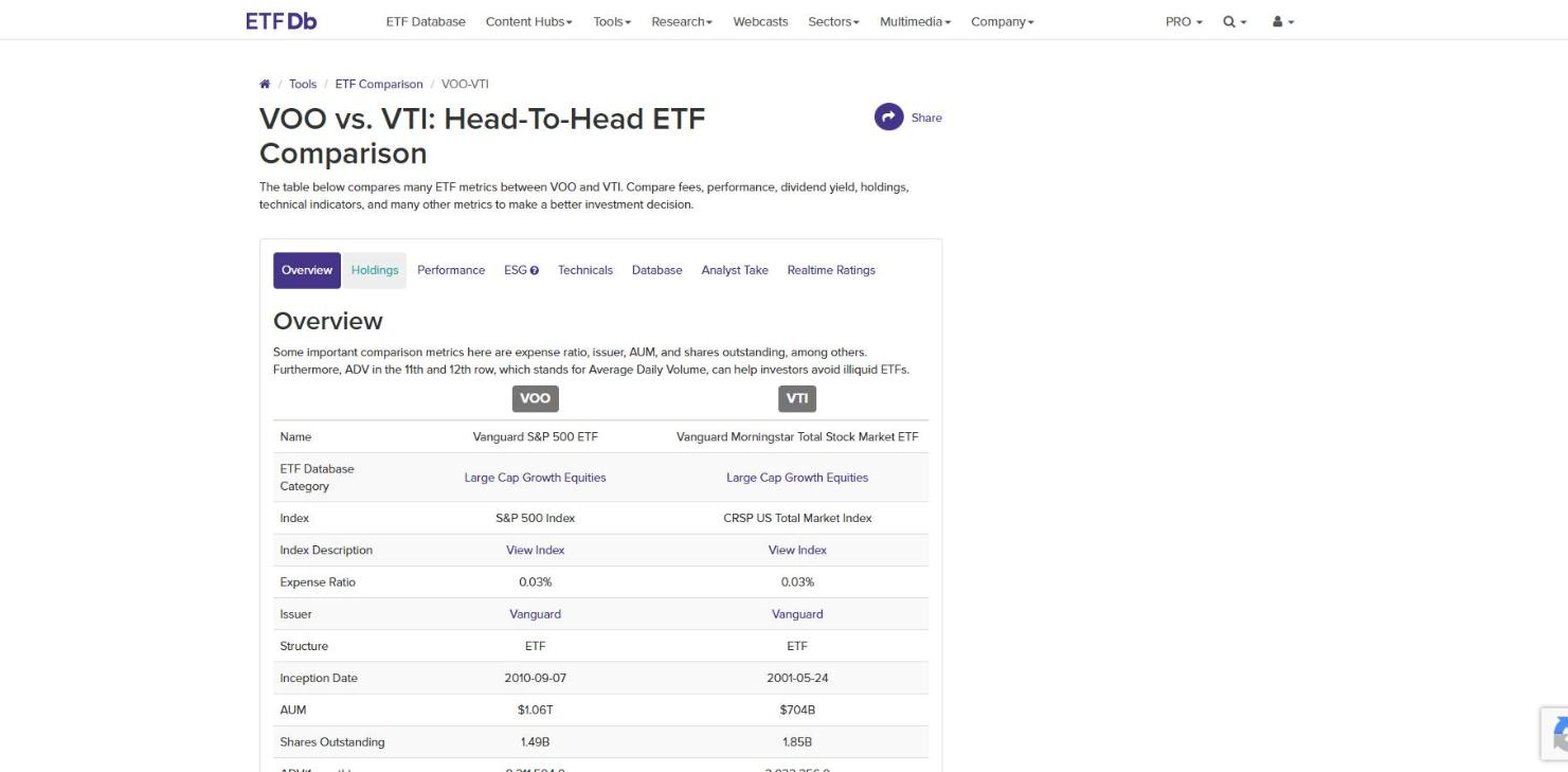
- Best for a head-to-head look at 2 ETFs' holdings.
- 2 ETFs per comparison, US-listed only.
- 8 tabs, from overview and holdings to technicals and ESG.
- Beta, volatility and standard deviation on the Technicals tab.
- Pro from $19 a month, or $199 a year, with a 14-day trial and holdings downloads.
The holdings tab is the strength: both funds' positions in parallel lists, with the holding count above each, so VOO's 507 positions sit beside VTI's 3,469 on one screen. Analyst Take and Realtime Ratings bring ETF Database's own grading of each fund into the same view.
Where it falls short: it compares 2 funds, and only US-listed ETFs, so a shortlist of 4 or an ETF against a mutual fund needs another tool. We found no fund flows or tracking difference in the comparison.
etf.com
etf.com is an ETF news and data site whose comparison tool takes up to 3 ETFs. It is strongest on what a fund costs to hold and to trade.
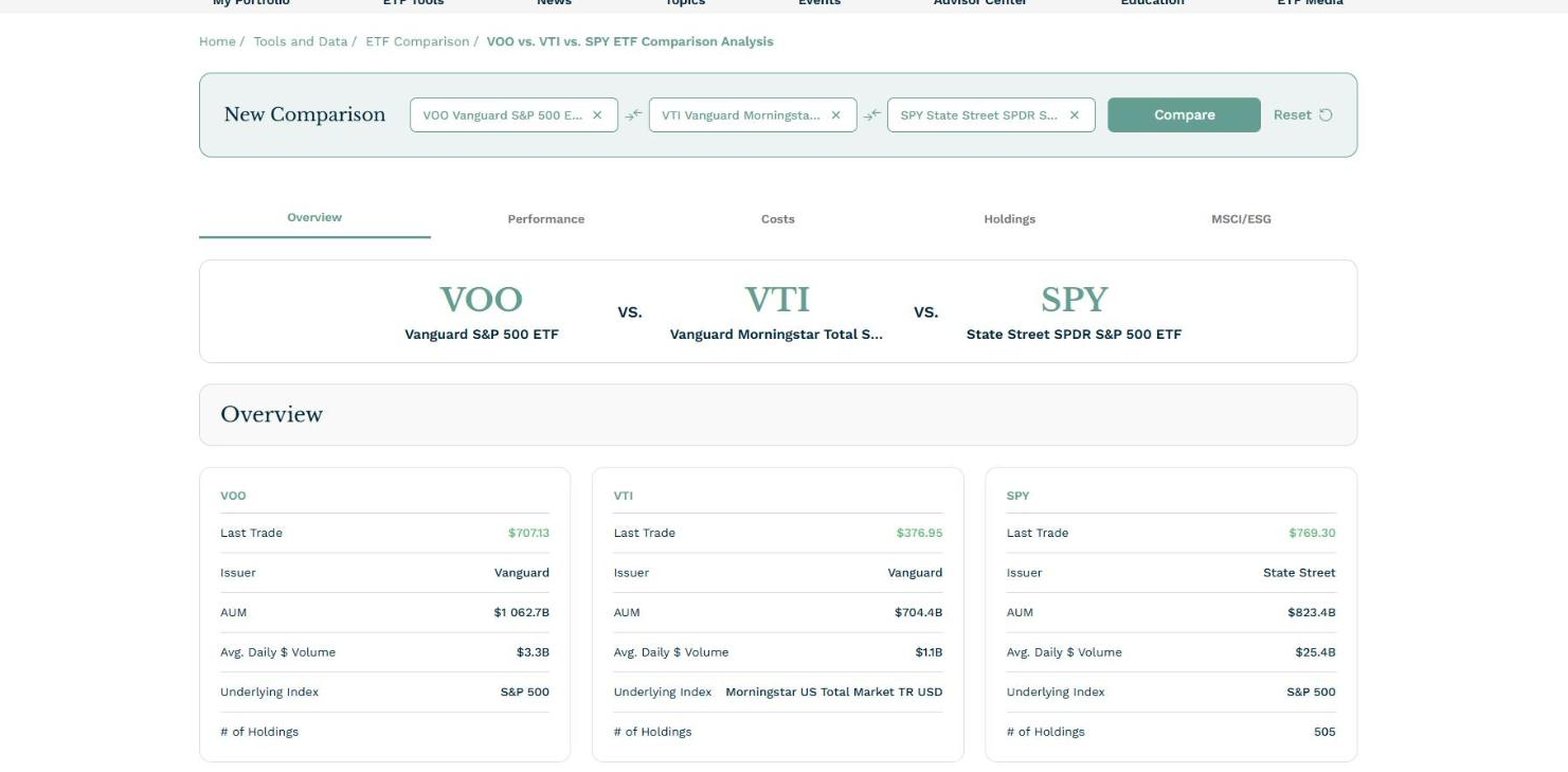
- Best for trading costs and tax treatment on up to 3 ETFs.
- Up to 3 ETFs in one view, at no cost.
- Costs tab: expense ratio, average spread and median tracking difference.
- Tax rates: maximum long and short-term capital gains rate.
- Holdings tab: top 10 per fund, with sector, country and market cap mix.
- MSCI factor and ESG data for each fund.
The costs tab answers a question most tools skip: what you lose to the bid-ask spread and to tracking difference, on top of the expense ratio. The holdings and MSCI tabs then show what each fund owns and how it leans on factors such as momentum, quality and low volatility.
Where it falls short: it covers ETFs only and stops at 3, and the tabs read show no risk ratios such as beta or standard deviation. A sign-in prompt for watchlists and portfolios appears after a few comparisons, though closing it leaves the tool working.
MarketWatch
MarketWatch, the Dow Jones markets site, keeps a plain fund comparison table among its tools. It takes up to 10 symbols, ETFs and mutual funds together, with data supplied by Lipper.

- Best for loads and fees across up to 10 funds.
- Up to 10 funds, ETFs and mutual funds mixed, at no cost.
- Returns from 1 week to 10 years annualised.
- Risk: alpha, beta, R-squared and standard deviation.
- Fees: front and deferred loads, 12b-1, redemption fee and minimums.
- Holdings: top sectors and top 25 positions.
The fees view is built for mutual funds. Front loads, deferred loads, 12b-1 fees and minimum investments are costs an ETF does not charge, and seeing them in the same table as an ETF's expense ratio makes the case for switching, or against it. The tickers sit in the address, so a comparison is easy to share.
Where it falls short: the table shows 4 views, one at a time, with no charts, and there is no export, fund flows or tracking data.
Morningstar
Morningstar's Compare tool holds up to 5 stocks, mutual funds or ETFs, including international ones, and lays out Morningstar's own data in collapsible sections.

- Best for Morningstar ratings beside the numbers.
- Up to 5 securities, funds and ETFs mixed.
- Risk section: Morningstar Risk Rating, alpha, beta and R-squared.
- Portfolio sections for equity and bond statistics and sectors.
- Investor from $20.75 a month, or $34.95 billed monthly.
Morningstar's categories, star ratings and Medalist Ratings are the reason to use it. Its announcement reserves the ratings in Compare for Investor subscribers, but the comparison itself, star rating included, ran for a signed-out visitor on the day we tested it.
Where it falls short: bonds and indexes are not supported, and comparisons cannot be saved yet, by Morningstar's own note. We found no export, fund flows or tracking data in the sections read.
Stock Analysis
Stock Analysis is a financial data site whose ETF comparison is the fastest way to see many ETFs' total returns on one chart.
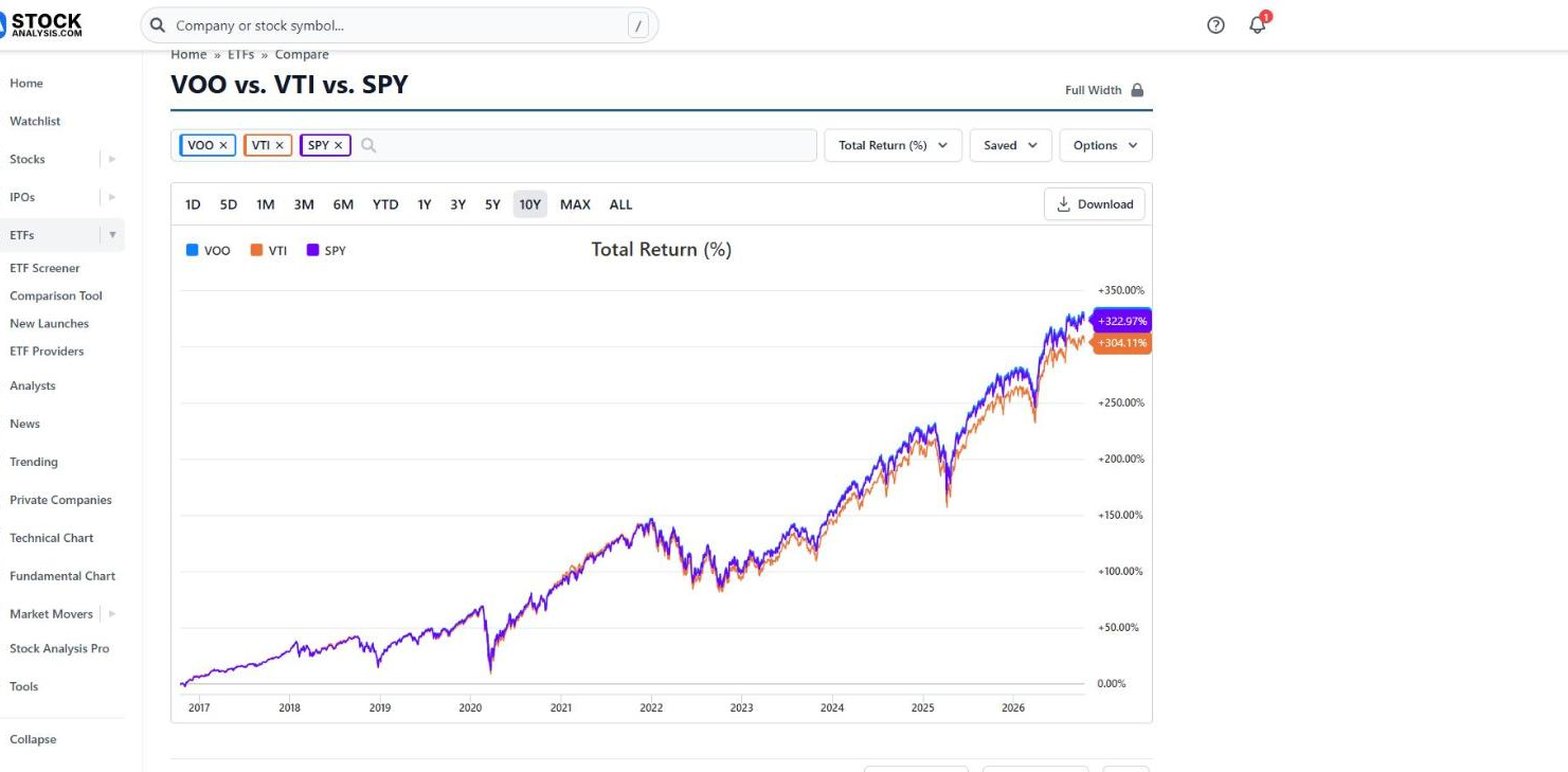
- Best for many ETFs on one return chart.
- 10 or more ETFs: 11 loaded at once in testing.
- Total return chart from one day to the full history.
- Table views for performance, price, profile, dividends and technicals, including 5-year beta.
- Top 25 holdings for each ETF.
- Pro from $6.58 a month, with full ETF holdings and downloads.
The chart is the draw: switch from total return to price and from 1 day to 10 years, and every fund redraws together. Below it, the average return table puts YTD, 1, 5 and 10-year and since-inception returns in one row per fund.
Where it falls short: it compares ETFs only, so a mutual fund cannot join. The comparison shows no fund flows or tracking difference, and Pro allows one download a day.
Stock Rover
Stock Rover is a research platform for investors who work in tables. Its comparison view puts stocks and ETFs side by side across hundreds of data columns, inside the same workspace as its screener and portfolio tools.

- Best for comparing funds inside a full research workspace.
- Premium from $24 a month on 2-year billing, with a 14-day trial.
- 800+ metrics in its comparison table and tile views.
- 7,000+ ETFs and 40,000+ funds covered.
- Tracking error over 1, 3 and 5 years, and data export on paid plans.
The comparison is a view onto Stock Rover's whole dataset, so you choose the columns and can sort, filter and score the funds in it, from tracking error to tax-cost ratio. That suits an investor who already uses Stock Rover for stocks and wants funds in the same tables.
Where it falls short: its free plan covers basic research on individual stocks, so comparison needs a paid plan, and Stock Rover does not publish a maximum number of funds per comparison. Fund Reports start on Ultimate, from $69 a month.
Vanguard
Vanguard's comparison tool is open to anyone and not limited to Vanguard funds. It holds up to 5 ETFs or mutual funds, from Vanguard, other fund families or benchmarks.
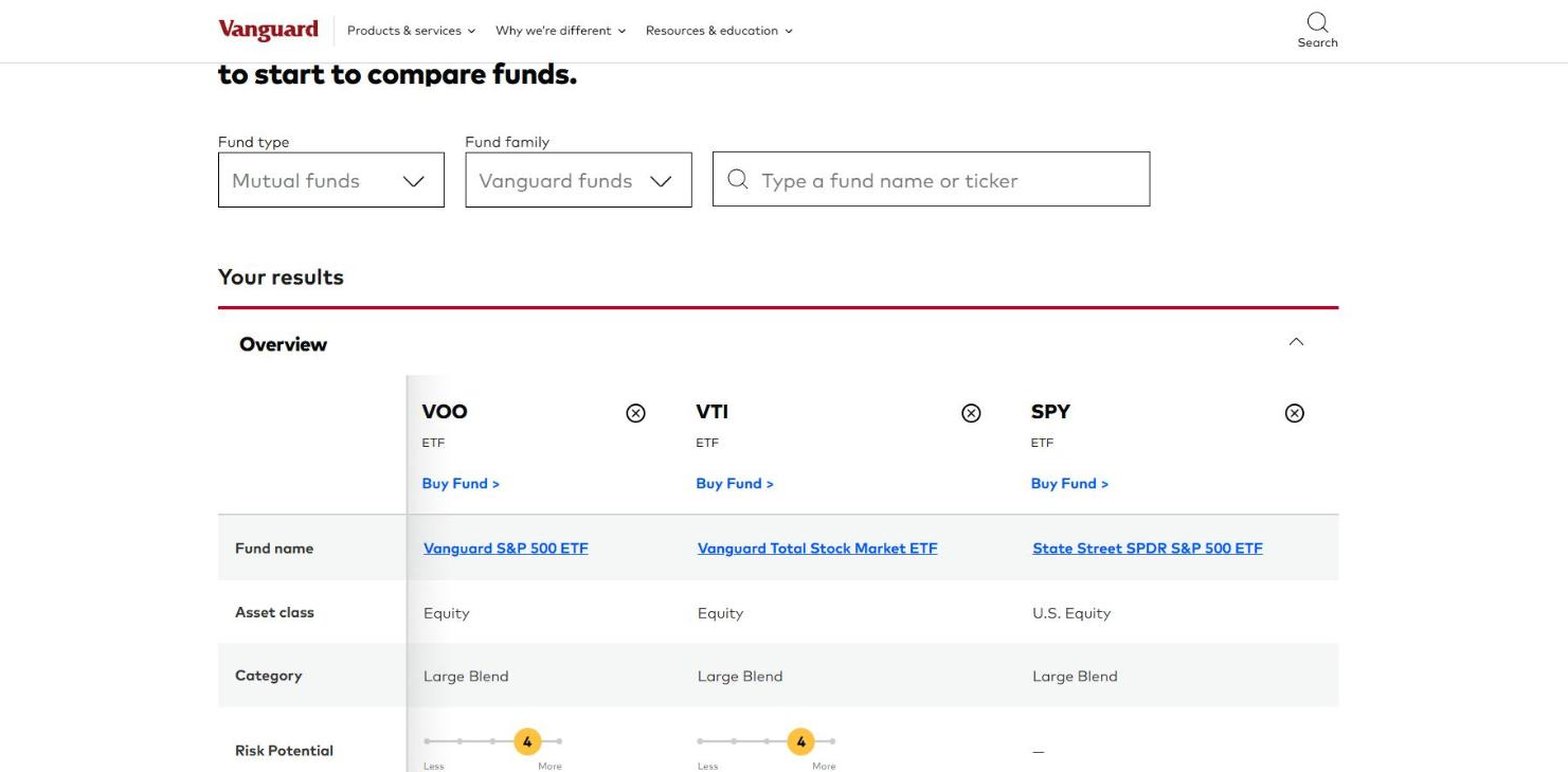
- Best for after-tax returns across fund families.
- Up to 5 funds, ETFs and mutual funds, at no cost.
- Any fund family, plus benchmarks.
- After-tax returns on distributions and on sale.
- Volatility measures: beta and R-squared.
- Ten largest holdings, asset allocation and top 5 countries.
After-tax returns are the feature to come for. Few tools show what a fund returned after taxes on its distributions and after selling, and for a taxable account that is the return you keep. Data for non-Vanguard funds comes from Morningstar.
Where it falls short: the risk potential scale fills in for Vanguard funds only, each fund carries a "Buy Fund" link because this is a broker's page as well as a research tool, and there is no export.
Business Quant
Business Quant is ours. Our fund comparison puts 2 to 6 ETFs or mutual funds side by side on 102 metrics, at share-class level, from a database of more than 32,000 share classes. It runs with no account.

- Best for share-class comparison on fees, flows and risk, with export and API access.
- Free to use, no account needed to compare funds, no card.
- Pro from $29 a month, full history, export and API access.
List of features
- Fund comparison: 2 to 6 ETFs or mutual funds on 102 metrics
- Prebuilt pair pages such as VOO vs VTI, each with a short answer on top
- An "only what differs" toggle that hides identical rows
- Best and worst marked where better is a fact, such as a lower fee
- Net flows over 1, 3 and 12 months, tracking difference and tracking error
- Risk ratios from 6 months to 5 years
- ETF pages and mutual fund pages with holdings, flows and distributions
- ETF and mutual fund screener on the same 102 metrics
- Financial statements, segment financials and KPI data for the stocks a fund holds
- Stock screener
- Economic data
- CSV and XLSX download
- API access
- MCP server
The comparison works at share-class level, which is what makes it useful beyond ETFs. VFIAX vs VOO puts the Admiral and ETF classes of one Vanguard portfolio in adjacent columns, and the page points out that they hold identical securities. The same layout works for 2 issuers on one index, as in VOO vs SPY, or for 2 different exposures, as in QQQ vs VGT and VT vs VTI.
Each pair page opens with a short answer: which fund is cheapest, which returned most over a year, and which is largest. Below it, the metrics run in groups: fees (gross and net expense ratio, acquired fund fees, fee waivers, minimum investment), returns with and without distributions plus calendar years, market cap mix and look-through valuation, sector and asset mix, bond duration and maturity, holdings count and concentration, net flows, turnover, tracking, and risk ratios (standard deviation, maximum drawdown, Sharpe, Sortino, alpha and beta). A blank cell means the fund did not disclose the figure, never zero, and every row carries the date its record was measured.
ETF comparison tools feature by feature
| Platform | ETFs and mutual funds |
5+ funds at once |
Free to compare |
Risk measures |
Tracking | Fund flows |
Spreadsheet export |
API access |
MCP server |
Plans from |
|---|---|---|---|---|---|---|---|---|---|---|
| Business Quant | ✓ | ✓ | ✓ | ✓ | ✓ | ✓ | ✓ | ✓ | ✓ | $29/mo |
| MarketWatch | ✓ | ✓ | ✓ | ✓ | ✗ | ✗ | ✗ | ✗ | ✗ | $0 |
| Morningstar | ✓ | ✓ | ✓ | ✓ | ✗ | ✗ | ✗ | ✗ | ✗ | $20.75/mo |
| Stock Analysis | ✗ | ✓ | ✓ | ✓ | ✗ | ✗ | ✓ | ✗ | ✗ | $6.58/mo |
| Stock Rover | ✓ | ✗ | ✗ | ✓ | ✓ | ✗ | ✓ | ✗ | ✗ | $24/mo |
| Vanguard | ✓ | ✓ | ✓ | ✓ | ✗ | ✗ | ✗ | ✗ | ✗ | $0 |
| ETF Database | ✗ | ✗ | ✓ | ✓ | ✗ | ✗ | ✓ | ✗ | ✗ | $19/mo |
| etf.com | ✗ | ✗ | ✓ | ✗ | ✓ | ✗ | ✗ | ✗ | ✗ | $0 |
Sorted by ticks, ties broken alphabetically. A tick means the platform's own tool, pricing, plan or help pages document the feature on a self-serve plan, or it worked when we tested the tool; a cross means we found no such documentation. "ETFs and mutual funds" means both can sit in one comparison. "5+ funds at once" means 5 or more funds in one view. "Free to compare" means the comparison runs without a paid plan. "Risk measures" means standard deviation, beta, drawdown or Sharpe ratio in the comparison. "Tracking" means tracking difference or tracking error. "Fund flows" means net money into or out of each fund. "Spreadsheet export" means downloading the data to a file. "API access" and "MCP server" mean a self-serve API and an AI-assistant connector.
Business Quant is the only tool here that ticks every column, and the only one with fund flows, an API or an MCP server. MarketWatch, Morningstar and Vanguard reach 4 with free comparisons that mix ETFs and mutual funds and show risk data; Stock Analysis reaches 4 with export in place of mutual funds, and Stock Rover with tracking error and export inside a paid platform. etf.com and ETF Database are ETF specialists that go deeper on trading cost and holdings than their tick counts suggest. A cross shows what a product was built for, not how good it is.
What about iShares and the Financial Times?
Both appear for this search and neither made the list. iShares compares up to 4 funds, but only iShares ETFs. The Financial Times fund comparison is built around UK and European listings and states that its listed securities cannot be bought by US investors. ETF Research Center's overlap tool shows the holdings 2 equity ETFs share, without costs or returns side by side.
Which ETF comparison tool is right for you?
- You want 2 ETFs' holdings in parallel lists: ETF Database.
- You care about spread, tracking and tax treatment: etf.com.
- You are weighing a loaded mutual fund against an ETF: MarketWatch.
- You want Morningstar's ratings in the table: Morningstar.
- You want a dozen ETFs on one return chart: Stock Analysis.
- You already work in a paid research platform: Stock Rover.
- You invest in a taxable account and want after-tax returns: Vanguard.
- You want up to 6 ETFs and mutual funds on fees, flows, tracking and risk, with export and an API: Business Quant.
Choosing between funds usually follows screening for them. Our mutual fund screener comparison covers the tools for that step, and our stock screener comparison does the same for individual stocks.
Where I would compare my next pair
If you want a star rating, a broker's after-tax table or a chart of a dozen funds, other tools on this list do those jobs. For deciding between funds you have already shortlisted, I would start with Business Quant fund comparison.
Take the pair from the start of this article. VOO and SPY hold the same index, and on Business Quant the gap shows up in the first rows: 0.03% against 0.0945% a year, $64.50 on every $100,000, with returns over 1, 3 and 5 years that favour VOO by less than a tenth of a point each time. The same table then shows holdings, concentration, flows, tracking and risk ratios over 5 years, and hides whatever the 2 funds have in common.
It puts up to 6 funds in one table, ETFs and mutual funds side by side down to the share class, on 102 metrics that include flows and risk ratios as well as fees and returns. The comparison is free to use without an account, and Pro, with export and API access, is from $29 a month.
A 5-minute test: pick 2 funds you are deciding between, open them side by side, and switch to "only what differs". If the fee and the risk rows are the only ones left, the cheaper fund is the answer. If the holdings rows differ too, you are choosing an exposure, not a price.
How this comparison was made
To make the list, a tool had to put 2 or more US-listed ETFs from any issuer side by side on fund data beyond a price chart, at minimum costs plus returns or holdings, and be usable by an individual at no cost or at a price published on the vendor's own site, without a brokerage account or a sales call. Tools limited to one issuer's funds, overlap-only tools and price-chart comparisons were not included. 8 tools met that bar.
Every price, limit and feature was read on the vendor's own tool, pricing, plan or help pages on 15 October 2026 and screenshotted there, with VOO, VTI and SPY as the test funds wherever a tool allowed; risk, tracking and export were checked again on 16 October. Prices are each platform's lowest advertised monthly price in US dollars on 15 October 2026. The figures in our illustration were read from our fund data on 15 October.
The list, the summary table and the reviews run alphabetically, with Business Quant last, and the feature table is sorted by the number of ticks, with ties broken alphabetically. We make Business Quant, one of the 8 products compared here.
Image credits. Header photograph by Arturo Añez on Unsplash, used under the Unsplash License. Vendor screenshots were captured on 15 October 2026 from each provider's own comparison tool or plans page and are reproduced for comparison. The VOO, VTI and SPY illustration is our own, built from our fund data.
Frequently asked questions
What is the best free ETF comparison tool?
For depth, Business Quant fund comparison is free to use with no account: it puts 2 to 6 ETFs or mutual funds side by side on 102 metrics, including fees, returns with distributions, flows, tracking and risk ratios. Vanguard's comparison tool and MarketWatch's fund comparison are also free and take mutual funds as well as ETFs, Vanguard up to 5 and MarketWatch up to 10. etf.com compares up to 3 ETFs on costs, holdings and MSCI data, and Stock Analysis charts total return for many ETFs at once.
How do I compare two ETFs?
Start with what you pay: the net expense ratio, then trading cost and tracking difference. Then check what you own, meaning holdings count, top 10 weight and sector mix, and only then look at returns, preferably with distributions included and over 3 and 5 years. On Business Quant, a pair page such as VOO vs VTI shows all of this in one table, with the cheaper fee and the better return marked, and a toggle that hides the rows where the 2 funds agree.
Where can I compare ETF performance?
Stock Analysis draws total return for many ETFs on one chart, from one day to the full history. MarketWatch lists 1-week to 10-year annualised returns for up to 10 funds in one table, and Vanguard adds after-tax returns. Business Quant shows price returns and returns with distributions from one month to 5 years, plus calendar-year returns for 2021 to 2025, next to risk figures such as standard deviation, maximum drawdown and Sharpe ratio.
Can I compare an ETF with a mutual fund?
Yes, on 5 of the 8 tools here. Business Quant compares at share-class level, so VFIAX and VOO, the Admiral and ETF classes of one Vanguard portfolio, sit in separate columns and the fee gap between them is the first thing you see. Vanguard, MarketWatch, Morningstar and Stock Rover also mix funds and ETFs. etf.com, ETF Database and Stock Analysis compare ETFs only.
How many ETFs can I compare at once?
It depends on the tool. ETF Database compares 2 head to head and etf.com up to 3. Business Quant takes 2 to 6, Vanguard and Morningstar up to 5, and MarketWatch up to 10. Stock Analysis loaded 11 ETFs on one chart and table.
What should I look at when comparing ETFs?
Cost first, because it is the one number you know in advance: a fee gap of 0.0645 percentage points between SPY and VOO is $64.50 a year on every $100,000, for the same index. Then holdings and concentration, so you know whether 2 funds are really different, then flows and size, then risk measured over several years. Returns come last, since last year says little about next year.