9 Best AI Stock Analysis Tools for 2027
Every AI tool will give you a confident answer about a stock. Which ones can show you the numbers the answer came from?


AI stock analysis tools come in 3 kinds: general assistants such as ChatGPT and Claude that answer questions in plain English, models that give every stock a score, and trading platforms that generate signals. Each one builds its answer from a source of data, and the source differs from tool to tool.
Below are 9 AI stock analysis tools, with what each one's AI does, what it costs and what data sits behind it. We compare them on price, statement data, segments, KPIs, estimates, ownership, filings, data export and API access.
What an AI answer about a stock is built on
An AI model writes its answer from whatever it has: its training data, a web search, or a data source you connect. Ask a general assistant for a company's operating margin over 5 years without a source, and it may give you figures that are close, stale or wrong, in the same confident tone it uses when it is right. The model is filling a gap in its data with the most plausible-looking numbers.
So the useful question about any AI stock tool is whether its answer is tied to a dataset you could check. A score is only as good as its inputs, and a summary is only as good as the figures it summarises. The tools below handle that differently: some show the statements next to the answer, some cite web sources, some publish the track record of their ratings, and one connects the assistant you already use to a financial database.
None of them can tell you where a stock will trade. The scoring models express their output as odds or grades, and the assistants do not forecast prices at all.
How to choose an AI stock analysis tool
- The kind of AI. An assistant you question, a model that scores stocks, or a signals tool for traders.
- The data under the answer. Where the figures come from, and whether you can see them.
- What works without paying. How much of the AI is on the free plan.
- Data you can take further. Export, an API, or a connector for your own assistant.
If you would rather compare research websites than AI tools, our stock analysis websites comparison covers that side.
The 9 AI stock analysis tools at a glance
- ChatGPT
- Claude
- Danelfin
- Perplexity Finance
- Seeking Alpha
- Trade Ideas
- TrendSpider
- WallStreetZen
- Business Quant
| Platform | Best for | Plans from |
|---|---|---|
| ChatGPT | Explaining and structuring an analysis | $8/mo |
| Claude | Reading long filings and transcripts | $17/mo |
| Danelfin | One AI score per stock | $22/mo |
| Perplexity Finance | Free stock pages with cited answers | $17/mo |
| Seeking Alpha | Ratings plus AI summaries of research | $299/yr |
| Trade Ideas | Active traders who want AI signals | $89/mo |
| TrendSpider | Technical traders who want an AI analyst | $52.38/mo |
| WallStreetZen | Beginner-friendly stock grades | $19.50/mo |
| Business Quant | Statements, segments, ownership and filings for your AI assistant, with export and API access | $29/mo |
Rows are alphabetical, Business Quant last. "Plans from" is the cheapest paid plan's lowest advertised monthly price, read on the vendor's own pricing page on 15 October 2026; Seeking Alpha advertises only a yearly renewal.
AI stock analysis tools reviewed
ChatGPT
ChatGPT is OpenAI's general assistant and the one most people try first. It answers in plain English, structures an analysis well, and will walk you through a business model, a valuation method or the risks in an annual report you paste in.

- Best for explaining and structuring an analysis.
- Free plan for everyday questions.
- Go from $8 a month, Plus $20 and Pro from $100.
- Custom MCP connectors for outside data sources.
ChatGPT is strongest as a thinking partner. Ask it to lay out the bull and bear case, list what to check in a 10-K, or explain why free cash flow and net income diverged, and it is fast and clear. Uploading the filing, or connecting a financial data service through a custom connector, gives it numbers to work from.
Where it falls short: it has no stock pages, ratings or financial database of its own, so without a connected source the figures in its answers are only as reliable as what it can find or remember. A custom data connector such as ours needs Plus or higher.
Claude
Claude is Anthropic's assistant, and a strong choice for long documents. Give it a full 10-K or an earnings call transcript and you can question it section by section, which is most of what fundamental research involves.

- Best for reading long filings and transcripts.
- Free plan with web search, files, code and connected apps.
- Pro from $17 a month, or $20 billed monthly.
- Max from $100 a month.
Claude's free plan lets you do real work before paying, including one custom connector. Code matters more than it sounds: ask it to compute a 5-year margin trend or a growth rate and it can calculate the answer rather than estimate it.
Where it falls short: like ChatGPT, it has no stock pages, scores or financial database of its own. Its answers about a company are as good as the source it is given.
Danelfin
Danelfin is a stock-scoring service built around one number. Its AI Score rates each stock on the probability of beating the market over the next 3 months, with fundamental, technical, sentiment and low-risk scores underneath.

- Best for a single AI score on each stock.
- Free plan with 10 stock and ETF reports a month.
- Plus from $22 a month, with AI price forecasts.
- Pro $59, adding buy, hold and sell parameters and CSV export.
- Elite $134, with API access.
Danelfin is the purest AI stock picker here: US and European stocks each get a score, and the site ranks stocks and ETFs by it. The free plan explains only the top signals behind a score, and Plus shows all of them.
Where it falls short: it is a ranking tool rather than a research environment. You will not read a company's statements or ask it a question in your own words, CSV export starts on Pro, and the API on Elite.
Perplexity Finance
Perplexity Finance is Perplexity's answer engine with a finance front end. Each stock has a page with a chart, key statistics, financial statements and an "ask anything" box, and every answer comes with citations.
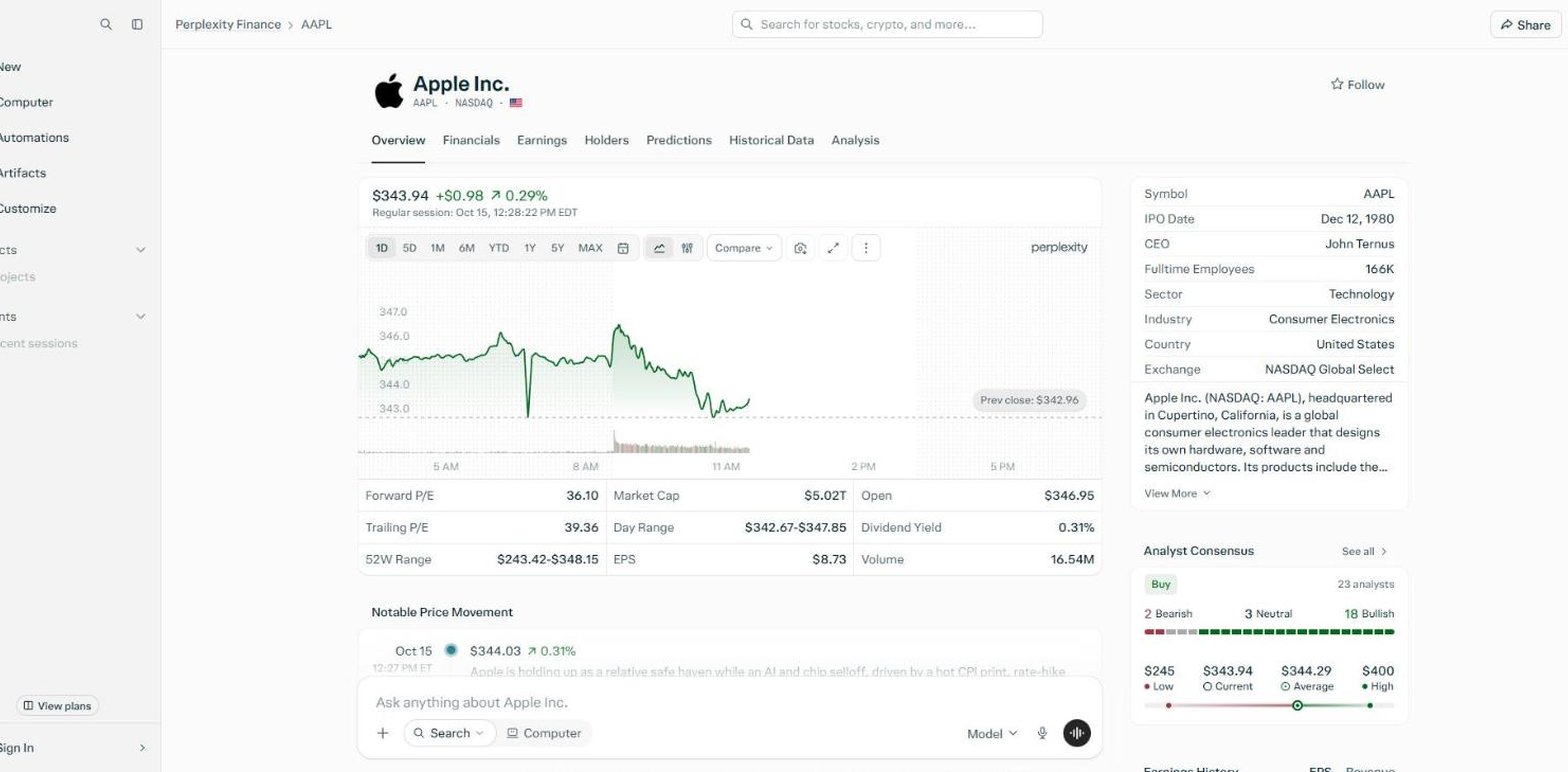
- Best for free stock pages with cited answers.
- Free plan, with citations in every answer.
- Pro from $17 a month, with deep research and top models.
- Statements, segments and KPIs, estimates and holders on each stock.
Perplexity Finance is the most complete free option among the assistants. The statements sit a tab away from the question box, JPMorgan's income statement uses bank line items such as net interest income, and the Financials tab includes segments, KPIs and 2 years of estimates.
Where it falls short: its Analysis tab is analyst consensus, not an AI rating, so there is no ready-made view on a stock. There is no filing list, export or API to its financial data.
Seeking Alpha
Seeking Alpha is an investing community with years of contributor research and Quant Ratings on covered stocks, with AI features layered on top of both.

- Best for ratings plus AI summaries of research.
- Basic account with news, portfolios and alerts.
- Premium renews at $299 a year, after $4.95 for the first month.
- Ask Seeking Alpha, an AI research assistant, and AI summary reports on Premium.
Seeking Alpha's AI works on top of a large body of human analysis: the assistant and the summaries draw on articles and calls that already argue both sides of most covered stocks. Each stock page also carries statements, consensus estimates, ownership and SEC filings.
Where it falls short: none of the AI is in the free Basic account. Export covers only its stock comparison, and there is no segment or KPI data and no API.
Trade Ideas
Trade Ideas is a real-time scanning platform for active traders. Its AI is aimed at entries and exits rather than a company's fundamentals.

- Best for day and swing traders who want AI signals.
- Standard from $89 a month, with real-time scans and screeners.
- Premium from $178 a month, with AI signals, backtesting and auto trading.
- 500+ data points for alerts and filters.
Trade Ideas is built for speed: it scans the market in real time and flags setups as they form. The AI signals, backtesting and risk levels are the reason most traders choose it.
Where it falls short: no AI feature is listed on Standard, so the AI costs $178 a month, the most on this list. A long-term investor reading a company's financials will not find them here.
TrendSpider
TrendSpider is a charting and research platform for technical traders, with an AI analyst called Sidekick that works across charts, scanners, backtests and filings.

- Best for technical traders who want an AI analyst.
- Standard from $52.38 a month, after a 14-day trial.
- Sidekick, an AI analyst, on every plan.
- Insider trades and 13F activity alongside the chart.
TrendSpider says Sidekick reviews charts, reads filings, analyses backtests, builds scanners and sets alerts. Plans differ by capacity, such as workspaces, alerts and scan frequency, not by feature, so the cheapest plan has the full toolset, and its fundamentals panel shows all 3 statements.
Where it falls short: there is no free plan, only a trial, and the centre of the platform is the chart. It documents no segment or KPI data, export or API.
WallStreetZen
WallStreetZen is a research site organised around its Zen Ratings, which give every covered stock a letter grade built from 115 factors, one of them an AI component.

- Best for beginner-friendly stock grades.
- Zen Rating on stock pages without an account.
- Premium from $19.50 a month, with a $1 trial.
- Full A-rated list and screener export on Premium.
WallStreetZen makes a quant model readable. Each stock shows its overall grade and the 7 grades behind it, Value, Growth, Momentum, Sentiment, Safety, Financials and Artificial Intelligence, and the site publishes the average annual return of each grade. Stock pages also carry analyst forecasts and ownership.
Where it falls short: stock pages show summary financials rather than full statements, and there is no question box. It answers "how does this stock score?" more than "why?", and there is no API.
Business Quant
Business Quant is ours. We give AI 2 ways into our data: an MCP server that plugs the assistant you already use into our statements, segments, ownership and filings, and a bull and bear investment thesis on every stock page.

- Best for statements, segments, ownership and filings for your AI assistant, with export and API access.
- Free to use, 5 years and 20 quarters, no card.
- Pro from $29 a month, full history, export and API access.
List of features
- MCP server for Claude, ChatGPT, Gemini, Perplexity, Cursor and VS Code
- API access
- Bull and bear investment thesis
- Financial statements: annual, quarterly and TTM
- 4 standardised statement templates: general, real estate, utilities and capital markets
- Financial results from 10-K, 10-Q, 8-K, 20-F, 40-F and 6-K filings
- Ratios and growth metrics
- CSV and XLSX download
- Segment financials
- KPI and operating data
- Analyst estimates
- Institutional ownership and insider trades
- 18 million+ SEC filings since 1993
- Economic data: 617 indicators
- Stock screener
- Advanced charting
- Time series tables
- Results within 10 to 15 minutes of release
Once connected, your assistant can pull financial statements, revenue by segment, product and geography, analyst estimates, dividends, peers, insider trades, 13F holders, a company's SEC filings and the sections inside them, fund data and US economic series. You ask in plain English, for example "which insiders sold Nvidia in the last 6 months?" or "summarise the new risk factors in the latest 10-K", and the assistant picks the tools and fetches the data. Connecting is a sign-in rather than an API key: in Claude it works on every plan, and in ChatGPT on Plus and higher.
We take results from 10-K, 10-Q, 20-F and 40-F filings, and also from the 8-K and 6-K filings that carry earnings releases, so a new quarter reaches your assistant within 10 to 15 minutes of the release. Without any assistant, each stock page opens with its investment thesis above the statements, segments, ownership and filings tabs, so a claim in the thesis is one tab from the numbers. Pro adds the full statement history, company KPIs, longer segment history, CSV and XLSX downloads and our API, and Max adds earnings call transcripts through the MCP server.
AI stock analysis tools feature by feature
| Platform | Spreadsheet export |
Industry‑specific statements |
Segment financials |
Company KPIs |
Analyst estimates |
Insider & Inst. Ownership |
SEC filings |
Economic data |
API access |
MCP server |
Plans from |
|---|---|---|---|---|---|---|---|---|---|---|---|
| Business Quant | ✓ | ✓ | ✓ | ✓ | ✓ | ✓ | ✓ | ✓ | ✓ | ✓ | $29/mo |
| Perplexity Finance | ✗ | ✓ | ✓ | ✓ | ✓ | ✓ | ✗ | ✗ | ✗ | ✗ | $17/mo |
| Seeking Alpha | ✗ | ✗ | ✗ | ✗ | ✓ | ✓ | ✓ | ✗ | ✗ | ✗ | $299/yr |
| TrendSpider | ✗ | ✗ | ✗ | ✗ | ✓ | ✓ | ✓ | ✗ | ✗ | ✗ | $52.38/mo |
| WallStreetZen | ✓ | ✗ | ✗ | ✗ | ✓ | ✓ | ✗ | ✗ | ✗ | ✗ | $19.50/mo |
| Danelfin | ✗ | ✗ | ✗ | ✗ | ✗ | ✗ | ✗ | ✗ | ✓ | ✗ | $22/mo |
| ChatGPT | ✗ | ✗ | ✗ | ✗ | ✗ | ✗ | ✗ | ✗ | ✗ | ✗ | $8/mo |
| Claude | ✗ | ✗ | ✗ | ✗ | ✗ | ✗ | ✗ | ✗ | ✗ | ✗ | $17/mo |
| Trade Ideas | ✗ | ✗ | ✗ | ✗ | ✗ | ✗ | ✗ | ✗ | ✗ | ✗ | $89/mo |
Sorted by ticks, ties broken alphabetically. A tick means the platform's own pages or help centre document the feature on a self-serve plan; a cross means we found no such documentation. "Spreadsheet export" refers to the cheapest paid plan. "Industry-specific statements" means a bank, for example, is shown with bank line items such as net interest income and loan-loss provisions rather than a generic template; we checked JPMorgan's income statement where a product shows statements. "Segment financials" means revenue by segment, product or geography over several years. "Company KPIs" means operating metrics such as subscribers or deliveries. "Analyst estimates" means consensus revenue or earnings forecasts. "Insider & Inst. Ownership" covers insider trades or holdings and institutional holders. "SEC filings" means a company's filing list. "Economic data" means macro series such as GDP, inflation and interest rates. "API access" and "MCP server" mean a self-serve API and an AI-assistant connector for the product's own stock data; the model APIs that OpenAI and Anthropic sell do not count.
Business Quant is the only product here that ticks every column. Perplexity Finance comes closest with 5, for its statements, segments, KPIs, estimates and holders. ChatGPT and Claude tick none because they hold no stock data of their own, and Trade Ideas none because its AI works on price. A cross shows what a product was built for, not how good it is, and an assistant with no data of its own is exactly what a data connector is for.
Which AI stock analysis tool is right for you?
- You want a thinking partner for an analysis: ChatGPT.
- You read long filings and transcripts: Claude.
- You want one score per stock: Danelfin.
- You want free stock pages with cited answers: Perplexity Finance.
- You want AI summaries of human research: Seeking Alpha Premium.
- You day-trade on AI signals: Trade Ideas.
- You trade from charts and want an AI analyst: TrendSpider.
- You want a simple grade on each stock: WallStreetZen.
- You want your own assistant to answer from statements, segments, ownership and filings, with export and an API: Business Quant.
For developers wiring data into their own agents, our financial statements API comparison covers the data underneath, and our free stock research tools guide covers what you can do without paying.
The AI setup I would use
If you want an AI to grade stocks for you, a scoring model is the tool for that job, and if you trade intraday, a signals platform is. For understanding a company, which is what most people mean by stock analysis, I would connect the AI assistant I already use to Business Quant.
An AI answer is only as good as the numbers underneath it. Connected to Business Quant, the assistant answers from statements, segments, ownership and SEC filings, refreshed within 10 to 15 minutes of a company's results, and it can point you to the 10-K a figure came from. The MCP server is free to use, connecting takes a sign-in rather than an API key, and every stock page adds a bull and bear case you can read without any assistant. Pro, from $29 a month, adds the full statement history, segment history, company KPIs, export and our API.
A 5-minute test you can run today: ask your assistant for one company's revenue and operating margin over the last 5 fiscal years, once on its own and once with a financial data source connected. Then open the latest 10-K and check one number. The difference between the 2 answers is the difference the data makes.
How this comparison was made
To make the list, a product had to let an individual point AI at a listed company and get analysis back, as a score, a signal or a written answer, with that AI feature documented on the vendor's own site and available self-serve at no cost or at a published price, without a sales call or a brokerage account. 9 products met that bar.
Every price, plan feature and capability was read on the vendor's own pricing, product, help or stock pages on 15 and 16 October 2026, and the screenshots were taken there. Prices are each platform's lowest advertised monthly price on that date; Seeking Alpha advertises only a yearly renewal. The Business Quant figures in the illustration were retrieved live through our MCP server.
The list, the summary table and the reviews run alphabetically, with Business Quant last, and the feature table is sorted by the number of ticks, with ties broken alphabetically. We make Business Quant, one of the 9 products compared here. For the same market from other angles, our stock research tools comparison looks at where each platform's data comes from, and our stock screener comparison covers screening.
Image credits. Header photograph by Daniel on Unsplash, used under the Unsplash License. Vendor screenshots were captured on 15 October 2026 from each provider's own pricing, plans or product pages and are reproduced for comparison. The Nvidia illustration is our own, built from our data.
Frequently asked questions
Which AI tool is best for stock analysis?
It depends on what you want the AI to do. For a ready-made score on each stock, Danelfin and WallStreetZen grade stocks with their own models. For questions in plain English, ChatGPT, Claude and Perplexity Finance answer conversationally, and Perplexity shows its sources. For answers grounded in a company's reported numbers, Business Quant connects Claude, ChatGPT and other assistants to financial statements, segments, ownership and SEC filings, and it is free to use.
What is the best free AI for stock analysis?
Several useful options cost nothing. Business Quant is free to use: its MCP server connects an AI assistant to its data, and every stock page carries a bull and bear case. ChatGPT, Claude and Perplexity all have $0 plans, Perplexity Finance shows financial statements on its stock pages without an account, Danelfin's $0 plan includes 10 stock reports a month, and WallStreetZen shows each stock's Zen Rating without an account.
Can AI really predict stocks?
No tool here claims certainty. Danelfin describes its AI Score as the probability of a stock beating the market over the next 3 months, and WallStreetZen publishes the past returns of each Zen Rating grade. Those are probabilities and track records, not forecasts you can rely on for any one stock. General assistants such as ChatGPT and Claude do not predict prices at all; they explain and summarise, and they are only as accurate as the data they read.
Is ChatGPT good for stock analysis?
It is good at explaining, summarising and structuring an analysis, and weaker at supplying reliable numbers on its own. The fix is to give it a source: upload the filing, or connect it to a financial data service. Business Quant's MCP server connects to ChatGPT on Plus and higher plans, so its answers can draw on statements, segments, ownership and SEC filings.
What is the best AI stock predictor?
The tools that score stocks on their odds are Danelfin, whose AI Score rates the probability of beating the market over 3 months, and WallStreetZen, whose Zen Ratings combine 115 factors including an AI component. Trade Ideas sells AI trade signals on its Premium plan for active traders. Treat any of them as one input next to the company's own numbers.
How do I connect Claude or ChatGPT to financial data?
Add a financial data MCP server as a custom connector. Business Quant's server works with Claude on every plan, where the free plan allows one custom connector, and with ChatGPT on Plus and higher. You sign in with a Business Quant account and choose Allow, with no key to paste, then ask questions in plain English.