9 Best Bloomberg Terminal Alternatives for 2027
Bloomberg sells the Terminal through its sales team, with no published price. 9 self-serve alternatives compared on data, export and API access.


The Bloomberg Terminal is Bloomberg's data, news and analytics service for financial professionals, and Bloomberg does not publish its price. Its product and order pages lead to a demo request and its sales team rather than a checkout.
Below are 9 Bloomberg Terminal alternatives that an individual or a small team can sign up for online, at a published price or at no cost. We compare them on price, statement data, segments, KPIs, ownership, economic data, data export and API access.
What a terminal does, and what replaces it
An individual investor rarely uses a whole terminal. The work comes down to a handful of jobs: reading a company's numbers, seeing who owns it, charting it against its peers, screening for the next idea and checking what the economy is doing. Each platform below covers some of those jobs, and few cover all of them, which is why a terminal user moving to self-serve tools often ends up with 2 subscriptions rather than one.
The source of the data matters as much as the screen. Koyfin's own FAQ says it does not allow any data to be taken out by API because of its data providers' restrictions, and that financials, estimates and valuation data cannot be downloaded. A platform that licenses its fundamentals inherits its vendor's rules, so check the export and API terms before you rebuild a workflow on one.
How to choose a Bloomberg Terminal alternative
- Company financials. How many years of statements you get, and whether a bank looks like a bank.
- Segments and KPIs. Revenue by business line and region, and the operating numbers a company reports.
- Ownership and filings. Institutional holders, insider trades and the filing list.
- Economic data. Rates, inflation and spreads with their history, not only a calendar.
- Getting data out. Spreadsheet export, an API or an MCP connection to an AI assistant.
Our stock research tools comparison looks at where each platform's data comes from.
The 9 Bloomberg Terminal alternatives at a glance
- Fiscal.ai
- Koyfin
- Morningstar Investor
- Seeking Alpha
- Stock Analysis
- Stock Rover
- TIKR
- TradingView
- Business Quant
| Platform | Best for | Plans from |
|---|---|---|
| Fiscal.ai | Segments and KPIs with AI research | $39/mo |
| Koyfin | Terminal-style dashboards and charts | $39/mo |
| Morningstar Investor | Analyst ratings and fair values | $20.75/mo |
| Seeking Alpha | Investment opinion and Quant Ratings | $299/yr |
| Stock Analysis | The cheapest full data plan | $6.58/mo |
| Stock Rover | Screening and portfolio analytics | $24/mo |
| TIKR | Global fundamentals at a low price | $17.95/mo |
| TradingView | Charting across every asset class | $12.95/mo |
| Business Quant | Company, ownership and economic data in one account, with export and API access | $29/mo |
Rows are alphabetical, Business Quant last. "Plans from" is the cheapest paid plan's lowest advertised monthly price on 16 October 2026; Seeking Alpha advertises only a yearly renewal. Bloomberg is not in the table because it does not publish a price.
Bloomberg Terminal alternatives reviewed
Fiscal.ai
Fiscal.ai is a fundamental research terminal with an AI copilot, built around company segments and KPIs. It sells 3 products, a web terminal, a data API and an MCP connector, and the terminal is the one an individual would buy.

- Best for segments and KPIs with AI research on top.
- Pro from $39 a month, or $49 billed monthly.
- Max from $79 a month, with full KPI history and data exports.
- 7-day trial, with a card added at sign-up.
- Segments and KPIs for 2,500+ companies.
- API and MCP on a separate subscription.
The Segments and KPIs tab is the centre of the product: Pro carries 10 years and 15 quarters of it, and Max opens the full history. Each company page also has estimates, ownership, filings and modelling tabs, and JPMorgan's income statement opens on net interest income, a bank's own layout.
Where it falls short: there is no $0 plan, data exports start on Max, and the API and MCP connection are sold apart from the terminal, so a research screen and a data feed are 2 purchases. We found no economic data.
Koyfin
Koyfin is a terminal-style platform whose dashboards, watchlists and charts put macro, fixed income and currencies next to equities, and its own Bloomberg comparison page ranks second for this search.

- Best for terminal-style dashboards and charts.
- Free plan with 2 years of financials, 2 watchlists and 2 screens.
- Plus from $39 a month, with 10 years of financials and estimates.
- Premium $79, with custom formulas and financial templates.
- Bonds, yield curves and FX alongside equities.
- Market and macro dashboards and an economic calendar.
As a screen to sit in front of all day, Koyfin is the nearest match to a terminal in this list. Its free plan includes the advanced charting and macro dashboards, and Plus adds the stock and ETF screener, unlimited watchlists and screens, filings and transcripts.
Where it falls short: its FAQ says data cannot be pulled by API, and financials, estimates and valuation data cannot be downloaded, both because of its data providers' terms. There is no segment or KPI data.
Morningstar Investor
Morningstar Investor is Morningstar's subscription for individual investors, built on more than 4 decades of fund and stock research. Where a terminal gives you the raw numbers, Morningstar gives you an analyst's conclusion beside them.

- Best for analyst ratings and fair values.
- From $20.75 a month, billed $249 a year, or $34.95 monthly.
- 7-day free trial.
- Screens on 200+ data points for stocks and funds.
- Fair value and competitive advantage ratings for stocks.
- Portfolio tools for allocation, fees and overlap.
Morningstar's strength is judgement. Its analysts publish a fair value and a competitive advantage rating for the stocks they cover, and the portfolio tools show how your holdings overlap and what you pay in fees, a job most terminals leave to the user. Its statements use bank line items for a bank.
Where it falls short: there is no $0 plan, the ratings are a conclusion to test rather than a dataset to work through, and we found no segment data, consensus estimates, filing list, economic data or download of statements. Its API and MCP server are sold only to enterprise customers.
Seeking Alpha
Seeking Alpha is the news and opinion side of a terminal, sold to individuals. It publishes stock and ETF analysis from independent contributors and grades stocks with its own Quant Ratings.

- Best for investment opinion and Quant Ratings.
- Basic account with news, portfolios and alerts.
- Premium renews at $299 a year, after $4.95 for the first month.
- Stock and ETF screeners and an AI research assistant on Premium.
- PRO renews at $2,400 a year.
A terminal user who mostly read news and research will find Seeking Alpha the most familiar replacement: breaking news is free, and Premium adds the full analysis, AI summaries of earnings calls and the screeners. Each stock also carries consensus estimates, ownership and its SEC filings.
Where it falls short: it is priced by the year, and the data tools sit on top of the research rather than being the product. Export covers only its stock comparison, and there is no segment, KPI or economic data and no API.
Stock Analysis
Stock Analysis is the cheapest way in this list to pay for a full data subscription. It shows a great deal for nothing and puts long history, downloads and saved screens behind a small fee.

- Best for the cheapest full data plan.
- Free account, no payment details required.
- Pro from $6.58 a month, or $9.99 billed monthly.
- 10 to 40 years of financial history on Pro.
- One download a day on Pro, unlimited from $16.58.
- 60-day money-back guarantee.
The Metrics tab carries revenue by segment, revenue by geography and operating metrics next to the statements, which use bank line items for banks. The site adds a fundamental chart, a comparison tool, analyst forecasts and a screener, and Pro lists business metrics for 50,000+ stocks.
Where it falls short: it is a data website rather than a terminal-style workspace, with no ownership data, filing list, economic data, API or MCP server, and calendars limited to earnings and IPOs.
Stock Rover
Stock Rover is a research platform for investors who work in tables. It combines a deep screener, fundamental charting and portfolio analytics with brokerage connections, and its plan cards state exactly what each step up buys.

- Best for screening and portfolio analytics in one subscription.
- Free plan for basic research on individual stocks.
- Premium from $24 a month on 2-year billing.
- 300+ screening metrics and 5-year fundamentals on Premium.
- Premium Plus $42, with equation-based and historical screening.
- 14-day free trial on every plan.
For a terminal user who leaned on screening and portfolio analytics, Stock Rover is the most complete self-serve match: brokerage-linked portfolios, data export on every paid plan, analyst estimates and insider transactions, and on Premium Plus, screens written as equations or run against the past. Coverage runs to 8,500+ stocks, 7,000+ ETFs and 40,000+ funds.
Where it falls short: the free plan is for basic single-stock research, and Premium carries 5 years of fundamentals. There is no segment, KPI, filing or economic data and no API.
TIKR
TIKR is a terminal-style platform that sells global company data at retail prices. Its appeal to former terminal users is breadth: one subscription covers stocks on 136 exchanges in 92 countries.

- Best for global fundamentals at a low price.
- Free plan with US data and one saved screen.
- Plus from $17.95 a month, or $24.95 billed monthly.
- 100,000+ global stocks on Plus.
- Pro $37.95, with 20 years of financial charting.
- 14-day money-back guarantee.
TIKR puts financials, estimates, ownership, filings and a segments tab side by side, and its free plan includes the holdings of the top 40 funds. Ultimate, at $79.95, takes the record to 30 years with unlimited valuation models.
Where it falls short: export starts on Pro and there is no API, according to its help centre, and its pricing page lists no economic data. There is no KPI data.
TradingView
TradingView is a charting platform with the broadest market view in this list: direct access to about 3.5 million instruments across stocks, futures, currencies and crypto, with fundamentals and economic data on top.
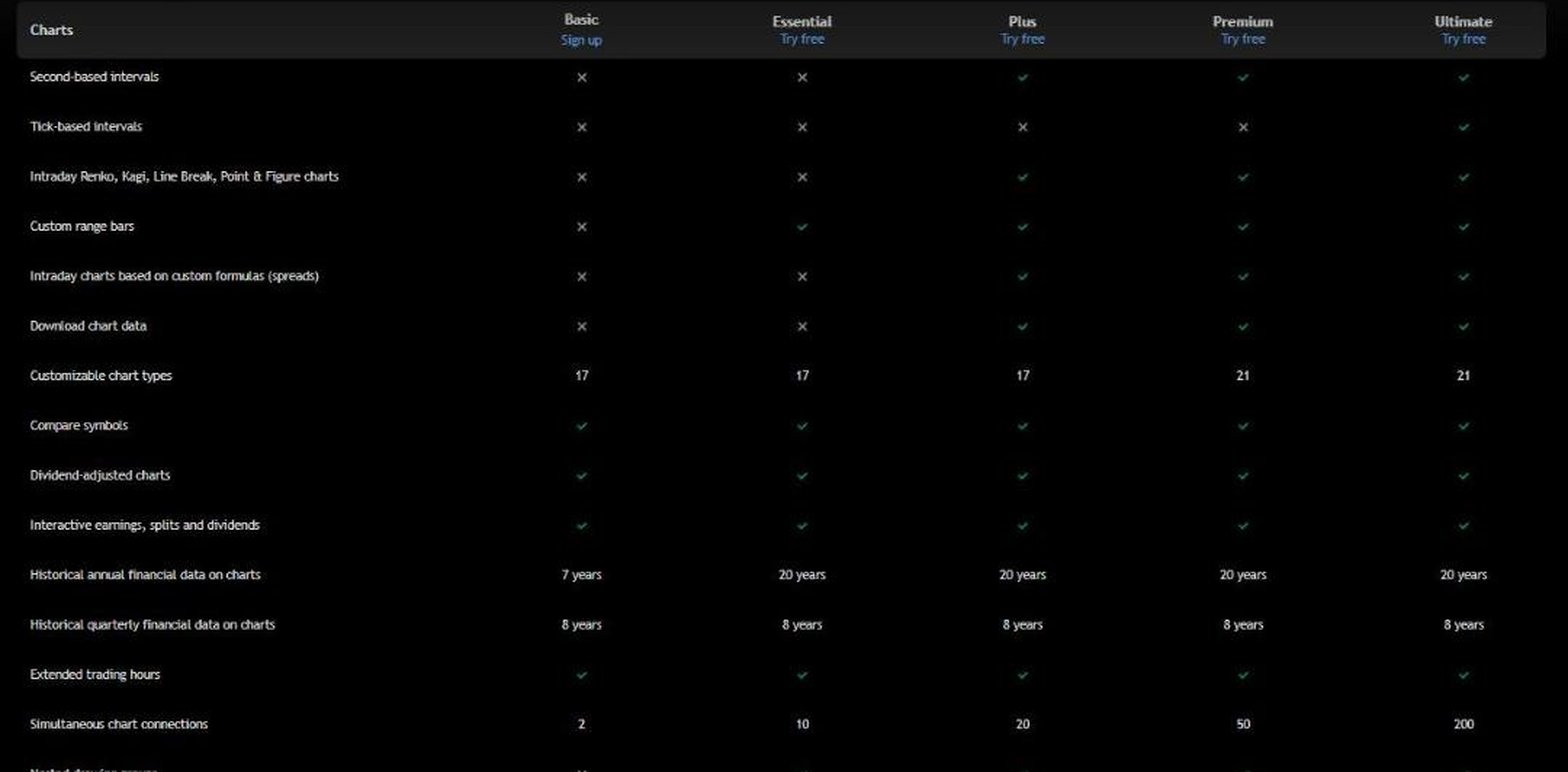
- Best for charting across every asset class.
- Basic at $0, no card needed.
- Essential from $12.95 a month.
- Global economic data and economic calendars on every plan.
- Screeners on 150+ exchanges in 50+ countries.
- 20 years of annual financials on charts on paid plans.
For the market-monitoring half of a terminal, TradingView is the obvious choice, and it reaches further into companies than its reputation suggests: bank line items for banks, a revenue breakdown by source and country, analyst forecasts, filing lists and an MCP server for AI assistants.
Where it falls short: there is no company KPI data, ownership data or data API, and outside the US its pricing page shows local currency.
Business Quant
Business Quant is ours. It puts a terminal's company screens and macro screens in one account: statements, segments, KPIs, ownership, filings and economic data for every US-listed stock, free to use.

- Best for company, ownership and economic data in one account, with export and API access.
- Free to use, 5 years and 20 quarters, no card.
- Pro from $29 a month, full history, export and API access.
List of features
- Financial statements: annual, quarterly and TTM
- 4 standardised statement templates: general, real estate, utilities and capital markets
- Financial results from 10-K, 10-Q, 8-K, 20-F, 40-F and 6-K filings
- Ratios and growth metrics
- History page for every line item
- CSV and XLSX download
- Segment financials
- KPI and operating data
- Analyst estimates
- Bull and bear investment thesis
- Dividends
- BQ-MICS industry classification: 11 sectors, 71 industry groups, 288 industries
- Industry financials
- Peers
- Stock screener
- Time series tables
- Advanced charting
- Institutional ownership and insider trades
- 18 million+ SEC filings since 1993
- Economic data: 617 indicators
- ETF and mutual fund screener
- Fund comparison
- Market heatmap
- Corporate actions
- Portfolio tracker
- API access
- MCP server
- Results within 10 to 15 minutes of release
The figure above is 3 screens a terminal user checks on a company, from one account: Microsoft's revenue rose 29.3% in 6 quarters to $90.0 billion, BlackRock held 8.18% of its shares at the end of June, and the federal funds rate stood at 3.75%. Every stock page carries the same tabs, statements are standardised on one of 4 templates so a bank shows bank line items, and the economic data covers 617 indicators with their release dates and history.
We take results from 10-K, 10-Q, 20-F and 40-F filings, and also from the 8-K and 6-K filings that carry earnings releases, so a new quarter appears within 10 to 15 minutes of the release. The screener filters more than 700 metrics without an account, and the MCP server brings the same data into Claude and ChatGPT. Pro adds the full statement history, company KPIs such as subscribers and deliveries, longer segment history, CSV and XLSX downloads and our API.
Bloomberg Terminal alternatives feature by feature
| Platform | Spreadsheet export |
Industry‑specific statements |
Segment financials |
Company KPIs |
Analyst estimates |
Insider & Inst. Ownership |
SEC filings |
Economic data |
API access |
MCP server |
Plans from |
|---|---|---|---|---|---|---|---|---|---|---|---|
| Business Quant | ✓ | ✓ | ✓ | ✓ | ✓ | ✓ | ✓ | ✓ | ✓ | ✓ | $29/mo |
| Fiscal.ai | ✗ | ✓ | ✓ | ✓ | ✓ | ✓ | ✓ | ✗ | ✓ | ✓ | $39/mo |
| TradingView | ✓ | ✓ | ✓ | ✗ | ✓ | ✗ | ✓ | ✓ | ✗ | ✓ | $12.95/mo |
| Koyfin | ✗ | ✓ | ✗ | ✗ | ✓ | ✓ | ✓ | ✓ | ✗ | ✗ | $39/mo |
| Stock Analysis | ✓ | ✓ | ✓ | ✓ | ✓ | ✗ | ✗ | ✗ | ✗ | ✗ | $6.58/mo |
| TIKR | ✗ | ✗ | ✓ | ✗ | ✓ | ✓ | ✓ | ✗ | ✗ | ✗ | $17.95/mo |
| Seeking Alpha | ✗ | ✗ | ✗ | ✗ | ✓ | ✓ | ✓ | ✗ | ✗ | ✗ | $299/yr |
| Stock Rover | ✓ | ✗ | ✗ | ✗ | ✓ | ✓ | ✗ | ✗ | ✗ | ✗ | $24/mo |
| Morningstar Investor | ✗ | ✓ | ✗ | ✗ | ✗ | ✓ | ✗ | ✗ | ✗ | ✗ | $20.75/mo |
Sorted by ticks, ties broken alphabetically. A tick means the platform's own pages or help centre document the feature on a self-serve plan; a cross means we found no such documentation. "Spreadsheet export" refers to the cheapest paid plan. "Industry-specific statements" means a bank, for example, is shown with bank line items such as net interest income and loan-loss provisions rather than a generic template; we checked JPMorgan's income statement on each site. "Segment financials" means revenue by segment, product or geography over several years. "Company KPIs" means operating metrics such as subscribers or deliveries. "Analyst estimates" means consensus revenue or earnings forecasts. "Insider & Inst. Ownership" covers insider trades or holdings and institutional holders. "SEC filings" means a company's filing list. "Economic data" means macro series such as GDP, inflation and interest rates, not only an economic calendar. "API access" and "MCP server" mean a self-serve API and an AI-assistant connector; Morningstar sells both only to enterprise customers.
Business Quant is the only product here that ticks every column. Fiscal.ai comes closest with 8: it has no economic data, and exports start on its Max plan. TradingView follows with 7, without company KPIs, ownership data or a data API. Morningstar Investor ticks 2, because it sells analysts' conclusions rather than data. A cross shows what a product was built for, not how good it is.
What about LSEG Workspace, AlphaSense, YCharts and OpenBB?
All 4 come up in threads about Bloomberg alternatives, and none publishes a price an individual can pay online. LSEG Workspace is a full professional terminal sold through its sales team. AlphaSense is a document search and research platform with no figure on its pricing page. YCharts asks you to call for pricing. OpenBB is a workspace you connect your own data to, free for individuals but not a data source in itself.
Which Bloomberg Terminal alternative is right for you?
- You want segments and KPIs with an AI copilot: Fiscal.ai.
- You want a screen to sit in front of all day: Koyfin.
- You want analyst ratings and fair values: Morningstar Investor.
- You mostly read news and research: Seeking Alpha Premium.
- You want the cheapest full data plan: Stock Analysis Pro.
- You screen and manage portfolios in tables: Stock Rover.
- You follow companies outside the US: TIKR.
- You chart every asset class: TradingView.
- You want company, ownership and economic data in one account, with export and an API: Business Quant.
If an AI assistant is part of how you want to replace terminal lookups, our AI stock analysis tools comparison covers that field, and our economic calendar comparison goes deeper on the macro side.
Where I would start without a terminal
If you trade intraday or need live order books, a self-serve research platform is a different tool from a trading terminal, so choose for that job alone. If your terminal time went on companies, owners and the economy, I would start with Business Quant.
The reason is how much of that work one account covers before you pay anything. Statements update within 10 to 15 minutes of a release, the screener runs more than 700 metrics without an account, 13F holders and insider trades sit on every stock page, and the economic data carries 617 indicators with their history. The Microsoft panel above came from one free-to-use account on one afternoon. Pro, from $29 a month, adds full statement history, segment and KPI data, export and our API.
A 15-minute test: write down the 5 screens you used most on a terminal. Open each one here and note whether it exists, whether it is free, and whether the number matches the company's latest filing. The gaps, if any, tell you exactly what a second subscription has to cover.
How this comparison was made
To make the list, a platform had to be available to an individual without a sales call, at no cost or at a price published on the vendor's own site, and had to combine company financial statements, a stock screener and charting in one product. Sales-led enterprise terminals and data toolkits without their own data were noted separately rather than reviewed. 9 platforms met that bar.
Every price, plan limit and feature was read on the vendor's own pricing, plan, help, product or stock pages on 16 October 2026, and the screenshots were taken there. Prices are each platform's lowest advertised monthly price on that date, whatever the billing term; Seeking Alpha advertises only a yearly renewal. TradingView shows prices in local currency, so its US dollar price was read from its US pricing page. Bloomberg's own product and order pages were checked for a price and carry none. The Business Quant illustration was read from our own data the same day.
The list, the summary table and the reviews run alphabetically, with Business Quant last, and the feature table is sorted by the number of ticks, with ties broken alphabetically. We make Business Quant, one of the 9 products compared here. For one company in depth, see our stock analysis websites guide.
Image credits. Header photograph by Jakub Żerdzicki on Unsplash, used under the Unsplash License. Vendor screenshots were captured on 16 October 2026 from each provider's own pricing, plan, help or stock pages and are reproduced for comparison. The Microsoft illustration is our own, built from our data.
Frequently asked questions
Is there a free alternative to the Bloomberg Terminal?
Yes, for most of what an individual investor uses a terminal for. Business Quant is free to use with no card: financial statements for the latest 5 fiscal years on every US-listed stock, a screener with more than 700 metrics, advanced charting of prices and fundamentals, 13F and insider data, and 617 economic indicators. Koyfin, Stock Analysis, Stock Rover, TIKR and TradingView also run $0 plans, each with tighter limits on history or features than their paid tiers.
How much does the Bloomberg Terminal cost?
Bloomberg does not publish a price for the Terminal. Its product and order pages route you to a demo request and its sales team. Every alternative in this comparison publishes its price: the cheapest paid plans start at $6.58 a month on Stock Analysis and $12.95 a month on TradingView, and Business Quant Pro is from $29 a month.
Is there a cheaper version of the Bloomberg Terminal?
Bloomberg does not sell a cut-down Terminal on a public price list. The practical route is a self-serve platform that covers the jobs you actually do: Koyfin for terminal-style dashboards from $39 a month, TIKR for global fundamentals from $17.95 a month, Morningstar Investor for analyst ratings from $20.75 a month, and Business Quant for statements, segments, ownership and economic data, free to use or from $29 a month on Pro.
Can I just buy a Bloomberg Terminal as an individual?
Bloomberg sells the Terminal through its sales team rather than through a checkout page, and describes it as a tool for financial professionals. An individual can ask for a demo, but there is no self-serve sign-up or published price. That is the main reason individual investors look at the platforms in this comparison, all of which you can join online.
Can AI replace the Bloomberg Terminal?
An AI assistant can replace a lot of terminal lookups if it is connected to reliable data. Business Quant runs an MCP server that connects Claude, ChatGPT, Cursor and VS Code to its statements, segments, estimates, ownership, SEC filings, fund and economic data, with 23 read-only tools, and it is free to use with one custom connector. Fiscal.ai also sells API and MCP access as a separate annual subscription. Seeking Alpha Premium includes an AI research assistant inside its own site.
Which Bloomberg Terminal alternative is best for individual investors?
It depends on which part of the terminal you use. For company fundamentals, segment revenue, ownership and economic data in one free-to-use account, Business Quant. For charts across asset classes, TradingView. For terminal-style dashboards, Koyfin. For global coverage at a low price, TIKR. For analyst ratings and fair values, Morningstar Investor.