7 Best Economic Calendars for 2027
Every economic calendar tells you what prints this week. Which one also shows you where each number has been?


An economic calendar lists scheduled data releases, such as jobs reports, inflation prints and retail sales, with the date, the time and the previous value. Most calendars are free to read, and they list the same releases on the same dates.
Below are 7 economic calendars for following US data releases. We compare them on price, filters, revisions, what sits one click behind each row, data export and API access.
What sits behind a calendar row
The values themselves agree across calendars, because every one takes them from the same official releases. On 15 October 2026, September retail sales printed 0.8% on MarketWatch, Trading Economics and Econoday alike. The month before was another matter: MarketWatch listed it as 1.2%, Trading Economics marked it revised to 1.3%, and Econoday showed both numbers side by side. If you judge a surprise against the prior, you need to know which prior you are looking at.
The other difference is history. Traders care about the gap between the print and the consensus forecast, because that gap moves prices within minutes. An investor holding a stock for years cares more about the trend: whether 197,000 jobless claims is low or high depends on what claims have done since the 1960s, and a single row cannot tell you that. The calendars below split between those that stop at the row and those that open onto the series behind it.
How to choose an economic calendar
- US coverage. The reports, Fed speakers and auctions you actually follow.
- History behind a row. Earlier releases and a chart, one click away.
- Revisions. Whether the prior shows as first published or as revised.
- Filters. A way to cut the list to inflation, jobs or housing.
- Data out. Export or an API, and what they cost.
If you want the long series themselves rather than the calendar, our economic data websites guide compares where to read them.
The 7 economic calendars at a glance
| Platform | Best for | Plans from |
|---|---|---|
| Econoday | Consensus ranges and definitions | $0 |
| Finviz | A fast US week view | $24.96/mo |
| Forex Factory | Filtering by currency and impact | $0 |
| MarketWatch | Major US reports and Fed speakers | $0 |
| Trading Economics | Global consensus and forecasts | $29.99/mo |
| TradingView | A calendar beside your charts | $12.95/mo |
| Business Quant | US release dates with each indicator's history, export and API access | $29/mo |
Rows are alphabetical, Business Quant last. Every calendar here is free to read. "Plans from" is the cheapest paid plan's lowest advertised monthly price on 15 October 2026; $0 means the calendar has no paid plan.
Economic calendars reviewed
Econoday
Econoday is a dedicated economic calendar whose copyright line runs back to 1998, with the most detailed event pages in this comparison. Each release opens on a report with the prior, the revised prior, the consensus, the consensus range and the actual, plus a written consensus outlook.

- Best for consensus ranges and plain-English release definitions.
- Free to read, in monthly, weekly or daily views.
- Prior and revised prior side by side.
- Treasury auctions, Fed speakers and settlement dates.
Econoday is the calendar that best explains a release. The retail sales page carried a definition of the measure, a note on why investors care, a relative performance index showing how US data has run against expectations, and every 2026 release date for that report. The consensus range, 0.0% to 0.7% for September retail sales, shows how far apart forecasters were, which a single consensus number hides.
Where it falls short: the history behind a row is short, the prior, the revised prior and a 6-month chart, and the calendar has no category filter, so a busy week is a long page.
Finviz
Finviz is the stock screener many investors already use, and it has a compact US economic calendar under its Calendar tab next to earnings and dividends. Rows expand in place to show a description of the latest release and a chart.

- Best for a fast US week view inside a stock research site.
- Impact, actual, expected and prior on every row.
- Charts to 10 years without paying.
- Elite from $24.96 a month.
The expanded row is the best feature: a short written account of what the latest release showed, then a chart you can stretch to 10 years. The detail page behind it lists every release with its actual, expected and prior; existing home sales ran back to the January 2021 report. Company statements are a click away on the same site.
Where it falls short: there is no category filter, the Max chart range is greyed out without an account, and the calendar has no export or API.
Forex Factory
Forex Factory is a calendar built for currency traders, run by Fair Economy, and the most configurable one here. A filter panel cuts the list by expected impact, by 10 event types and by 9 currencies.
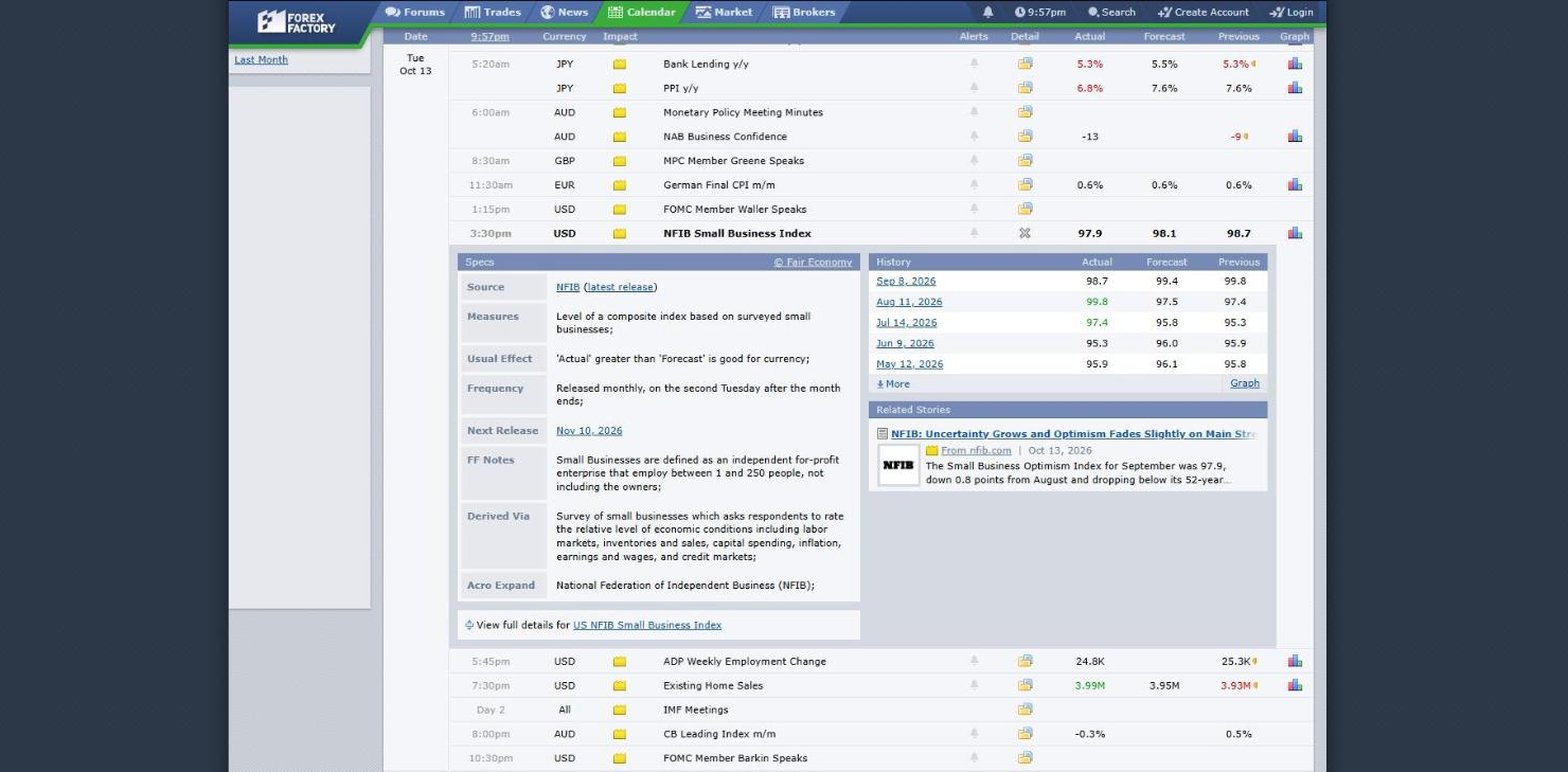
- Best for filtering by currency, impact and event type.
- Free to read, with no paid plan for the calendar.
- A detail panel with source, frequency, usual effect and next release.
- History and a graph one click from every row.
The detail panel is unusually thorough: for each event it states the source, what the figure measures, how it is derived, how often it is released, the next release date and its usual effect on the currency. The graph behind a row can run a long way back; the one opened on China's CPI spanned July 2010 to November 2026.
Where it falls short: events are grouped by currency rather than by country or sector, which suits a trader and asks a stock investor to translate. There is no export, API or company data.
MarketWatch
MarketWatch publishes a short, clean list of the US reports and Fed speakers that move markets, powered by Onclusive and Dow Jones, covering 2 weeks at a time in Eastern Time.

- Best for the major US reports and Fed speakers at a glance.
- 2 weeks of events, with period, actual, forecast and previous.
- A category filter from Employment and Inflation to Central Banks.
- Add to my calendar on each row.
MarketWatch is the easiest calendar here for someone who only wants to know what matters this week. It lists major reports rather than every series, says which period each figure covers, and gives Fed speeches with their venue, which most calendars leave as a bare name.
Where it falls short: it stops at the row, with no link from a report to its history or a chart, and on 15 October its previous retail sales figure was the first-published 1.2%, with no revision mark. There is no export or API.
Trading Economics
Trading Economics runs the broadest calendar in this comparison, covering 196 countries, with both the economists' consensus and its own forecast for each release. Revised previous values carry a mark.

- Best for global coverage with consensus and forecasts.
- Impact, category and time-zone filters.
- Indicator pages with charts to 10 years without paying.
- Basic from $29.99 a month, for unlimited display and alerts.
- Data export and API on Standard, $199 a month.
Every row links to an indicator page with a written summary of the latest release, a chart and a table of recent and upcoming releases. The category menu is thorough, from interest rates and inflation to the labour market, housing, bond auctions and energy.
Where it falls short: the MAX chart range is for subscribers, and Basic, the cheapest plan, lists no data export; export and the API start on Standard at $199 a month.
TradingView
TradingView's calendar puts economic events, earnings, dividends and IPOs on 4 tabs, with a week strip counting each type by day. On 15 October it listed 102 economic events alongside 585 earnings reports.
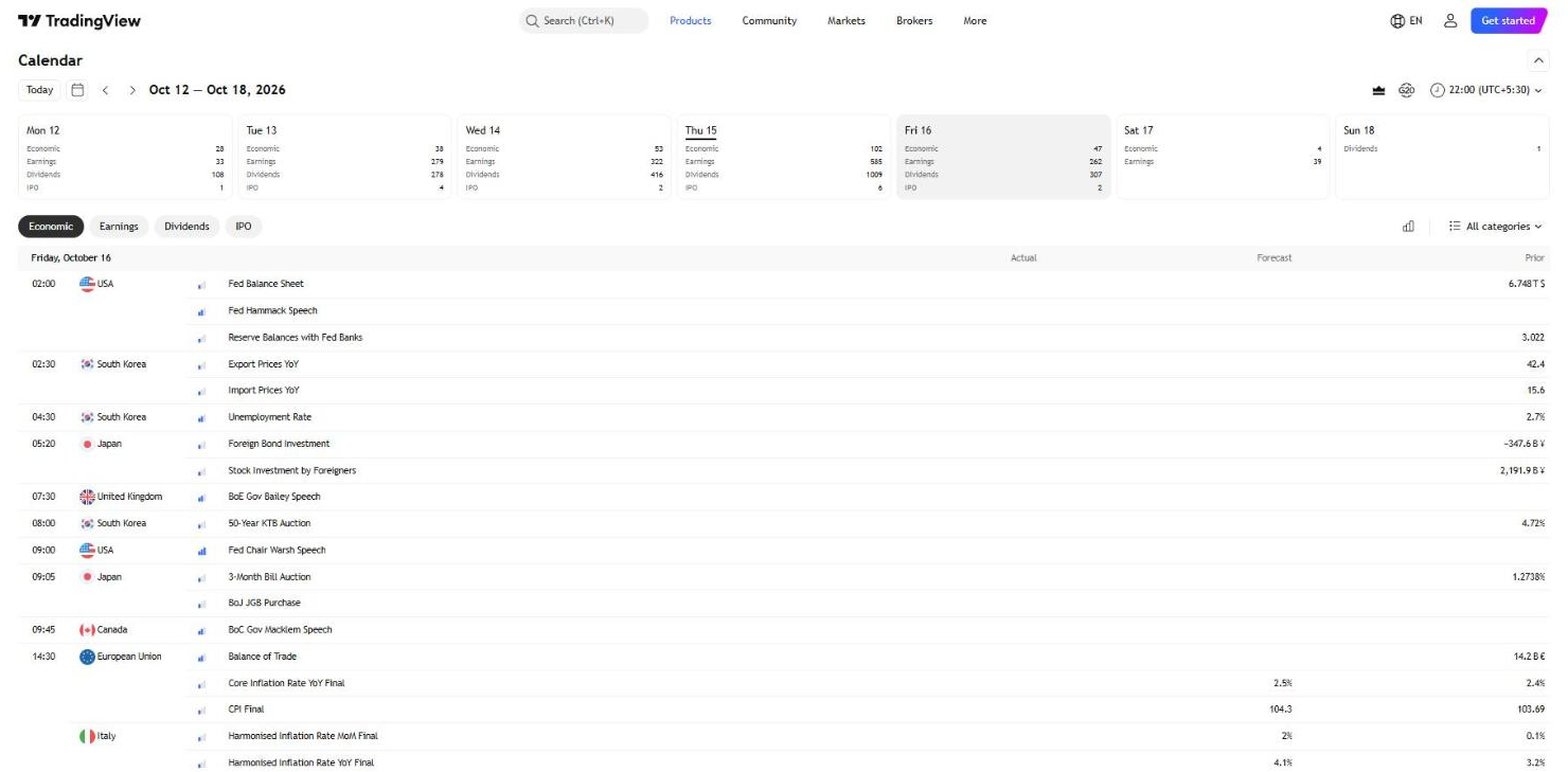
- Best for a global calendar beside your charts.
- Economic, earnings, dividends and IPO calendars together.
- Category filter and a time-zone selector.
- Essential from $12.95 a month.
If you already chart on TradingView, keeping the calendar in the same place is convenient, and the week strip is a quick way to see which days are heavy with data or earnings. Company financials, data export on paid plans and an MCP server sit on the same platform.
Where it falls short: the calendar is a list, and selecting an event opened no history view, so the long-run context for a release has to come from elsewhere.
Business Quant
Business Quant is ours. Our economic calendar lists 617 indicators in 16 categories with the latest value, the change, the frequency and the next release date, and every indicator opens on its own page with the series behind it.
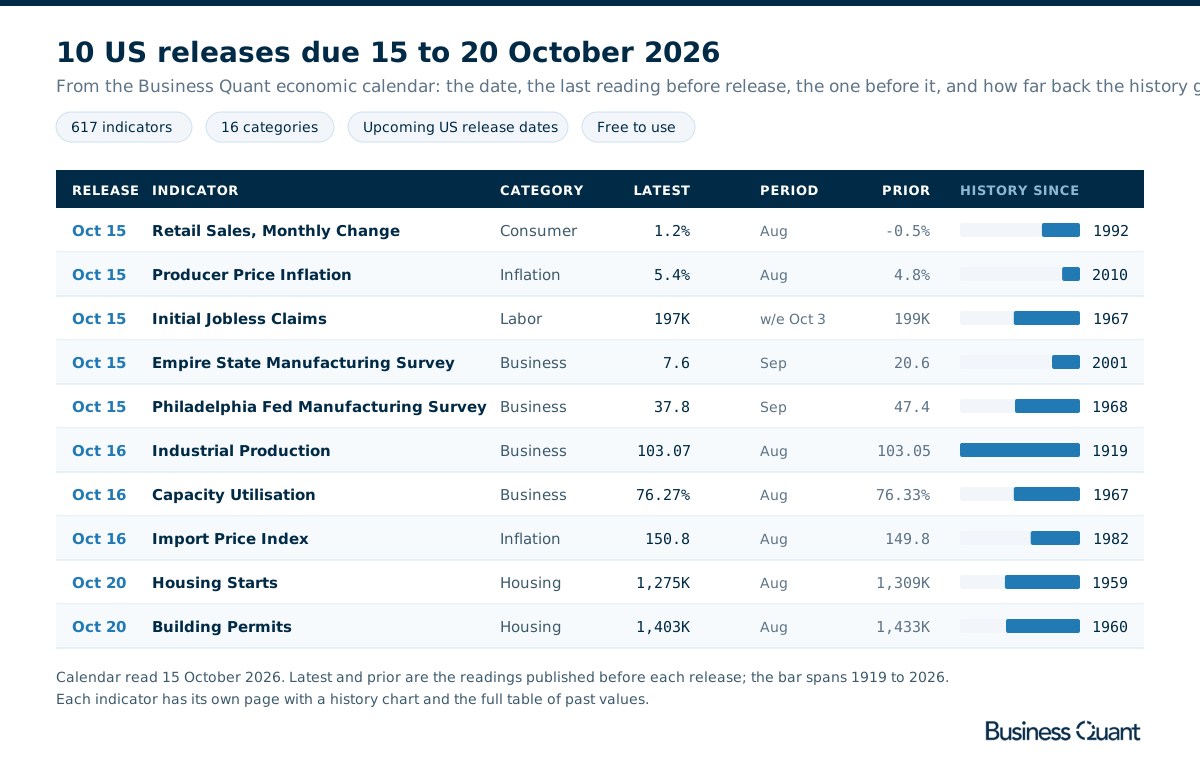
- Best for US release dates with each indicator's history, export and API access.
- Free to use, 617 indicators and their history, no card.
- Pro from $29 a month, with data export.
List of features
- Economic calendar: release dates, latest value, change and frequency
- 16 categories, from Inflation and Labor to Housing, Energy and Rates
- Indicator pages with prior value, last and next release and seasonal adjustment
- History charts from 1 year to the full record
- Tables of every past value, such as monthly CPI since January 1947
- CSV and XLSX download
- Economic calendar API and economic data API
- MCP server
- Financial statements, segment financials and analyst estimates for every US-listed stock
- Stock screener
Each row links to an indicator page such as Consumer Price Index, which shows the latest value and its change, a key facts panel with the prior value, the last and next release dates, frequency and seasonal adjustment, a chart from one year to the full record, and a paginated table of every past value. The series are built from official government and central bank releases.
The full record is the point. Industrial production goes back to 1919, housing starts to 1959 and capacity utilisation to 1967, so a print that looks dramatic on its own can be set against decades of the same number in 2 clicks. The same data is available through our economic calendar and economic data APIs, and through our MCP server if you would rather ask Claude or ChatGPT what is due this week. When a release moves a sector, the companies in it are one search away with their statements, segments and estimates.
Economic calendars feature by feature
| Platform | Category filter |
Past values per indicator |
Spreadsheet export |
API access |
MCP server |
Company financials |
Plans from |
|---|---|---|---|---|---|---|---|
| Business Quant | ✓ | ✓ | ✓ | ✓ | ✓ | ✓ | $29/mo |
| TradingView | ✓ | ✗ | ✓ | ✗ | ✓ | ✓ | $12.95/mo |
| Trading Economics | ✓ | ✓ | ✗ | ✓ | ✗ | ✗ | $29.99/mo |
| Finviz | ✗ | ✓ | ✗ | ✗ | ✗ | ✓ | $24.96/mo |
| Forex Factory | ✓ | ✓ | ✗ | ✗ | ✗ | ✗ | $0 |
| MarketWatch | ✓ | ✗ | ✗ | ✗ | ✗ | ✓ | $0 |
| Econoday | ✗ | ✗ | ✗ | ✗ | ✗ | ✗ | $0 |
Sorted by ticks, ties broken alphabetically. A tick means the platform's own calendar, indicator, help or pricing pages document the feature; a cross means we found no such documentation. "Category filter" means a way to cut the calendar to a category such as inflation or housing. "Past values per indicator" means a list of earlier releases one click from a calendar row. "Spreadsheet export" refers to the cheapest paid plan. "API access" and "MCP server" mean a self-serve API and an AI-assistant connector, on any plan. "Company financials" means listed companies' financial statements on the same site.
Business Quant is the only calendar here that ticks every column. TradingView comes closest with 4, for its category filter, export, MCP server and company financials, though its calendar rows open no history. Trading Economics follows with 3. Econoday ticks none, because its strengths, the consensus range, the revised prior and the written outlook, are not columns: it is the best-explained calendar here. A cross shows what a calendar was built for, not how good it is.
What about Investing.com and Bloomberg?
Both rank for this search, and neither could be checked at source: Investing.com's calendar returned an access error to our browser on 15 October 2026, and Bloomberg's served a robot check. An unverified calendar is left out rather than described from memory.
Which economic calendar is right for you?
- You want each release explained, with the consensus range: Econoday.
- You want a fast US week view next to stock research: Finviz.
- You trade currencies and filter by impact: Forex Factory.
- You only want the major US reports and Fed speakers: MarketWatch.
- You follow many countries, with consensus and forecasts: Trading Economics.
- You want the calendar beside your charts: TradingView.
- You want each US release with its history, export and an API: Business Quant.
For pulling the same series into code, our free economic data API comparison covers the options.
Where I would check the week ahead
If you trade the minutes after a release, you want a calendar built around the consensus and the surprise. If you hold stocks for months or years, I would start the week on the Business Quant economic calendar.
The reason is the click behind the row. A calendar tells you that housing starts are due on Tuesday and came in at 1.275 million last time. Ours tells you that too, then opens the series back to 1959, so you can see in seconds whether 1.275 million is a weak year or an ordinary one. Industrial production goes back to 1919 and CPI to January 1947, across 617 indicators in 16 categories, free to read without an account. Pro, from $29 a month, adds data export.
A 5-minute test: pick the 3 releases you care about most this week. On each calendar you use, try to find, from the row alone, the value 10 years ago. The calendar that gets you there fastest is the one that will make the next surprise make sense.
How this comparison was made
To make the list, a calendar had to list scheduled US economic releases by date, show the latest value next to the previous one on the calendar or one click away, and be readable by an individual without paying or opening a brokerage account. Calendars available only as apps, and agency schedules that publish dates without values, were not included. 7 calendars met that bar.
Every feature, filter and price was read on each calendar's own calendar, indicator or pricing pages on 15 October 2026, and the screenshots were taken there; TradingView's US price was read from its own pricing page as listed in Google's US index. Prices are each platform's lowest advertised monthly price on that date. The Business Quant illustration was built from our economic calendar the same day.
The list, the summary table and the reviews run alphabetically, with Business Quant last, and the feature table is sorted by the number of ticks, with ties broken alphabetically. We make Business Quant, one of the 7 products compared here. For the paid feeds behind the same data, our macroeconomic data provider comparison covers the options.
Image credits. Header photograph by Towfiqu barbhuiya on Unsplash, used under the Unsplash License. Calendar screenshots were captured on 15 October 2026 from each provider's own calendar pages and are reproduced for comparison. The release table is our own, built from our economic calendar.
Frequently asked questions
Which economic calendar is the best?
It depends on what you do with the release. For a stock investor who wants the US week ahead and the history behind each number, Business Quant lists upcoming US release dates with the latest value for 617 indicators, and every indicator opens on a page with a chart and its full table of past values, free to use. Forex Factory and Trading Economics suit traders who watch the surprise against consensus, Econoday adds consensus ranges and release definitions, and MarketWatch gives a short list of major US reports and Fed speakers.
Is there a free economic calendar?
Yes. All 7 calendars compared here can be read without paying. Business Quant is free to use with no card, including the indicator pages and their full history; Pro, from $29 a month, adds data export. Trading Economics keeps its MAX chart range for subscribers, from $29.99 a month, and data export for its $199 Standard plan, and Finviz Elite starts at $24.96 a month.
Where can I find the current U.S. economic data calendar?
The release schedule comes from the agencies that publish the data, such as the Bureau of Labor Statistics, the Census Bureau, the Bureau of Economic Analysis and the Federal Reserve. A calendar site gathers those schedules in one list. Business Quant shows the next release date, the latest value and the change for each indicator, grouped into 16 categories, and MarketWatch, Finviz and Econoday each publish a US-focused weekly view.
What is the most accurate economic indicator?
No single indicator is accurate on its own, because early estimates get revised. Retail sales for August 2026 were first published as a 1.2% rise and showed as 1.3% once revised. Monthly figures built from large samples, such as payrolls, CPI and retail sales, are the most watched, while weekly jobless claims are the most timely. Reading an indicator over several years, rather than one print, is what makes it reliable.
Which economic calendar is the most accurate?
The values themselves agree, because every calendar takes them from the same official releases: on 15 October 2026, September retail sales printed 0.8% on MarketWatch, Trading Economics and Econoday alike. Calendars differ in how they show revisions. MarketWatch listed the prior month as 1.2%, while Trading Economics flagged it as revised to 1.3% and Econoday showed both figures side by side.
What is the best economic calendar for forex or futures traders?
Traders who need to filter by currency and impact usually prefer Forex Factory, which filters by 9 currencies and 10 event types, or Trading Economics, which adds consensus and its own forecasts for each release. Investors holding stocks for longer tend to care more about where a number has been, which is where an indicator page with decades of history helps.