8 Best Economic Data Websites for 2027
Every economic data website will show you this month's unemployment rate. Which ones show you the 943 months before it without asking you to pay?


Economic data websites publish government and central bank statistics, such as the unemployment rate, inflation and GDP, as charts and tables. They differ in how much of each series they show without payment, whether they say when the next number is due, and whether you can download it.
Below are 8 websites where you can look up a US economic series. We compare them on full history, release dates, download, stock data, API access and price.
Why one number needs its history
The US unemployment rate read 4.2% for September 2026. The series has 944 monthly readings, from January 1948 to September 2026, and its long-run average is 5.65%. Against that record, 4.2% is low: only 220 of those 944 months came in at or below it. Against the last few years alone, the same 4.2% looks like a labor market getting weaker, because the rate has drifted up from 3.4% in April 2023. Which reading you see depends on how far back a site lets you look.
Every site below holds the full record for that series, but they draw the line in different places. Some chart all 944 months without payment, some chart the whole series but hold back the table, and one keeps its longest range for subscribers.
Gaps are the other thing to check. There is no October 2025 reading for unemployment, because the survey was not carried out during the 2025 lapse in federal appropriations. The Bureau of Labor Statistics marks the month with a footnote, and a careful data site either does the same or leaves the month out of its table.
How to choose an economic data website
- Full history. The whole series on a chart, not the last 10 years.
- The values, not just the line. A table you can read month by month.
- The release schedule. When the next print is due, on the same page.
- Download. A CSV or Excel file for your own spreadsheet.
- Company data alongside. Whether the stocks a release moves are one click away.
If you follow releases week to week, our economic calendar comparison covers the schedule side.
The 8 economic data websites at a glance
- Bureau of Labor Statistics
- Census Bureau
- FRED
- Trading Economics
- TradingView
- World Bank
- YCharts
- Business Quant
| Platform | Best for | Plans from |
|---|---|---|
| Bureau of Labor Statistics | Jobs and price data at the source | $0 |
| Census Bureau | Retail, housing and trade releases | $0 |
| FRED | Charting and downloading any series | $0 |
| Trading Economics | Other countries and forecasts | $29.99/mo |
| TradingView | Macro series on a trading chart | $12.95/mo |
| World Bank | Comparing the US with other economies | $0 |
| YCharts | Advisers charting macro with stocks | On request |
| Business Quant | Long US series beside company data, with export and API access | $29/mo |
Rows are alphabetical, Business Quant last. "Plans from" is the cheapest paid plan's lowest advertised monthly price on 15 October 2026; $0 means the site has no paid plan, and YCharts quotes its prices by phone.
Economic data websites reviewed
Bureau of Labor Statistics
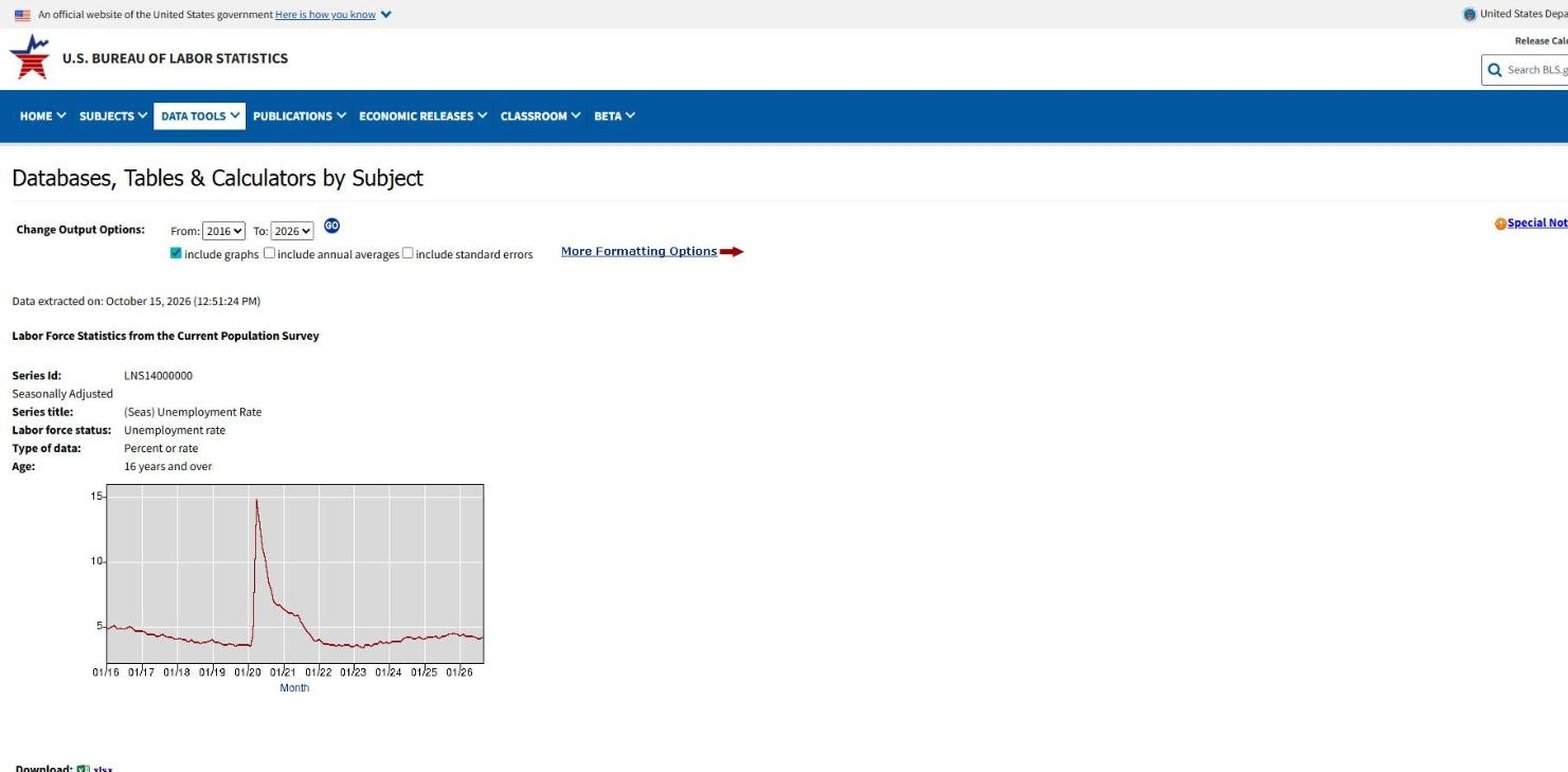
The Bureau of Labor Statistics produces the unemployment rate, payrolls, CPI and producer prices, and every other site on this list ultimately gets them from it. Its data tools are plain, and they are the record itself.
- Best for jobs, prices and pay data straight from the source.
- No cost and no account.
- Years from 1948 in the unemployment rate's output options, with graphs, annual averages and standard errors.
- xlsx download on every series page.
- Footnotes for gaps and revisions.
Each series has an ID and a page. For the unemployment rate it opens on a table of the last 10 years with a small chart, and a From menu running back to 1948 lets you widen it. The footnotes are what make it worth a visit even if you read the numbers elsewhere: October 2025 shows as unavailable because of the 2025 lapse in appropriations, and January 2026 carries a note that it was revised for new population controls.
Where it falls short: the release schedule lives on a separate calendar page, not on the series page, and the interface asks you to know roughly what you are looking for. There is no stock data.
Census Bureau
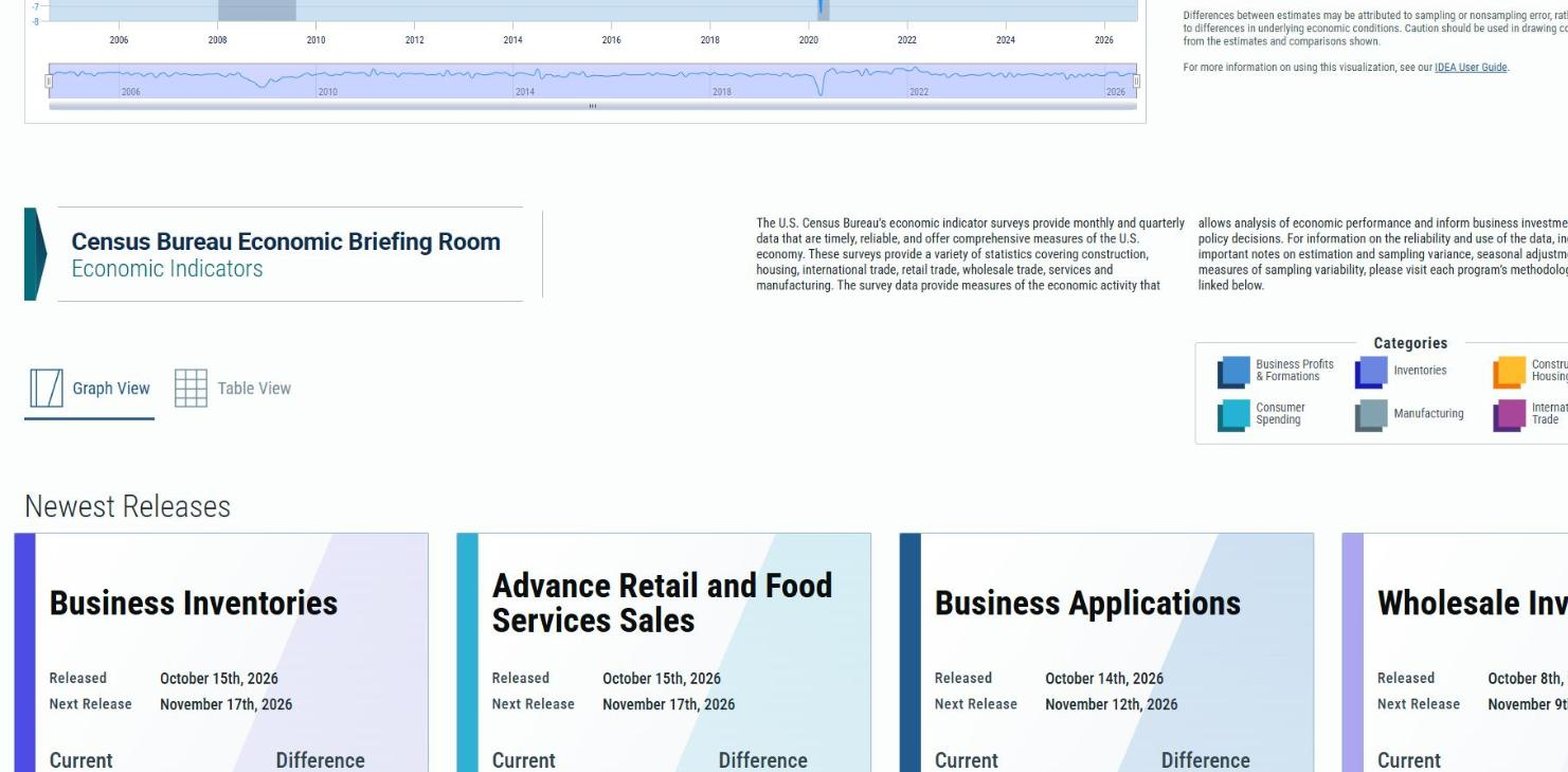
The Census Bureau is the source for retail sales, housing starts, durable goods orders, inventories and trade. Its Economic Briefing Room puts the latest release of each survey on one page, with the next release date beside it.
- Best for retail, housing, manufacturing and trade releases.
- No cost and no account.
- Released and next release dates on each indicator card, with graph and table views.
- An index of economic activity built from 15 of its series.
- Downloads and a time series tool for longer history.
The briefing room is the fastest way to see what the Census Bureau has just published. Cards for business inventories, retail sales, business applications and wholesale inventories each show the release date and the next one, grouped into 6 categories from business formations to international trade. Its experimental Index of Economic Activity combines 15 of the bureau's series into one number, charted from 2004.
Where it falls short: a long series means a separate Time Series and Trend Charts tool, where you pick a survey and then the data you want, and it is built for people who know the survey names. We did not see a full-history chart in the briefing room itself.
FRED
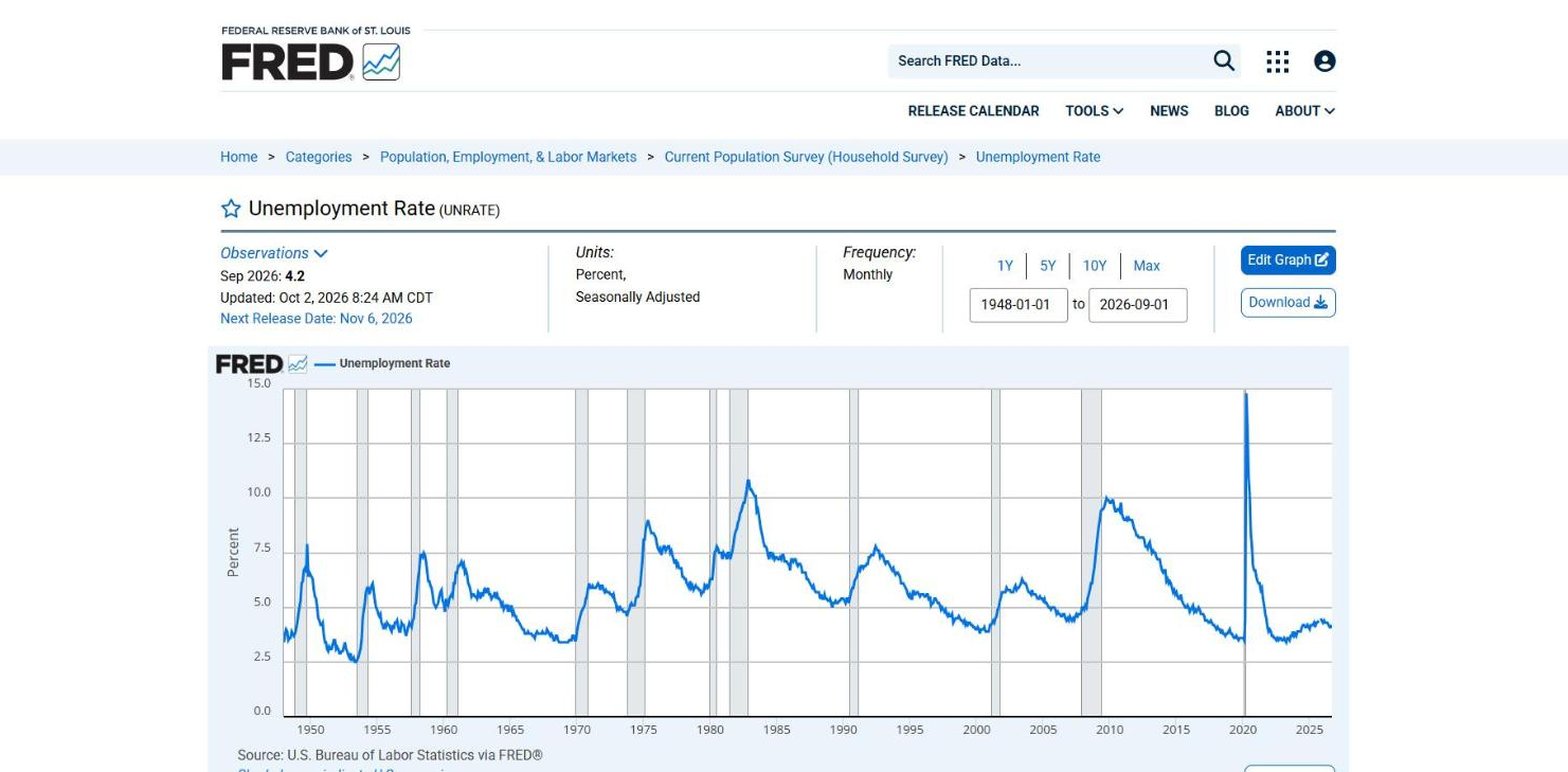
FRED is the St. Louis Fed's database, and the site most economists and analysts open first. It began in the early 1990s and now holds hundreds of thousands of series, gathered from scores of national, international, public and private sources.
- Best for charting, combining and downloading almost any series.
- No cost; an account adds saved lists and email alerts.
- Next release date on the series page, with 1Y to Max ranges.
- CSV, Excel, image and PowerPoint downloads.
- ALFRED for earlier vintages of revised data.
FRED's strength is what you can do once a series is on screen. You can add a second series, change units to percent change from a year ago, or convert monthly data to quarterly, all in the browser. ALFRED, its archive, keeps every vintage of a revised series, so you can see GDP as it was first reported and not only as it reads today.
Where it falls short: it is a data site, not a market site, so there are no company financials and the stocks a release affects live somewhere else.
Trading Economics
Trading Economics has the widest coverage on this list, describing more than 20 million economic indicators for nearly 200 countries. Each indicator page combines a chart, a release calendar with consensus and its own forecast, and a short written summary of the latest print.

- Best for other countries, consensus and forecasts.
- Charts up to 10 years at no cost.
- Basic from $29.99 a month, with a $4.99 trial week but no data export.
- Standard from $199 a month, with 500 series exports a month.
- Next release, consensus and forecast on each indicator.
For a single US series the page is rich: the release calendar shows the next print on 6 November with the consensus and the house forecast, and a stats line gives the record high of 14.8%, the low of 2.5% and the date range, 1948 to 2026. Where it leads is breadth, since the same indicator exists for most countries and the US page links straight to the rest.
Where it falls short: drawing the full range on the chart is a subscriber feature, and the first plan that exports data is Standard, at $199 a month. There is no stock data.
TradingView
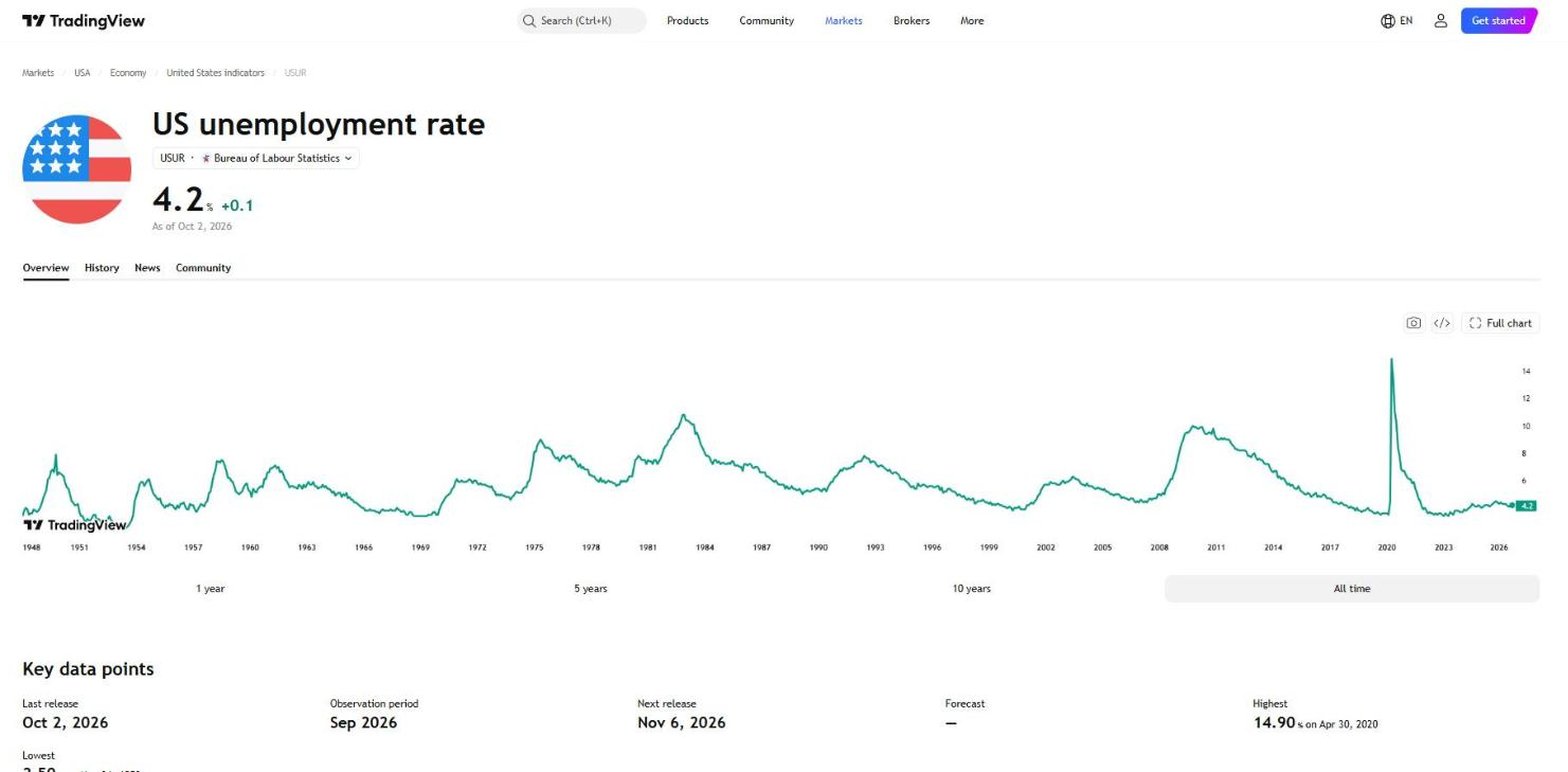
TradingView is a charting platform for traders that treats economic series like tickers. Every indicator has a symbol, such as ECONOMICS:USUR for US unemployment, and can be drawn on the same chart tools used for stocks and futures.
- Best for traders who want macro series on their charts.
- All time charts on the indicator page, signed out, with the last and next release.
- Essential from $12.95 a month, with chart data export.
The indicator page is clean: the latest value, a chart with 1-year to all-time ranges, and key data points including the last release, the observation period and the next release. Because the series behaves like a symbol, you can overlay it on an index or a stock in the full charting tool, which is the main reason to read economic data here.
Where it falls short: the free Basic plan limits how many indicators and charts you can run at once, exporting chart data starts on Essential, and we found no self-serve API.
World Bank
The World Bank's open data site publishes development and macro indicators for more than 200 economies in one consistent annual format, under a CC BY-4.0 licence that lets you reuse it with credit.

- Best for comparing the US with other economies.
- No cost, with line, bar and map views.
- CSV, XML and Excel downloads, and a public API.
- US GDP growth from 1961, annual.
Its US GDP growth series runs from 1961 to 2025, when it was 2.2%, and the map view shows the same figure for every country at once. That makes it the cleanest source here for a question such as how US growth compares with the euro area's over 30 years.
Where it falls short: everything is annual, so it says nothing about this month's print, and there is no release schedule on the page.
YCharts
YCharts is a research platform built mostly for financial advisers, with economic indicators alongside stocks, ETFs and mutual funds. Its indicator pages are open to anyone; the full tables are not.

- Best for advisers who chart macro data with stocks and funds.
- A full level chart on the free indicator page.
- Next release, long-term average and year-ago value in a stats panel.
- 4 tiers, from Analyst to Enterprise, priced by phone.
The stats panel is useful: next to the next release time it shows the long-term average, 5.65% for unemployment, the value a year ago and the change. Its Analyst tier is the one aimed at individual investors.
Where it falls short: the table stops at 2022 until you start a trial, and the plans page asks you to call for a price, so there is no self-serve plan to export the data.
Business Quant
Business Quant is ours. Our economic data page lists 617 indicators in 16 categories, from Labor, Inflation and Housing to Rates, Credit and Energy, and every indicator opens on its own page with the full history as a chart and as a table, next to the company data on the rest of the site.

- Best for long US series beside company data, with export and API access.
- Free to use, with every chart and history table open, no card.
- Pro from $29 a month, full history, export and API access.
List of features
- Economic data: 617 indicators in 16 categories
- Indicator pages with prior value, last and next release, frequency and seasonal adjustment
- 1Y, 5Y, 10Y and Max charts, Max drawing the whole series
- A history table under every chart, with gaps left as the source left them
- Financial statements, segment financials and KPI data
- Analyst estimates
- Stock screener with more than 700 metrics
- Advanced charting
- CSV and XLSX download
- Economic data API
- MCP server
The unemployment rate page is typical. It shows the latest value and its change, then a key facts panel with the prior value, the last release date, the next release date, the frequency and whether the series is seasonally adjusted. The Max range draws all 944 months from January 1948 without signing in, and the table underneath lists every reading, with October 2025 left out exactly as the source left it. Consumer prices go back to January 1947 and industrial production to January 1919.
The difference from a pure data site is what sits next to it. When a housing starts print moves homebuilders, a builder such as D.R. Horton is one search away with its statements, segments and estimates. The same series are available through the economic data API and the MCP server, so you can ask Claude or ChatGPT how a print compares with the last 20 years.
Economic data websites feature by feature
| Platform | Full history charted free |
Next release on the page |
Spreadsheet export |
Stock data on the site |
API access |
MCP server |
Plans from |
|---|---|---|---|---|---|---|---|
| Business Quant | ✓ | ✓ | ✓ | ✓ | ✓ | ✓ | $29/mo |
| TradingView | ✓ | ✓ | ✓ | ✓ | ✗ | ✓ | $12.95/mo |
| FRED | ✓ | ✓ | ✓ | ✗ | ✓ | ✗ | $0 |
| Bureau of Labor Statistics | ✓ | ✗ | ✓ | ✗ | ✓ | ✗ | $0 |
| Census Bureau | ✗ | ✓ | ✓ | ✗ | ✓ | ✗ | $0 |
| Trading Economics | ✗ | ✓ | ✓ | ✗ | ✓ | ✗ | $29.99/mo |
| World Bank | ✓ | ✗ | ✓ | ✗ | ✓ | ✗ | $0 |
| YCharts | ✓ | ✓ | ✗ | ✓ | ✗ | ✗ | On request |
Sorted by ticks, ties broken alphabetically. A tick means the site's own indicator, series, pricing or help pages document the feature on a self-serve plan or at no cost, or its pages showed it when we tested them; a cross means we found no such documentation. "Full history charted free" means a chart of the whole series without paying, checked on the US unemployment rate. "Next release on the page" means the next release date sits on the series page. "Spreadsheet export" means a data download on any self-serve plan. "Stock data on the site" means company prices or financials on the same platform. "API access" and "MCP server" mean a self-serve API and an AI-assistant connector.
Business Quant is the only site here that ticks every column. TradingView comes closest with 5, missing only an API, and FRED follows with 4, for its full charts, release dates, downloads and API. The Bureau of Labor Statistics, the Census Bureau, the World Bank, Trading Economics and YCharts tick 3 each. The agencies and the World Bank exist to publish statistics, not to sell research tools, so stock data is not their job. A cross shows what a product was built for, not how good it is.
What about the BEA, Macrobond and Haver?
None of them made the list. The Bureau of Economic Analysis, the source for GDP and PCE, keeps its long tables in a separate interactive application that we could not test, so its full-history chart is unverified. Macrobond and Haver Analytics are professional terminals sold by quote, which our macroeconomic data provider comparison covers.
Which economic data website is right for you?
- You want jobs and price data with every footnote: Bureau of Labor Statistics.
- You follow retail, housing and trade releases: Census Bureau.
- You want to chart, combine and download almost any series: FRED.
- You need other countries, consensus and forecasts: Trading Economics.
- You want macro series on a trading chart: TradingView.
- You compare the US with other economies year by year: World Bank.
- You advise clients and chart macro with funds: YCharts.
- You invest in stocks and want long series beside company data, with export and an API: Business Quant.
For pulling the same series into code, our free economic data API comparison covers the agency and aggregator APIs.
Where I would look up a number
If you want a series to drop into an academic model, the agency sites and their aggregators serve you well. If you invest in stocks and want to know whether this month's number is normal, I would start on Business Quant economic data.
Take the 4.2% from the start of this article. On Business Quant, that number's page shows the prior reading, the last release on 2 October and the next on 6 November, and its Max chart draws all 944 months back to January 1948 without an account. The table underneath gives every reading, so you can see in a minute that only 220 of those months were as low and that the 1980s averaged 7.27%. The same treatment covers 617 indicators, beside the statements and estimates of the companies those releases move. It is free to use, and Pro, with export and API access, is from $29 a month.
A 5-minute test you can run on any site: pick the indicator you care about most, open it, and try to answer 3 questions without paying. When is the next release? What was the reading 20 years ago? What is the long-run average? The site that answers all 3 is the one to bookmark.
How this comparison was made
To make the list, a website had to let an individual look up a named US economic series and see its history as a chart and as values, either at no cost or at a price published on the vendor's own site, with the series page itself readable without paying. Calendar-only pages, app-only products, API-only services and sales-led terminals were not included. 8 websites met that bar.
Every feature, history depth and price was read on each site's own indicator, series or pricing pages on 15 October 2026, using the US unemployment rate as the common test series, and screenshotted there. TradingView's US price was taken from its own pricing page as listed in Google's US index. Prices are each platform's lowest advertised monthly price in US dollars on that date; YCharts quotes by phone. Our illustration was built from our economic data the same day.
The list, the summary table and the reviews run alphabetically, with Business Quant last, and the feature table is sorted by the number of ticks, with ties broken alphabetically. We make Business Quant, one of the 8 products compared here.
Image credits. Header photograph by Nathan Sack on Unsplash, used under the Unsplash License. Screenshots were captured on 15 October 2026 from each provider's own indicator, series or data pages and are reproduced for comparison. The unemployment illustration is our own, built from our economic data.
Frequently asked questions
What is the best website for economic data?
For US series, FRED is the standard reference: it carries hundreds of thousands of series from scores of sources and lets you chart and download any of them at no cost. If you also research stocks, Business Quant puts 617 indicators in 16 categories next to company financials, and every indicator page shows the next release date and the full history, free to use. Trading Economics is the broadest for other countries, and the Bureau of Labor Statistics and the Census Bureau publish their own series at the source.
Are economic data websites free?
Most are. FRED, the Bureau of Labor Statistics, the Census Bureau and the World Bank charge nothing, including downloads. Business Quant is free to use with no card, with the full chart and history table on every indicator, and data export on Pro from $29 a month. Trading Economics keeps its MAX chart range for subscribers, from $29.99 a month, and its Basic plan has no data export. TradingView charts economic series free, and YCharts shows a long chart free but asks for a trial to see or export the full table.
Where can I find US economic data?
At the agencies that produce it, such as the Bureau of Labor Statistics for jobs and prices, the Bureau of Economic Analysis for GDP and the Census Bureau for retail sales, housing and trade, or at a site that gathers them in one place. FRED collects the agencies' series with their release dates, and Business Quant groups 617 indicators into categories such as Labor, Inflation, Housing and Rates, each with its prior value, last release and next release.
How far back does US economic data go?
It depends on the series. The monthly unemployment rate starts in January 1948, which gave 944 monthly readings by September 2026. Monthly CPI runs from January 1947, and industrial production from January 1919. Some sites store the whole record but only chart part of it for free, so check the longest range a site will draw before you rely on it.
Can I download economic data for free?
Yes, from several sites. FRED offers CSV and Excel downloads of any series, the Bureau of Labor Statistics offers an xlsx download on each series page, and the World Bank offers CSV, XML and Excel. On Business Quant the full table is free to read and export is part of Pro, from $29 a month. Trading Economics starts data export on its Standard plan at $199 a month.
Which economic indicators should investors watch?
The ones that move earnings and interest rates: payrolls and the unemployment rate, CPI and PCE inflation, retail sales, industrial production, housing starts, and Treasury yields and the yield curve. Each is most useful against its own history. A 4.2% unemployment rate means little alone; against a long-run average of 5.65% since 1948 it is a tight labor market.