10 Best Stock Comparison Tools for 2027
Every tool here will put 2 stocks side by side. Which ones show you how the businesses compare, not just the share prices?


A stock comparison tool puts 2 or more companies side by side, on share price, on financial figures, or on both. Some show one day's numbers for each company; others chart revenue, margins and cash flow across several years.
Below are 10 stock comparison tools an individual can use at no cost. We compare them on fundamentals over time, a % change view, built-in peer groups, export, the segment and KPI data behind them, API access and price.
Why a price chart is not a comparison
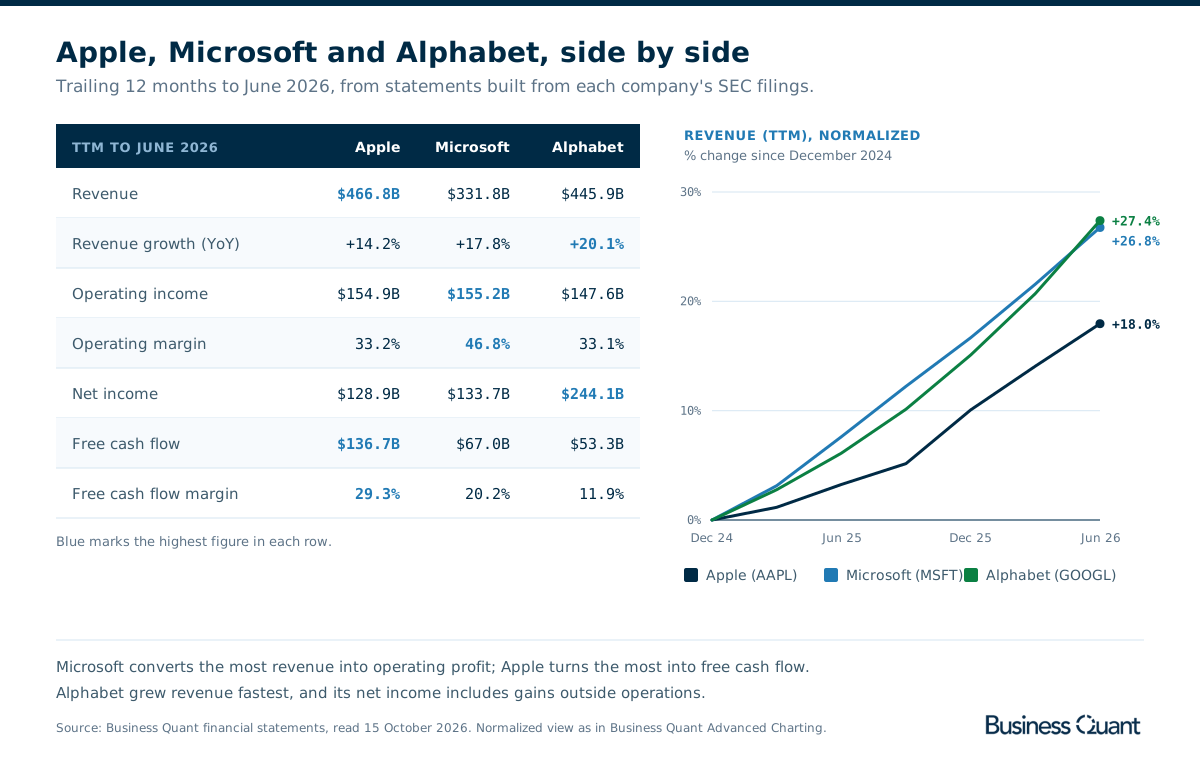
Apple, Microsoft and Alphabet show the problem. Over the 12 months to June 2026, Alphabet grew revenue fastest, by 20.1%. Microsoft kept 46.8% of its revenue as operating profit, the widest margin of the 3. Apple produced $136.7 billion of free cash flow, more than Microsoft and Alphabet combined. Each company leads on a different line, and a share price chart shows none of them.
Most comparison pages show a snapshot: one market cap, one P/E and one trailing revenue figure per company, as of today. That answers where the companies stand. Whether a business is getting better needs the same figures across several years.
Scale is the next trap. Plotting raw prices on one chart makes the most expensive share look like the best performer. A normalized or % change view starts every line at 0%, so the gap between them is the difference in return, and normalized revenue does the same for growth, whatever the size of the company.
How to choose a stock comparison tool
- Price or business. Whether it compares only share prices, or fundamentals too.
- Over time or a snapshot. A trend across years, or one row of today's numbers.
- A fair scale. A % change view, so a $50 stock and a $500 stock start level.
- The peer set. Whether it builds the group of related companies for you.
- Export. Whether the comparison can be downloaded to a spreadsheet.
To find the companies worth comparing in the first place, our stock screener comparison covers that step.
The 10 stock comparison tools at a glance
- Barchart
- Koyfin
- MarketBeat
- Seeking Alpha
- Stock Analysis
- Stock Unlock
- TIKR
- TradingView
- Yahoo Finance
- Business Quant
| Platform | Best for | Plans from |
|---|---|---|
| Barchart | Technicals and performance snapshots | $8.25/mo |
| Koyfin | Charting fundamentals in a terminal | $39/mo |
| MarketBeat | Ratings and dividends, up to 10 stocks | $20.75/mo |
| Seeking Alpha | Ratings and dividend grades | $299/yr |
| Stock Analysis | Total return and fundamentals on one chart | $6.58/mo |
| Stock Unlock | Fundamental charts on a budget | $7.50/mo |
| TIKR | Global peer tables | $17.95/mo |
| TradingView | Price and technical comparison | $12.95/mo |
| Yahoo Finance | A quick snapshot of up to 4 stocks | $7.95/mo |
| Business Quant | Prices and fundamentals on one chart, against industry peers, with export and API access | $29/mo |
Rows are alphabetical, Business Quant last. "Plans from" is the cheapest paid plan's lowest advertised monthly price on 15 October 2026; Seeking Alpha advertises an annual renewal only.
Stock comparison tools reviewed
Barchart
Barchart is a market data site for traders that covers futures and commodities as well as stocks. Its comparison page lays 5 stocks out like a quote board: prices, technical readings and short-term performance first, fundamentals in a few summary rows.

- Best for technical and performance snapshots.
- Runs signed out, 5 symbols at a time, with a download link.
- Technicals, including moving averages and Barchart Opinion.
- Performance over 5 days to 6 months, with highs and lows.
- Percent Change mode on its comparison chart.
- Plus from $8.25 a month, with a 30-day trial.
The table is long and dense: price information, then 20-day moving average, stochastic and relative strength, then 5-day to 6-month performance with highs and lows. Key statistics add market cap, annual sales and net income, the last quarter's sales and income, and a 60-month beta, and Select Fields lets you swap in other data.
Where it falls short: fundamentals are a single row each, from Zacks and Morningstar according to the page footer, so it answers which of 5 names is strongest this month better than how the businesses have changed. There is no peer group, segment or KPI data.
Koyfin
Koyfin is a terminal-style research platform whose Historical Graph is one of the most flexible comparison charts here. You add securities and metrics to the same chart, from price and moving averages to P/E and around 300 other fundamental series.

- Best for charting fundamentals across tickers in a terminal.
- $0 plan with advanced charting, 5 saved graphs and 2 years of financials.
- Plus from $39 a month, with 10 years of financials and 50 saved graphs.
- Graph transformations, including cumulative performance, YoY growth and drawdowns.
Koyfin suits an investor who wants to build a chart once and come back to it. Graphs save, transformations turn a price series into cumulative performance, year-on-year growth or drawdown, and the release notes describe a Comparison Graph for several securities side by side.
Where it falls short: 2 years of financials on the $0 plan is enough to compare this year with last year but not to see a cycle, so fundamental comparisons over time really start on Plus. It does not build the peer group for you, and we found no segment or KPI data, export or API.
MarketBeat
MarketBeat is a market news and ratings site whose comparison page covers the most stocks at once in this list: up to 10, side by side, without signing in.

- Best for analyst ratings and dividends across up to 10 stocks.
- Runs signed out, with comparison ideas by theme, such as banks or semiconductors.
- Performance chart from one day to 365 days, in %.
- Analyst consensus, price targets and recent rating changes.
- All Access from $20.75 a month, with a 30-day trial and Excel export.
The page runs through 11 sections: performance chart, price and volume, MarketRank, analyst ratings, sales and book value, profitability and earnings, dividends, debt, ownership, miscellaneous and headlines. The dividend section is the most useful, with annual payout, yield, 5-year annualised dividend growth, payout ratio and years of consecutive growth in one row per company.
Where it falls short: the financial rows are a snapshot of the latest figures and the performance chart stops at a year, so it shows how the companies look today rather than how they have changed. There is no segment or KPI data.
Seeking Alpha
Seeking Alpha is an investing community with a comparison tool that mixes fundamentals, price and its own ratings. Its preset comparisons, such as the Magnificent 7 or chip and semiconductor stocks, open fully populated.

- Best for comparing ratings and dividend grades.
- Preset comparisons by theme and sector.
- Chart metrics include price return, total revenue and revenue growth.
- Quant, analyst and Wall Street ratings rows.
- Premium renews at $299 a year, after $4.95 for the first month, with Excel download.
The chart is more capable than it first looks. Its metric picker goes beyond price return to total revenue, revenue growth, cash and debt to equity, so you can compare the businesses as well as the shares. The ratings rows are the reason most people come: Quant Rating, Seeking Alpha analysts and Wall Street analysts, plus valuation, growth and profitability grades.
Where it falls short: signed out, the ratings cells read "View Ratings" and the chart stops at 5 years, with the 10-year view padlocked. Premium is sold by the year only, and there is no segment or KPI data.
Stock Analysis
Stock Analysis is a fast, clean research site whose comparison tool charts total return by default and can switch the same chart to 78 other metrics.

- Best for total return and fundamentals on one chart.
- Total return chart, with dividends reinvested.
- 78 chart metrics, from revenue and margins to ROIC.
- Table views for performance, dividends, financials and technicals, with a download button.
- Pro from $6.58 a month, with longer history.
Total return is the right default, because comparing price alone ignores dividends. Switching the chart to revenue, free cash flow, operating margin or EV to EBITDA turns the same view into a fundamental comparison, and the average return table puts YTD, 1, 5 and 10-year returns in one row per stock.
Where it falls short: the ready-made comparisons are popular pairs, such as KO vs PEP or V vs MA, so finding the rest of an industry is up to you. There is no API.
Stock Unlock
Stock Unlock is a research platform founded in 2020 and backed by Y Combinator. Its comparison tool, called Free Form in the app, is a fundamentals charting tool first.

- Best for fundamental charts across companies on a budget.
- 80+ metrics, quarterly, yearly or trailing 12 months.
- "View as %" to normalize different-sized companies.
- CAGR, averages, highs and lows on every chart.
- Pro from $7.50 a month, with 10 years of history; Unlimited, with 35 years, from $20.
Stock Unlock charts the same metric for several companies and shows the growth rate for each line, across 170,000+ stocks worldwide. Its own statement and KPI pages sit behind the chart.
Where it falls short: the free account limits how far back the data goes and how much free-form graphing you can do, so the long view is a Pro feature. It does not build peer groups, and we found no comparison export or API.
TIKR
TIKR is a global fundamentals terminal for long-term investors. Its comparison lives in the Competitors tab on every company page, which builds the peer group for you.

- Best for global peer tables on standardized financials.
- Competitors tab, grouped by sector and market cap.
- Up to 20 years of standardized financials across peers.
- $0 plan for US stocks.
- Plus from $17.95 a month, with 100,000+ global stocks.
TIKR puts ROIC, EBITDA margins and free cash flow yields for a company and its closest peers in one table, and its standardized data lets you set a US company against a European or Asian rival on the same definitions. Comparing across borders is the strongest case for it.
Where it falls short: history depth is set by plan, rising to 20 years of financial charting on Pro at $37.95 a month, and the comparison is a table of fundamentals with no % change price chart. We found no KPI data, export or API.
TradingView
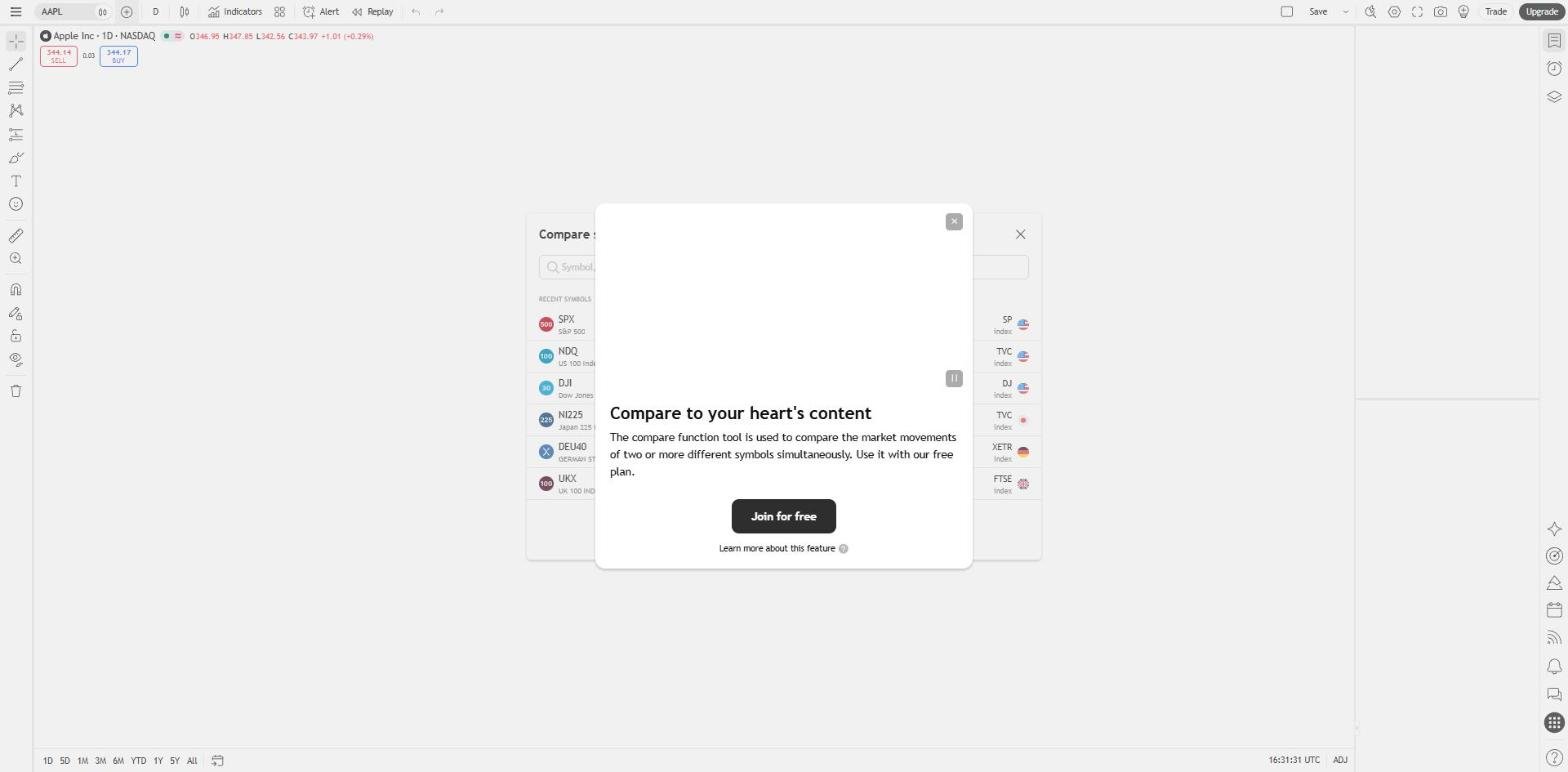
TradingView is the charting platform most traders already know. Its Compare tool overlays other symbols on a chart, and its support pages say you can add as many as you need.
- Best for price and technical comparisons.
- Unlimited compare symbols on one chart.
- 3 display modes: same % scale, new price scale or new pane.
- Essential from $12.95 a month; comparing needs a free account.
Same % scale is the mode to use: every line starts at 0% on the first visible bar and shows how far each has moved since, which answers "which grew more this year" at a glance. New price scale keeps real prices, and New pane gives each symbol its own section when lines overlap.
Where it falls short: the compare tool is about price behaviour, relative strength and timing, not the businesses, and it does not build peer groups. We found no company KPI data or self-serve API.
Yahoo Finance
Yahoo Finance's Compare Stocks page puts a stock next to up to 3 others, signed out, with a snapshot that runs from valuation to cash flow.

- Best for a quick snapshot of up to 4 stocks.
- Runs signed out, at no cost.
- Sections for statements, price ratios, margins, earnings, returns and ownership.
- Highlight Highs and Lows toggle across each row.
- Bronze from $7.95 a month.
For a quick read the snapshot is well built, with a toggle that highlights the best and worst in each row, and its trailing revenue and operating margins matched ours for Apple, Microsoft and Alphabet to the decimal. The interactive chart has a separate Comparisons button that switches the axis to percent.
Where it falls short: every row is a single date, so the snapshot tells you where 4 companies stand, not how they got there. There is no peer group, export, segment data or API.
Business Quant
Business Quant is ours. Comparison runs through several tools: Advanced Charting for several stocks on one chart, the Peers tab on every stock page, Time Series Tables and Industry Financials.
- Best for prices and fundamentals on one chart, against industry peers, with export and API access.
- Free to use, 5 years and 20 quarters, no card.
- Pro from $29 a month, full history, export and API access.
List of features
- Advanced Charting: several securities, prices and 100+ metrics, original, normalized, % from high or % from low
- Peers tab on every stock, against its whole industry group
- Time Series Tables: 1,000+ metrics, companies side by side by period
- Industry Financials for every company in an industry
- Financial statements in industry-specific layouts
- Segment financials
- KPI and operating data
- Analyst estimates
- Institutional ownership and insider trades
- 18 million+ SEC filings since 1993
- Stock screener with more than 700 metrics
- Economic data
- CSV and XLSX download
- API access
- MCP server
Advanced Charting is the closest thing here to a comparison workbench. You add securities and metrics, from share price to revenue, earnings, P/E and margins, then choose how to see them: as reported, normalized to % change so different-sized companies start level, or as % from a high or low. Line, bar and stacked bar charts are available, with one panel, a panel per metric or a panel per security, and the chart can be downloaded.
The Peers tab does the part most tools leave to you. Apple's peer comparison lists all 278 companies in its BQ-MICS Computer Hardware industry group, 129 of them with it as their primary business, on market cap, price, change, 1-year return, P/E, price to sales and enterprise value, with columns you can edit. Industry Financials does the same for a whole industry, such as 136 semiconductor companies on revenue, net income, P/E, net margin and dividend yield, and results arrive within 10 to 15 minutes of a company's release, so a comparison run the evening a company reports already includes the new quarter.
Stock comparison tools feature by feature
| Platform | Fundamentals over time |
% change view |
Peer groups built in |
Comparison export |
Segment financials |
Company KPIs |
API access |
MCP server |
Plans from |
|---|---|---|---|---|---|---|---|---|---|
| Business Quant | ✓ | ✓ | ✓ | ✓ | ✓ | ✓ | ✓ | ✓ | $29/mo |
| Stock Analysis | ✓ | ✓ | ✗ | ✓ | ✓ | ✓ | ✗ | ✗ | $6.58/mo |
| Seeking Alpha | ✓ | ✓ | ✓ | ✓ | ✗ | ✗ | ✗ | ✗ | $299/yr |
| Stock Unlock | ✓ | ✓ | ✗ | ✗ | ✓ | ✓ | ✗ | ✗ | $7.50/mo |
| TradingView | ✗ | ✓ | ✗ | ✓ | ✓ | ✗ | ✗ | ✓ | $12.95/mo |
| MarketBeat | ✗ | ✓ | ✓ | ✓ | ✗ | ✗ | ✗ | ✗ | $20.75/mo |
| TIKR | ✓ | ✗ | ✓ | ✗ | ✓ | ✗ | ✗ | ✗ | $17.95/mo |
| Barchart | ✗ | ✓ | ✗ | ✓ | ✗ | ✗ | ✗ | ✗ | $8.25/mo |
| Koyfin | ✓ | ✓ | ✗ | ✗ | ✗ | ✗ | ✗ | ✗ | $39/mo |
| Yahoo Finance | ✗ | ✓ | ✗ | ✗ | ✗ | ✗ | ✗ | ✗ | $7.95/mo |
Sorted by ticks, ties broken alphabetically. A tick means the platform's own pricing, product, comparison or help pages document the feature on a self-serve plan, or its comparison view showed it when we tested it; a cross means we found no such documentation. "Fundamentals over time" means a financial metric for several stocks across past periods, in a chart or a table. "% change view" means a chart that starts each stock at 0% or plots percent return. "Peer groups built in" means a ready-made set of 3 or more related companies opens without typing tickers. "Comparison export" means downloading the comparison or its data to a file. "Segment financials" means revenue by segment, product or geography over several years, and "Company KPIs" means operating metrics such as subscribers or deliveries, anywhere on the platform. "API access" and "MCP server" mean a self-serve API and an AI-assistant connector.
Business Quant is the only tool here that ticks every column. Stock Analysis comes next with 5, for fundamentals over time, a download button, and segment and KPI data. Seeking Alpha, Stock Unlock and TradingView follow with 4 each, for different reasons: Seeking Alpha builds the peer group, Stock Unlock adds segment and KPI data to its fundamental charts, and TradingView adds an MCP server to its price charts. Barchart and Yahoo Finance are built around price and today's numbers, and do that well. A cross shows what a product was built for, not how good it is.
What about Stock Rover and Finviz?
Both come up often in this category and neither made the list. Stock Rover's comparison table and tiled views are on its paid plans only, from $24 a month on 2-year billing, so it fails the test of being usable at no cost. Finviz is a screener and market map, without a page that compares named stocks side by side.
Which stock comparison tool is right for you?
- You trade and want technicals for 5 names in one table: Barchart.
- You want to build and save fundamental charts in a terminal: Koyfin.
- You compare dividends and analyst ratings across up to 10 stocks: MarketBeat.
- You want quant ratings and ready-made themes: Seeking Alpha.
- You want total return and 78 chart metrics at no cost: Stock Analysis.
- You want fundamental charts with growth rates on a budget: Stock Unlock.
- You compare companies across countries: TIKR.
- You care about price action and relative strength: TradingView.
- You want a quick snapshot of a few stocks: Yahoo Finance.
- You want prices and fundamentals over time against the whole industry, with export and an API: Business Quant.
Our stock analysis websites guide covers reading one company in depth, and comparing funds is covered in our ETF comparison tools guide.
Where I would compare first
If your question is which share went up more this year, any tool with a % change chart will answer it. For comparing stocks as businesses, I would start with Business Quant Advanced Charting and the Peers tab.
The harder question is which company is getting better, and that needs fundamentals across time, on a fair scale, against the right peers. Business Quant puts all 3 in one place: prices and fundamentals on one chart, normalized so a smaller company is not drowned out, and a Peers tab that lays a company against its whole industry group without you typing a ticker.
The Apple, Microsoft and Alphabet example shows what that buys. On a price chart they are 3 lines. Side by side on the numbers, one is growing fastest, one has by far the widest margin, and one generates more free cash flow than the other 2 combined. Business Quant is free to use with 5 years of data and no card, and Pro, with full history, export and API access, is from $29 a month.
A 5-minute test: pick 2 companies you think of as close rivals. Compare their share price over 5 years, then their revenue and operating margin over the same 5 years, normalized. If the 2 charts tell the same story, the market has priced the business. If they do not, you have found the question worth researching.
How this comparison was made
To make the list, a tool had to put 2 or more named stocks side by side, on price performance or financial metrics, in one chart or table, and be usable by an individual at no cost, signed out or with a free account, with any paid plan priced on the vendor's own site. Broker-only tools and sales-led terminals were not included. 10 tools met that bar.
Every price, limit and feature was read on the vendor's own pricing, product, comparison or help pages on 15 October 2026 and screenshotted there; export and the MarketBeat dividend rows were checked again on 16 October. Prices are each platform's lowest advertised monthly price in US dollars on 15 October 2026; Seeking Alpha advertises only an annual renewal. The figures in our illustration were read from our own data on 15 October.
The list, the summary table and the reviews run alphabetically, with Business Quant last, and the feature table is sorted by the number of ticks, with ties broken alphabetically. We make Business Quant, one of the 10 products compared here. For the same market from other angles, our stock research tools comparison looks at where each platform's data comes from.
Image credits. Header photograph by Maxim Hopman on Unsplash, used under the Unsplash License. Vendor screenshots were captured on 15 October 2026 from each provider's own comparison, pricing or chart pages and are reproduced for comparison. The Apple, Microsoft and Alphabet illustration is our own, built from our financial data.
Frequently asked questions
Is there a free stock comparison tool?
Yes, and most of the good ones cost nothing to start. Business Quant is free to use with no card: Advanced Charting puts several stocks on one chart, prices and fundamentals together, and every stock page has a Peers tab that compares the company with its industry. Yahoo Finance, Barchart, MarketBeat and Seeking Alpha show a comparison without an account, while Stock Analysis, Koyfin, Stock Unlock, TIKR and TradingView work with a free account. Paid plans mostly add longer history and exports.
What is the best tool to analyze stocks?
The one that lets you check a company against its peers, not just read its own numbers. Business Quant shows each US-listed company's statements, segment revenue and KPIs, then compares it with every company in its industry on the Peers tab and in Industry Financials, updated within 10 to 15 minutes of a release. Koyfin and TIKR are strong on global data, and Seeking Alpha adds ratings and written analysis.
What is the best tool for analyzing stock charts?
For price action and technical indicators, TradingView is the standard, and its Compare tool overlays as many symbols as you need on a shared percentage scale. For charts of the business itself, such as revenue, margins or free cash flow across several companies, Business Quant Advanced Charting, Koyfin, Stock Analysis and Stock Unlock all plot fundamentals over time.
How do I compare two stocks on the same chart?
Add both tickers to one chart and switch to a percentage or normalized view, so each line starts at 0% and the gap shows which performed better. In Business Quant Advanced Charting, choose the securities, pick a metric such as price or revenue, and set the data format to Normalized (% change). Yahoo Finance, TradingView, Barchart and Stock Analysis do the same for price.
How many stocks can I compare at once?
It depends on the tool. MarketBeat compares up to 10 stocks, Barchart's comparison page has 5 symbol slots, and Yahoo Finance compares a stock with up to 3 others. TradingView says you can add as many symbols as you need. Business Quant puts several securities on one Advanced Charting chart, and its Peers tab compares a company with every company in its industry group at once, 278 of them in Apple's case.
Should I compare stocks on price or on fundamentals?
Both, because they answer different questions. Price performance tells you what the market has paid for; fundamentals tell you what each business has delivered. Over the 12 months to June 2026, Alphabet grew revenue 20.1% and Apple 14.2%, yet Apple produced $136.7 billion of free cash flow against Alphabet's $53.3 billion. A price chart alone shows neither.