9 Best Stock Screeners for 2027
9 stock screeners compared on filters, free limits, export and price, from Finviz and Yahoo Finance to Koyfin, Stock Rover and Business Quant.

Below are 9 stock screeners for individual investors: Finviz, Koyfin, Seeking Alpha, Stock Analysis, Stock Rover, TIKR, WallStreetZen, Yahoo Finance and Business Quant. For each one you will find what it is best for, how many filters it carries, what the free version includes, and what the first paid plan adds.
How to choose a stock screener
Five things decide whether a screener is worth your time.
- Filter depth. Whether it has the metric you screen on, at the period you need.
- Your own thresholds. Typed values rather than preset bands.
- The free version. Whether you can run, keep and export a screen without paying.
- Data source and freshness. Where the fundamentals come from and how quickly they update.
- What happens after the screen. How easily you can check each match.
Filter counts are the least comparable number in this market. Finviz's free screener shows 90 filters, mostly dropdowns of preset bands such as a P/E under 15. Koyfin describes 5,900+ criteria with a minimum and maximum box on each. Business Quant's 818 metrics include each statement line in annual, quarterly and trailing twelve month form, which is exactly what you need when a screen has to look at the last 4 quarters rather than the last fiscal year. Read a count as a question: does the list have your metric, at your period, with a threshold you choose?
Data source matters more than most people realise. Koyfin's help page says its data vendor, Capital IQ, restricts equity financials, valuation, estimates and growth rates from being downloaded, so you can filter on a fundamental and still be unable to export it. Stock Rover's FAQ notes that trial members cannot export tables because of a licensing restriction. Screeners built on data a vendor licenses from someone else often behave this way; our research tools comparison explains why.
Finally, the free line. Running a screen is the thing most vendors give away. Keeping a screen and exporting the results are what they usually charge for, and a few, such as Seeking Alpha and Stock Rover, put the screener itself behind a subscription.
The 9 stock screeners at a glance
- Finviz
- Koyfin
- Seeking Alpha
- Stock Analysis
- Stock Rover
- TIKR
- WallStreetZen
- Yahoo Finance
- Business Quant
| Platform | Best for | Screener filters |
Plans from |
|---|---|---|---|
| Finviz | Fast free screening and visual scans | 90 | $24.96/mo |
| Koyfin | Global screening inside a terminal | 5,900+ | $39/mo |
| Seeking Alpha | Screening by Quant Rating | Not published | $299/yr |
| Stock Analysis | Cheapest paid screener with export | 326 | $6.58/mo |
| Stock Rover | Formula and historical screening | 300+ | $29/mo |
| TIKR | Global fundamentals screening | Not published | $17.95/mo |
| WallStreetZen | Beginner-friendly screening by grade | Not published | $19.50/mo |
| Yahoo Finance | Quick screens in any region | 100+ | $7.95/mo |
| Business Quant | Fundamental screening on filing data | 818 | $29/mo |
Scroll the table sideways for every column. Rows run alphabetically, with Business Quant placed last. Filter counts are the figure each vendor publishes or shows on its own screener, and they count different things. "Plans from" is the cheapest paid plan at its lowest advertised monthly price; Seeking Alpha advertises an annual renewal only.
Stock screeners reviewed
Finviz
The screener people paste into forum threads. It loads fast, a screen lives in its URL so it can be shared, and it can show every match as a chart rather than a row. Finviz began as a visual map of the US market, and the screener grew around that idea.

- Best for fast free screening and visual scans.
- $0 registered account, with delayed quotes.
- Elite from $24.96 a month.
- 90 filters on the free screener's All tab.
- 50 saved presets free, unlimited on Elite.
- Export to Excel and CSV on Elite only.
- NYSE, NASDAQ and AMEX listings.
Finviz is the most generous free screener for keeping screens: 50 saved presets is more than most people will build. On the free tier most filters are preset bands rather than typed values, and statements stop at 3 years on the free account and 8 on Elite.
Fundamentals are recalculated every hour, which suits a screener used to find candidates rather than to time a trade. The Elite trial asks for a card before it starts.
Koyfin
A terminal-style research platform with a screener inside it. Koyfin's appeal is the interface: dashboards, charting and watchlists that feel built by people who have used a professional terminal, with the screener feeding results into the same tables.

- Best for global screening inside a research terminal.
- $0 plan with 2 saved screens and 2 years of financials.
- Plus from $39 a month.
- Unlimited screens and an ETF screener on Plus.
- 5,900+ filter criteria, each with min and max inputs.
- 100K+ global securities.
- CSV download of results, fundamentals excluded.
Koyfin has the most criteria and the widest coverage here, and its free plan genuinely screens. The catch is on its own help page: because its equity data comes from Capital IQ, financials, valuation, estimates and growth rates cannot be downloaded, so a screen built on those fields stays on screen.
For investors who want to look rather than export, that matters little, and the terminal around the screener is excellent.
Seeking Alpha
A research and opinion community first, with screeners as one of the tools that come with a subscription. The screener is how you search Seeking Alpha's Quant Ratings, which grade stocks from Strong Buy to Strong Sell.
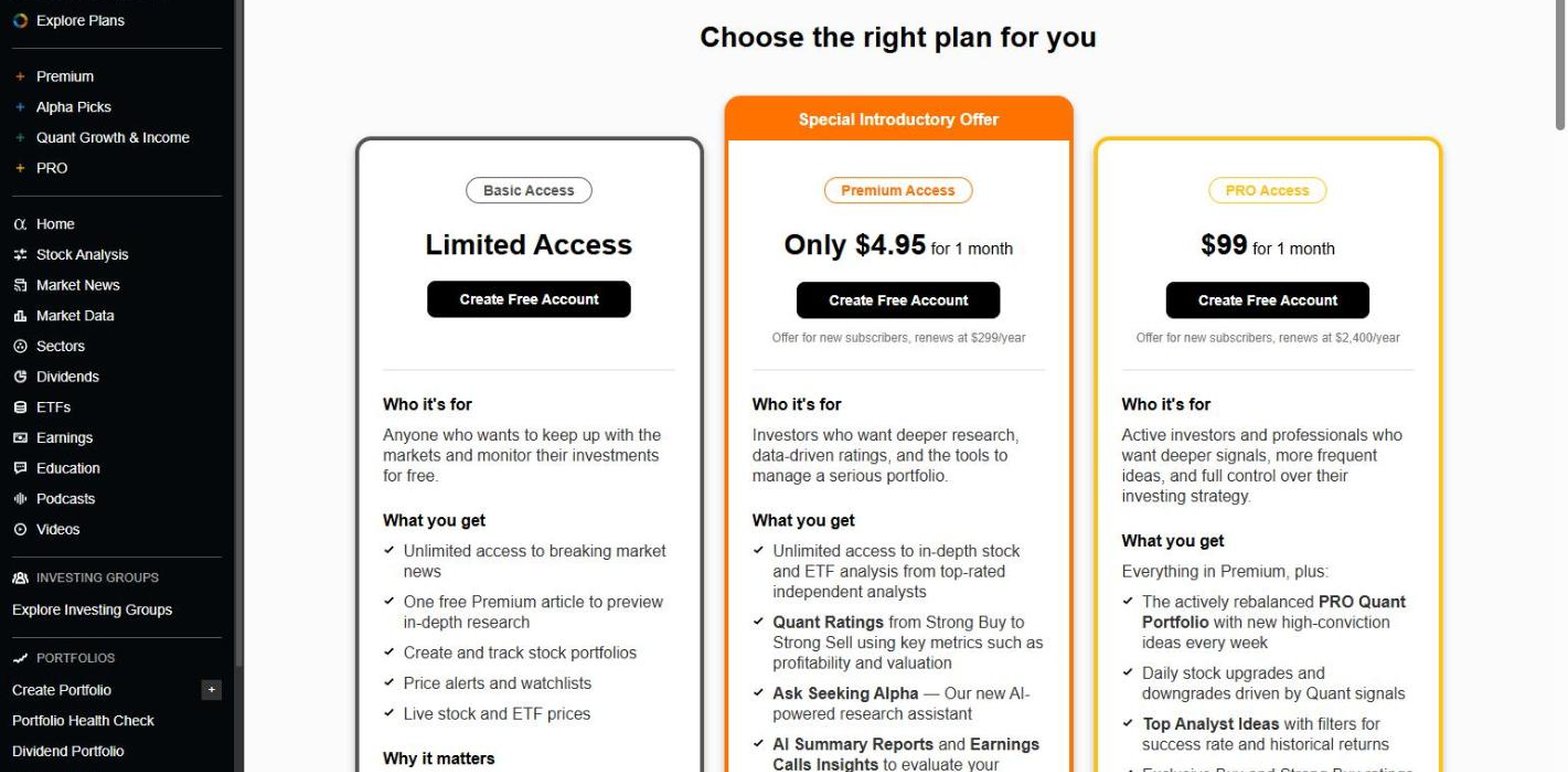
- Best for screening by Quant Rating.
- Basic account at $0, with news, portfolios and alerts.
- Premium renews at $299 a year, after $4.95 for the first month.
- Stock and ETF screeners on Premium.
- Quant Ratings from Strong Buy to Strong Sell.
There is no screener at $0, and the plan that carries one is priced as a research subscription rather than a screening tool. It makes sense if you also want the ratings and articles.
Stock Analysis
The cheapest route from a free screener to a paid one that saves and exports. Stock Analysis runs a deep screener at no cost, then sells the convenience features at a low price.

- Best for a low-cost screener with export.
- 326 filters, around 20 of them Pro only.
- Pro from $6.58 a month.
- Saving screeners starts at Pro.
- One download a day on Pro, unlimited on Unlimited.
- 130,000+ global stocks and funds on Pro.
The Pro-only filters are the specialist ones: 10-year growth rates, Sharpe and Sortino ratios, Graham and Lynch value estimates and the top-analyst fields. Everything a typical value or growth screen needs is open.
At $0 you cannot keep the screen or take the list; $6.58 a month buys both, with a 60-day money-back guarantee.
Stock Rover
Built for investors who treat screening as the main event. Stock Rover's plan cards spell out how many screens, rows and metrics each step up buys.

- Best for formula-based and historical screening.
- Premium from $29 a month.
- 300+ screening metrics, 5-year fundamentals.
- 15 screeners and 250 rows on Premium.
- Data export on every paid plan.
- Premium Plus $49, with equation-based and historical screening.
- Ultimate $79, with 800+ metrics and OTC screening.
Equation-based and historical screening on Premium Plus set Stock Rover apart: writing a condition as a formula, or asking what a screen would have returned in the past, is rare at any price.
There is no screener at $0, and a trial cannot export, so the first full test of the product is a paid month.
TIKR
A global fundamentals platform for long-term investors, with a screener whose limits are counted in saved screens.
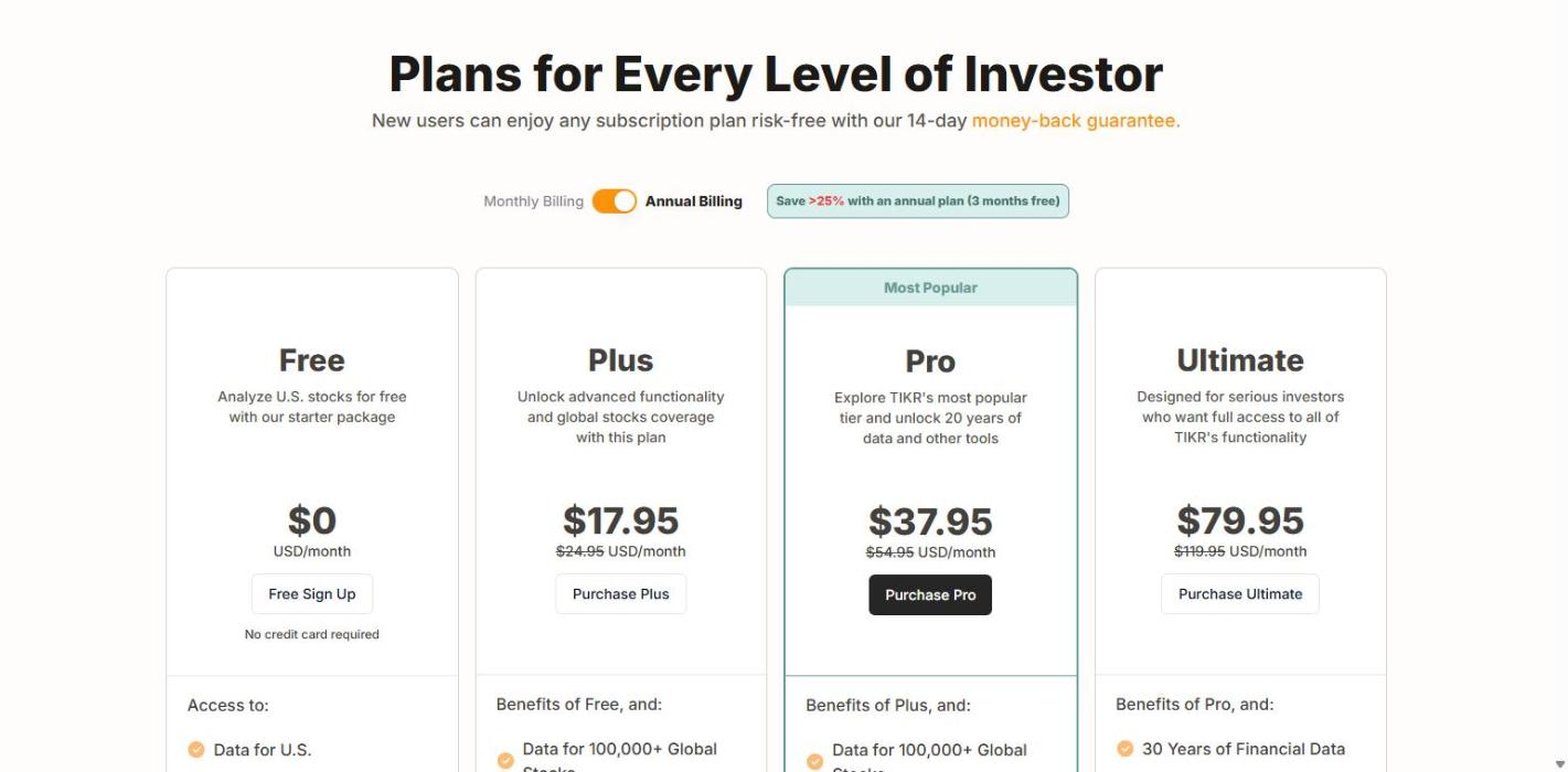
- Best for screening global fundamentals.
- $0 plan, US data and one saved screen.
- Plus from $17.95 a month.
- 5 saved screens and 100,000+ global stocks on Plus.
- 136 exchanges across 92 countries.
- Ultimate $79.95, adding 50+ exclusive screening factors.
The global reach on Plus is the main reason to pay. The saved-screen ladder runs from one to 5 to unlimited on Ultimate.
The pricing page does not mention exporting a screen, so check before you subscribe if the list has to leave the site.
WallStreetZen
A screener organised around a rating. WallStreetZen runs its Zen Ratings model, 115 factors condensed into a letter grade, and its screener tabs follow the same logic: Value, Growth, Financials, Momentum, Sentiment, Forecast, Dividends and Due Diligence.

- Best for beginners who want guided screens.
- Basic account at $0, and the screener runs signed out.
- Premium from $19.50 a month.
- A $1 trial for 14 days, with a 90-day money-back guarantee.
- Advanced screener and export on Premium.
- 5,300+ US stocks.
The tab layout teaches you what a balanced screen looks like, which suits investors early in the habit. The Zen Rating column shows "Unlock" until you pay, so the free screen is a plain fundamental filter.
No filter count is published on the pages read.
Yahoo Finance
The easiest screener to start with: no account, 50 regions of coverage, and a filter panel organised like a set of financial statements.

- Best for quick screens in any region.
- Runs signed out, no account needed.
- Just over 100 filters in 9 groups, statements included.
- Coverage spanning 50 regions.
- Bronze from $7.95 a month.
- Gold from $39.95 a month, with CSV download.
For a first screen on a non-US market, nothing here is easier: pick a region and filter. The filter list is broad rather than deep, with income statement, balance sheet and cash flow groups of 8 to 19 filters each.
Export sits on the top plan, so taking a Yahoo screen into a spreadsheet costs $39.95 a month rather than $7.95.
Business Quant
A fundamentals screener built on financial statements that Business Quant extracts in house from SEC filings, so the numbers you filter on are the numbers in the filing. The stock screener runs with no account at all.
- Best for fundamental screening on filing-based data.
- 818 screenable metrics, every one with a threshold you type.
- Runs with no account. A free account adds column choice.
- Annual, quarterly and TTM versions of each statement line.
- Industry filter by BQ-MICS.
- Results updated within 10 to 15 minutes of release.
- CSV download on Pro, from $29 a month.
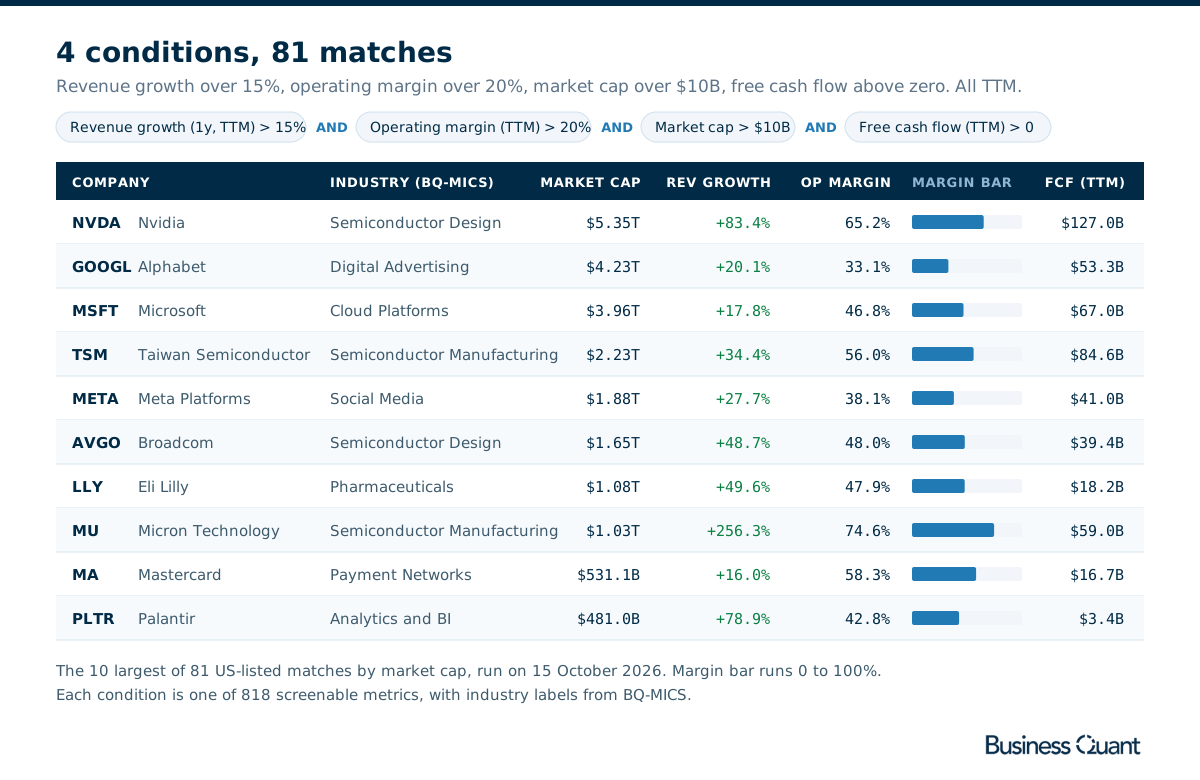
The 818 metrics cover the income statement, balance sheet and cash flow statement line by line, in annual, quarterly and trailing twelve month form, plus 1-year and 3-year growth rates, margins and valuation ratios. The screen in the figure, growth above 15%, margins above 20% and positive free cash flow, uses trailing figures and returns 81 companies; switch the growth condition to a 3-year rate and the list changes in a way that tells you something.
Each match opens onto the rest of the platform: financial statements in industry-specific layouts, revenue by segment and geography on the revenue breakdown tab, KPIs and operating metrics, analyst estimates, and SEC filings, institutional ownership and insider trading on their own tabs. Time series tables and advanced charting show any metric over time across your matches, and the ETF and mutual fund screener does the same job for 32,727 fund share classes on 102 metrics.
Because the statements are built from the filings and refreshed within 10 to 15 minutes of a company's results, a screen run the evening a company reports already includes the new quarter.
Stock screener features compared
| Platform | Screener at $0 |
300+ filters at $0 |
Export on entry plan |
Plans from |
|---|---|---|---|---|
| Business Quant | ✓ | ✓ | ✓ | $29/mo |
| Stock Analysis | ✓ | ✓ | ✓ | $6.58/mo |
| Finviz | ✓ | ✗ | ✓ | $24.96/mo |
| Koyfin | ✓ | ✓ | ✗ | $39/mo |
| WallStreetZen | ✓ | ✗ | ✓ | $19.50/mo |
| Stock Rover | ✗ | ✗ | ✓ | $29/mo |
| TIKR | ✓ | ✗ | ✗ | $17.95/mo |
| Yahoo Finance | ✓ | ✗ | ✗ | $7.95/mo |
| Seeking Alpha | ✗ | ✗ | ✗ | $299/yr |
Sorted by number of ticks, ties broken alphabetically. A tick means the feature is documented in the platform's own published material at the tier the column names; a cross means it is not documented there or sits on a higher tier. "300+ filters at $0" counts filters open without paying. "Export on entry plan" means the cheapest paid plan exports screen results with their fundamental values; Koyfin's cross reflects its own stated restriction on exporting financials.
Stock Rover and Seeking Alpha sit low because both put the screener behind a subscription, not because their screeners are weak: Stock Rover's paid formula and historical screening is among the most capable here.
Screening on Business Quant
Here is what the Business Quant screener gives you, and how much of it needs no account.
| What you want | What you get |
|---|---|
| To screen before creating an account | The stock screener runs signed out |
| A filter on the exact statement line | 818 metrics across income, balance sheet and cash flow |
| Annual, quarterly or trailing figures | Each line in all 3 periods |
| Growth over more than one year | 1-year and 3-year growth rates |
| Peers that share a business, not just a label | Industry filter by BQ-MICS |
| The latest quarter on results night | Results updated within 10 to 15 minutes of release |
| Numbers taken from the filings | Statements built in house from SEC filings |
| Your own columns in the results | Column choice with a free account |
| The list in a spreadsheet | CSV download on Pro |
| A metric's history across your matches | Time series tables and advanced charting |
| To check a match | Statements, revenue breakdown, KPIs, ownership and SEC filings per stock |
| To screen ETFs and mutual funds | The fund screener, 32,727 share classes on 102 metrics |
If you would rather run screens from code, our screener API comparison covers that side, and our financial statements API comparison covers where the underlying numbers come from. For what each statement line means before you filter on it, start with the financial statements guides.
Where I would run my first screen
For a fundamental screen, I would run it first on the Business Quant stock screener.
Most of what you want from a screener is decided before you pay: whether you can use real fundamentals, whether the filter takes your threshold, and whether you can check the answer. Business Quant puts all 818 of its metrics in front of you with no account and no card, lets you set the number on every condition, and opens each match onto the statements, segments and filings the screen was built from.
The statements are built in house from SEC filings, so the figure you filter on is the figure in the filing. Results update within 10 to 15 minutes of release, so a screen run the evening a company reports already includes it. And every statement line exists in annual, quarterly and trailing form, so a screen can ask about the last 4 quarters as easily as the last fiscal year. When you want the list in a spreadsheet, Pro adds CSV download from $29 a month.
A 10-minute test: write down a real screen, for example revenue growth above 15%, operating margin above 20% and positive free cash flow. Run it on 2 or 3 free screeners and note how many companies each returns. Then open the same 3 matches on each and check one number against the company's latest filing. The count tells you how each tool defines the metric; the check tells you which one you can trust.
How this comparison was made
To make the list, a screener had to filter listed stocks on fundamental metrics with conditions you set, and be available to an individual at no cost or at a price published on the vendor's own site, without a sales call or a brokerage account. Technical-only scanners and broker-only screeners were not included.
Every price, plan limit, filter count and coverage figure was read on the vendor's own pricing, plan, screener or help pages on 15 October 2026 and screenshotted there. Where a vendor does not state something on those pages, the table says "Not published". Prices are each platform's lowest advertised monthly price on that date; Seeking Alpha advertises only an annual renewal. The Business Quant screen in the illustration was run live on the same day.
The reviews and summary table are alphabetical, with Business Quant placed last; the feature table is sorted by number of ticks, with ties broken alphabetically. Business Quant, which publishes this article, makes one of the 9 products compared here. I write for Business Quant.
Image credits. Header photograph by Veli Yunus Ünal on Unsplash, used under the Unsplash License. Vendor screenshots were captured on 15 October 2026 from each provider's own pricing, plan or screener pages and are reproduced for comparison. Diagrams are Business Quant originals.
Frequently asked questions
What is the best free stock screener?
For fundamental screening, the Business Quant screener is free to use with no account: you can run conditions across all 818 of its metrics before signing up for anything, and a free account adds column choice. Finviz is the fastest free screener, with 90 filters and 50 saved presets on a registered account. Yahoo Finance and WallStreetZen also run signed out, and Stock Analysis runs 326 filters at no cost.
Which stock screener is best for fundamental analysis?
The one that carries the statement lines and growth periods you actually screen on. Business Quant screens 818 fundamental metrics built in house from SEC filings, updated within 10 to 15 minutes of a company's results, and every match opens onto its statements, revenue breakdown, ownership and filings. Koyfin advertises the most criteria, Stock Rover adds formula and historical screening on its higher plans, and Stock Analysis is the cheapest paid route to a large fundamental filter set with export.
Which stock screener lets you export the results?
Almost none at $0, so the useful question is how cheap the first plan that exports is. Stock Analysis Pro, from $6.58 a month, allows one download a day. WallStreetZen Premium at $19.50 a month includes screener export, Finviz Elite at $24.96 a month exports to Excel and CSV, Stock Rover Premium at $29 includes data export, and Business Quant includes CSV download on Pro from $29 a month. Koyfin lets you download a screen, but its own help page says equity financials, valuation, estimates and growth rates cannot be exported because of its data vendor's restriction.
How many filters does a stock screener need?
Fewer than the marketing suggests, but they have to be the right ones and take your own thresholds. Finviz runs 90 filters on its free screener, mostly as dropdowns of preset ranges. Koyfin advertises 5,900+ criteria with minimum and maximum inputs, and Business Quant carries 818 fundamental metrics, with each statement line available in annual, quarterly and trailing twelve month form. A higher count matters when the metric you care about, such as a cash flow line or a 3-year growth rate, is missing from a shorter list.
Can I save a stock screen without paying?
On some screeners. Finviz keeps up to 50 saved presets on a registered free account, Koyfin keeps 2 screens on its free plan, TIKR keeps one, and Yahoo Finance shows a Save button on its screener. Stock Analysis reserves saved screeners for its Pro plan, and Seeking Alpha and Stock Rover put the screener itself behind a paid plan.
Do stock screeners cover ETFs and mutual funds?
Some do. Business Quant has a separate ETF and mutual fund screener covering 32,727 share classes on 102 metrics, free to use. Koyfin adds an ETF screener on its Plus plan, Seeking Alpha lists stock and ETF screeners on Premium, and Stock Rover covers 7,000+ ETFs and 40,000+ funds.