9 Best ETF Screeners for 2027
Every ETF screener filters on expense ratio and past returns. Which one lets you screen on what a fund owns, what it risks and what money is doing with it?


An ETF screener filters several thousand exchange-traded funds down to the ones that meet your conditions, such as a low expense ratio, a minimum size or a market you want to own. Screeners differ in which fund data they let you filter on, whether mutual funds sit in the same table, and what they charge to save or export a screen.
Below are 9 ETF screeners for individual investors. We compare them on what runs at no cost, fund flow data, risk-adjusted return filters, mutual fund coverage, export, API access and price.
Why the same ETF can look different from screener to screener
Many of the largest ETFs are one share class of a bigger fund. VTI is the ETF class of Vanguard's Total Stock Market Index Fund, which also sells as VTSAX, VITSX and 4 more mutual fund classes, and all 7 hold the same 3,477 positions. A screener that lists ETFs alone shows VTI with about $704 billion in assets; one that reads the whole fund shows $2.30 trillion. Both figures are right, but they describe different things, and only a screener that holds both ETFs and mutual funds will show you a cheaper class of the same portfolio.
Flows are the second thing a price-led screener misses. Among the 34 US equity ETFs with a net expense ratio of 0.05% or less and at least $10 billion in assets on 15 October 2026, the SPDR Portfolio S&P 500 ETF (SPYM) took in net flows equal to 38.8% of its assets over 12 months, while Vanguard's 500 Index Fund, the portfolio behind VOO, saw net outflows of 5.8%. Both track the S&P 500, at fees of 0.02% and 0.03%. A flows filter shows that kind of shift before it reaches the asset rankings.
How to choose an ETF screener
- Fund-level filters. Expense ratio, assets, flows and holdings, not just price and volume.
- Exposure. Sector, country and concentration, read from the fund's actual portfolio.
- Risk measures. Volatility, drawdown and risk-adjusted return over more than one window.
- The universe. ETFs alone, or mutual funds and their share classes in the same table.
- The free line. Whether you can run, save and export a screen without paying.
Once the screen is done, our ETF comparison tools guide covers putting a handful of funds side by side.
The 9 ETF screeners at a glance
- ETF Database
- etf.com
- Finviz
- Koyfin
- Morningstar
- Stock Analysis
- TradingView
- Yahoo Finance
- Business Quant
| Platform | Best for | Plans from |
|---|---|---|
| ETF Database | Fund flows and ETF categories | $19/mo |
| etf.com | Fund ratings such as closure risk | $0 |
| Finviz | Fast ETF scans next to stocks | $24.96/mo |
| Koyfin | ETF screening inside a research terminal | $39/mo |
| Morningstar | Screening with Morningstar ratings | $20.75/mo |
| Stock Analysis | Risk-adjusted returns at no cost | $6.58/mo |
| TradingView | ETFs in many countries, with flows | $12.95/mo |
| Yahoo Finance | Quick screens by Morningstar category | $7.95/mo |
| Business Quant | ETFs and mutual funds in one screen, on costs, flows and risk, with export and API access | $29/mo |
Rows are alphabetical, Business Quant last. "Plans from" is the cheapest paid plan's lowest advertised monthly price on 15 October 2026; etf.com's screener costs nothing to use.
ETF screeners reviewed
ETF Database
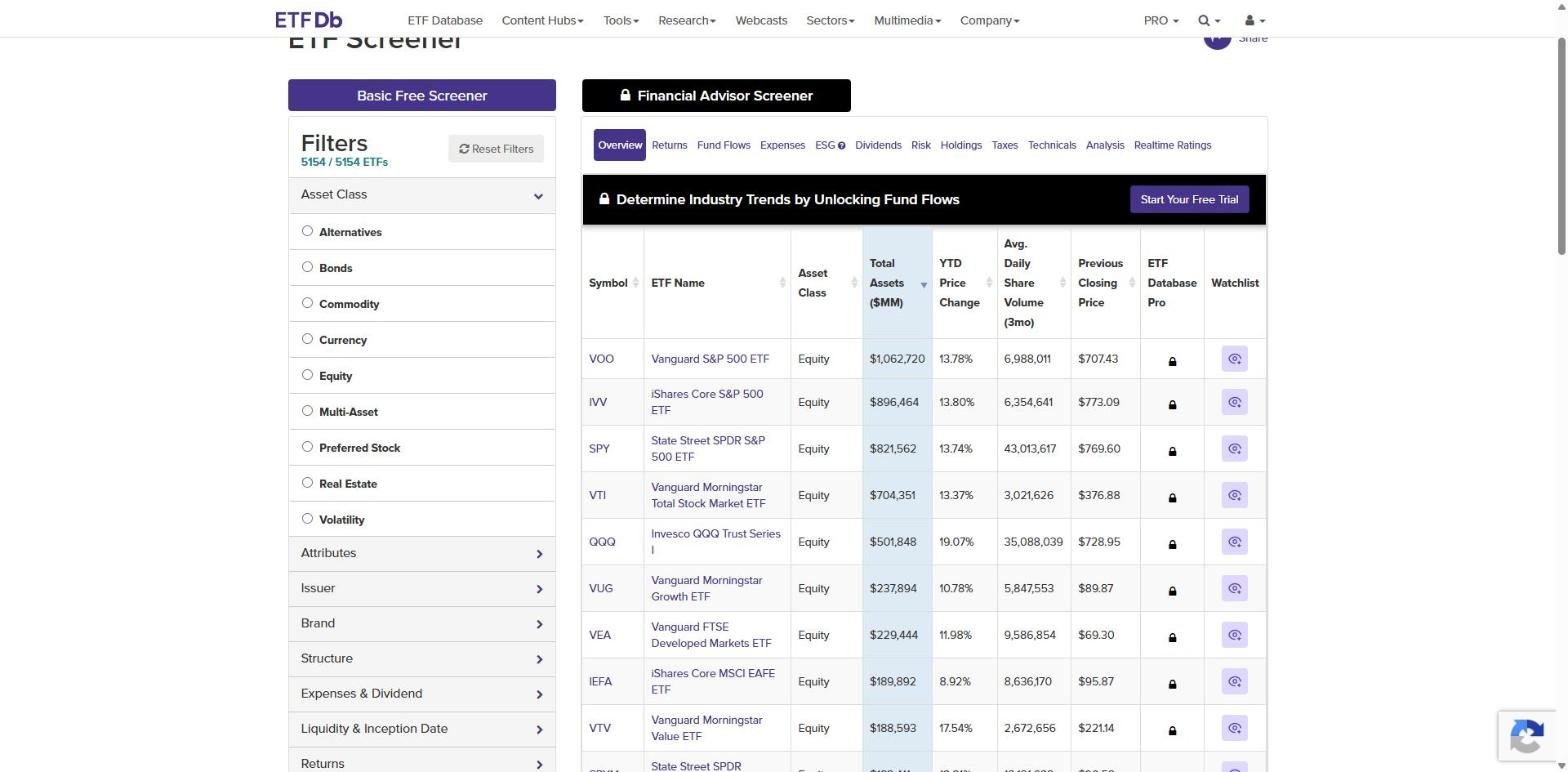
ETF Database is one of the longest-running ETF research sites, with a screener built around the way ETFs are categorised and traded in the US. Its free screener is generous with filters and keeps some result columns and the export for subscribers.
- Best for fund flows and ETF categories.
- Basic screener at $0, 5,154 US-listed ETFs.
- Fund flow filters from 1 week to 3 years.
- Filter groups for expenses and dividends, risk, holdings, ESG and themes.
- Pro from $19 a month, or $199 a year, with CSV export after the 14-day trial.
The fund flow filters are the standout: sliders for 1-week, 4-week, year-to-date, 1-year and 3-year flows sit in the free screener, which is rare. The results tabs cover returns, expenses, dividends, risk, holdings, taxes and technicals, and ETF Database grades every fund with its own Realtime Ratings.
Where it falls short: coverage is US-listed ETFs only, by its own statement, and the Financial Advisor Screener stays locked. We found no Sharpe or Sortino filter, and putting the list into a spreadsheet needs Pro.
etf.com
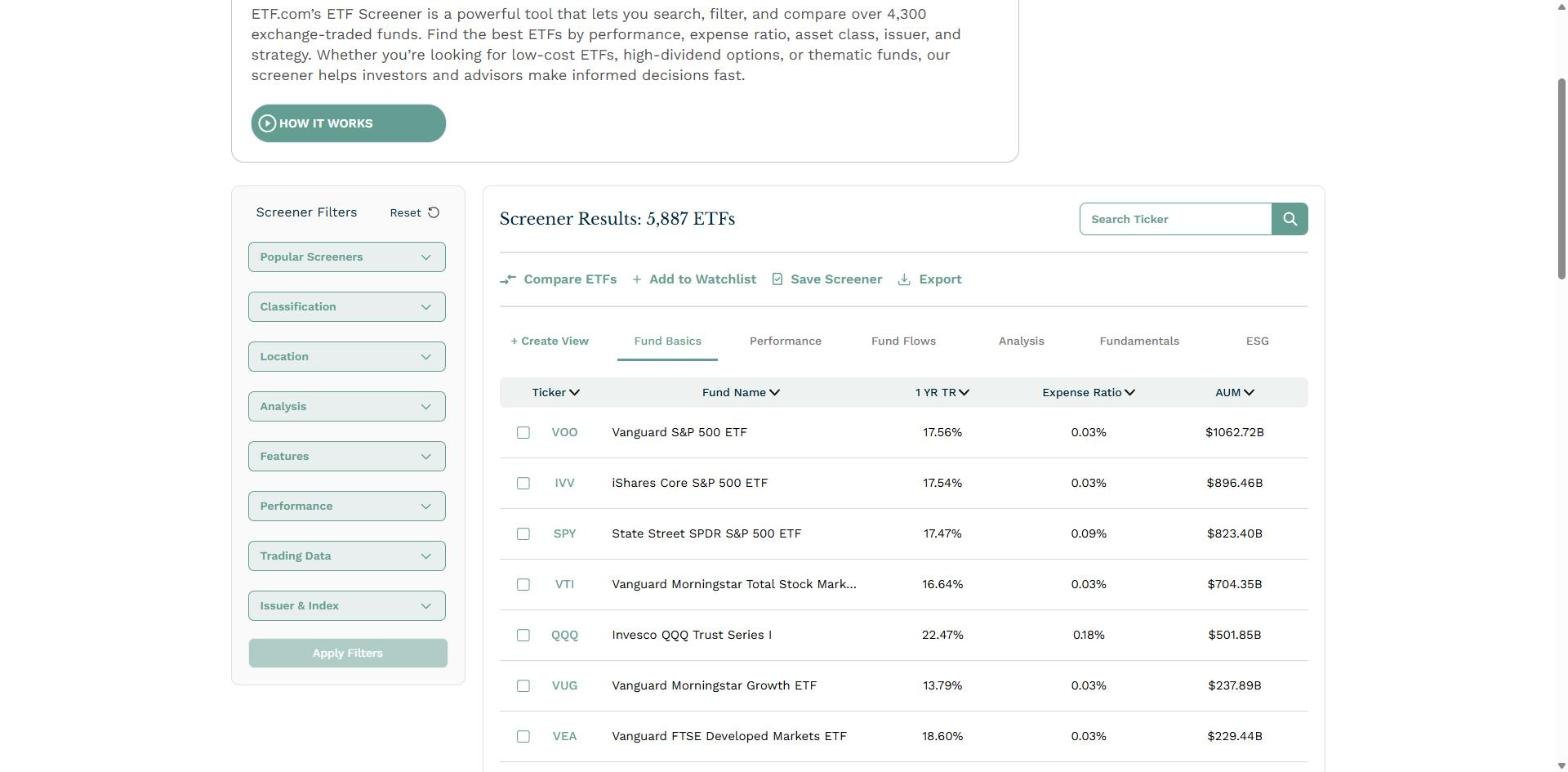
etf.com is an ETF news and analytics site whose screener leans on scores: efficiency, tradability, fit and, unusually, the risk that a fund closes. Classification follows FactSet's ETF scheme, and the results show 5,887 ETFs.
- Best for fund ratings such as closure risk.
- No charge for the screener, with saved screens on a free account.
- Analysis filters: efficiency, tradability, fit, letter grade, closure risk and MSCI ESG.
- Fund Flows view among 6 result views, and an Export button.
The Analysis group is what sets etf.com apart. A Fund Closure Risk filter answers a question most screeners never ask, and the efficiency, tradability and fit scores are filters in their own right. Results can be compared, added to a watchlist or exported from the same toolbar.
Where it falls short: the filters are categorical rather than deep, the site does not publish a filter count, and we found no Sharpe or Sortino filter. It screens ETFs only.
Finviz
Finviz is the stock screener many investors already use, with an ETF tab that puts funds through the same fast interface. ETFs and stocks share one universe, so a single screen can mix them.

- Best for fast ETF scans next to stocks.
- 29 ETF filters, 8 of them open without payment, including net fund flows.
- Elite from $24.96 a month, or $39.50 billed monthly.
- Sector, region, holdings and AUM filters and export on Elite.
The open filters cover the basics well: category, asset type, sponsor, expense ratio, flows, annualized return, tags and the index tracked. Elite opens the rest, along with full ETF holdings, not just the top 10, on each fund's page.
Where it falls short: everything that describes what a fund holds, from Sector/Theme and Region to Holdings, Held By and AUM itself, is marked Elite only. It does not publish how many ETFs it covers, and we found no Sharpe or Sortino filter or mutual fund screener.
Koyfin
Koyfin is a terminal-style research platform with dashboards, charting and a screener that covers stocks on its $0 plan and adds ETFs on Plus. ETF data on Koyfin is global from Plus upward.

- Best for ETF screening inside a research terminal.
- Plus from $39 a month, adding ETFs, global coverage and unlimited screens.
- Mutual funds in the screener from Advisor Core, $209 a month.
If you already work in Koyfin's dashboards, the ETF screener on Plus feeds results into the same watchlists, charts and tables, and global coverage makes it one of the few here that screens ETFs listed outside the US.
Where it falls short: the $0 plan screens stocks only, so ETF screening starts at $39 a month, the highest entry price of the self-serve screeners here. We found no flows or Sharpe filter in the plan grid, and no export or API.
Morningstar
Morningstar is the fund research house most investors know by its star ratings. Its screener covers stocks, ETFs and mutual funds on more than 200 data points and sits inside the Morningstar Investor subscription.

- Best for screening with Morningstar's own ratings.
- Investor from $20.75 a month, or $34.95 billed monthly, with a 7-day trial.
- Stocks, ETFs and mutual funds in one screener, including global securities.
- Side-by-side comparison of up to 5 securities.
Morningstar's ratings are the reason to screen here: if your shortlist starts with an analyst's view of a fund, this is where that view lives, and the same subscription carries its fund research.
Where it falls short: there is no screener without the subscription, so the trial is the way to test it. We found no flows or Sharpe filter documented on the pages read, and no export.
Stock Analysis
Stock Analysis is a fast, clean research site whose ETF screener opens 111 filters without payment, including risk-adjusted return measures that most free screeners leave out. Its US view shows 5,791 ETFs.

- Best for risk-adjusted returns at no cost.
- 111 ETF filters, with an exchange country selector.
- Sharpe and Sortino ratios, including 3 and 5-year versions, plus beta.
- Pro from $6.58 a month, with one download a day and full ETF holdings.
- A separate mutual fund screener with 86 filters.
The filter list is broad: expense ratio, holdings count, dividend yield and growth, total returns out to 20 years, beta, and Sharpe and Sortino ratios. It is the cheapest paid route in this list to exporting an ETF screen.
Where it falls short: there are no flow or sector-weight filters among the 111, and mutual funds live in their own screener rather than the same table. Pro allows one download a day.
TradingView
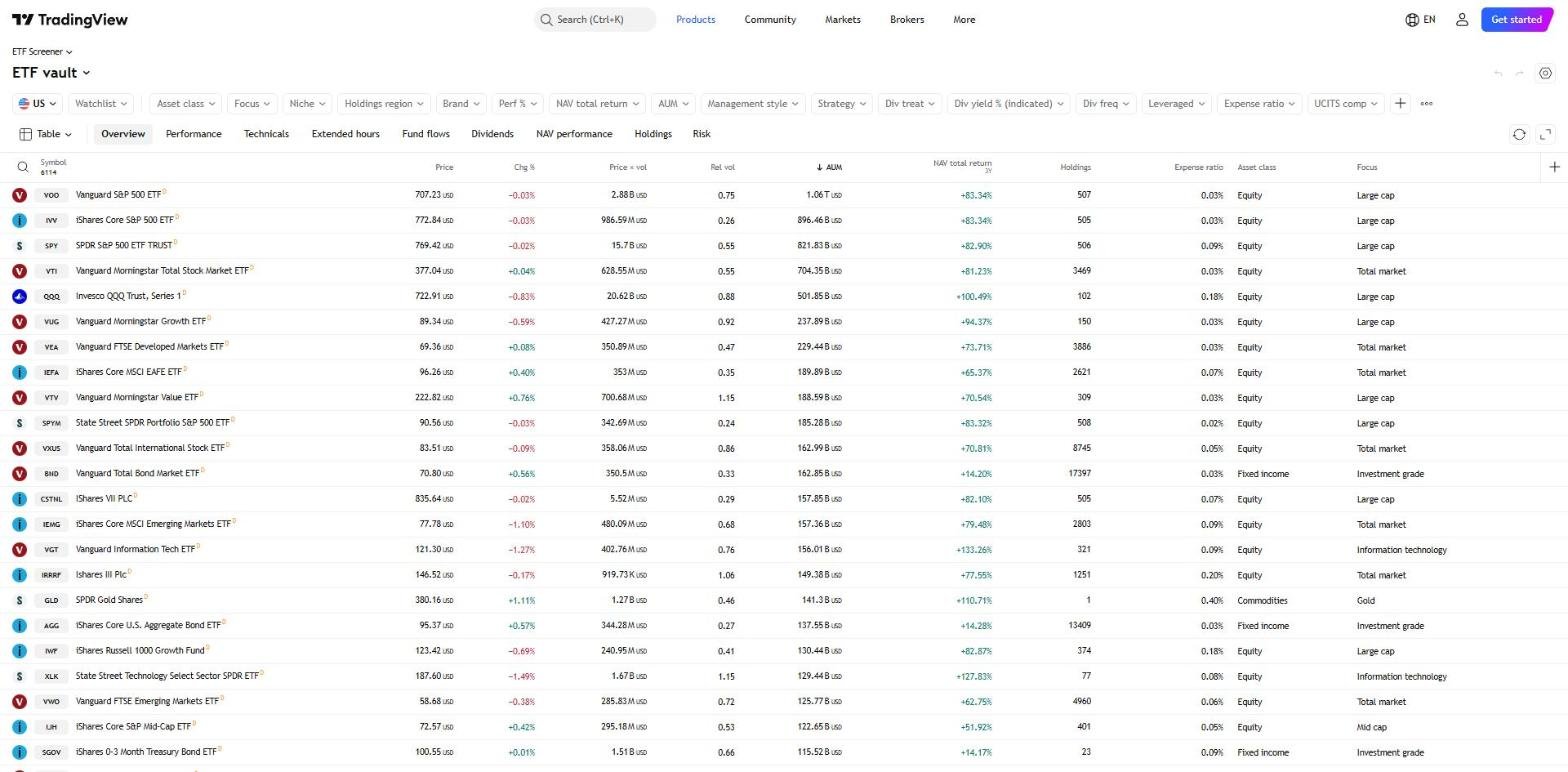
TradingView is a charting platform with a screener for ETFs listed in many countries, organised into column sets you switch between: performance, fund flows, dividends, NAV performance, holdings and risk. Its US view shows 6,114 ETFs.
- Best for ETFs in many countries, with flows.
- Runs signed out, with a country selector.
- Filters for focus, niche, holdings region, strategy, leverage and dividends.
- Fund flows over 1 month to 3 years.
- Essential from $12.95 a month; the ETF screener runs on the $0 plan.
The holdings region filter and the flows column set make TradingView more than a price screener, and a country switch brings up ETFs listed outside the US, including UCITS funds.
Where it falls short: its Risk view shows beta and volatility but no Sharpe or Sortino ratio, and it does not screen mutual funds. The paid plans are priced for charting rather than for fund data.
Yahoo Finance
Yahoo Finance has ETF, mutual fund and stock screeners side by side in its research hub, with filters built on Morningstar's fund categories and ratings.

- Best for quick screens by Morningstar category.
- Runs signed out, with exchanges worldwide.
- Filters for fund category, fund family, net assets, region and performance rating.
- Bronze from $7.95 a month; CSV download on Gold, at $39.95.
For a quick list of ETFs in one Morningstar category, such as large blend or intermediate core bond, Yahoo is the fastest route, and the mutual fund screener is one tab away.
Where it falls short: the filters centre on category, size, performance and ratings, with no flows or Sharpe filter on the pages read, and taking the list into a spreadsheet means the Gold plan.
Business Quant
Business Quant is ours. Our ETF and mutual fund screener puts ETFs and mutual funds in one table, one row per share class, more than 32,000 of them, with filters on what each fund charges, owns, earns, risks and takes in. It runs with no account.

- Best for ETFs and mutual funds in one screen, on costs, flows and risk, with export and API access.
- Free to use, no account needed to screen, no card.
- Pro from $29 a month, full history, export and API access.
List of features
- ETF and mutual fund screener on 102 metrics
- Cost filters: net and gross expense, acquired fund fees, minimum investment and turnover
- Flow filters: net flows over 1, 3 and 12 months, and months of positive flows
- Exposure filters: each of 11 sectors, US weight, top country, market cap mix and look-through P/E
- Risk ratios: Sharpe, Sortino, standard deviation and max drawdown from 6 months to 5 years
- Tracking difference and tracking error
- Bond character: effective duration, effective maturity and average coupon
- Fund pages with costs, risk, distributions, sectors, countries and holdings
- Fund comparison of 2 to 6 funds
- Stock screener with more than 700 metrics
- Financial statements, segment financials and KPI data
- Economic data
- CSV and XLSX download
- API access
- MCP server
The filters are grouped the way a fund analyst reads a fund: fees, size, returns by period and by calendar year, market cap mix, look-through valuation, asset mix, sector weights, bond character, geography, concentration in the top 10 positions, flows, turnover and fund age, then risk. A Vehicle filter separates ETFs, mutual funds, closed-end funds and unit investment trusts, and the expense filter has presets at 0.10%, 0.25% and 0.50%. The fund assets column is the whole fund, so switching Vehicle to mutual funds brings VTSAX and VFIAX into the same list at their own fees, and every column carries the date of the record it came from.
Each result opens onto a fund page, such as VOO's, with costs, Sharpe and Sortino ratios, alpha, beta, drawdown, the last distribution and its ex-date, the sector and country split, the top holdings, and the objective and principal risks from the prospectus; the full holdings list needs only a free account. Fund comparison then puts 2 to 6 of your matches side by side on the same 102 metrics.
ETF screeners feature by feature
| Platform | ETF screener at $0 |
Fund flow data |
Sharpe or Sortino |
Mutual funds too |
Spreadsheet export |
API access |
MCP server |
Plans from |
|---|---|---|---|---|---|---|---|---|
| Business Quant | ✓ | ✓ | ✓ | ✓ | ✓ | ✓ | ✓ | $29/mo |
| Stock Analysis | ✓ | ✗ | ✓ | ✓ | ✓ | ✗ | ✗ | $6.58/mo |
| TradingView | ✓ | ✓ | ✗ | ✗ | ✓ | ✗ | ✓ | $12.95/mo |
| ETF Database | ✓ | ✓ | ✗ | ✗ | ✓ | ✗ | ✗ | $19/mo |
| etf.com | ✓ | ✓ | ✗ | ✗ | ✓ | ✗ | ✗ | $0 |
| Finviz | ✓ | ✓ | ✗ | ✗ | ✓ | ✗ | ✗ | $24.96/mo |
| Yahoo Finance | ✓ | ✗ | ✗ | ✓ | ✓ | ✗ | ✗ | $7.95/mo |
| Koyfin | ✗ | ✗ | ✗ | ✓ | ✗ | ✗ | ✗ | $39/mo |
| Morningstar | ✗ | ✗ | ✗ | ✓ | ✗ | ✗ | ✗ | $20.75/mo |
Sorted by ticks, ties broken alphabetically. A tick means the platform's own pricing, plan, help or screener pages document the feature on a self-serve plan, or its screener showed it when we tested it; a cross means we found no such documentation. "ETF screener at $0" means an ETF screen runs without paying. "Fund flow data" means flows can be filtered on or shown as screener columns. "Sharpe or Sortino" means a risk-adjusted return filter. "Mutual funds too" means the same site also screens mutual funds, on any plan. "Spreadsheet export" means downloading a screen to a file. "API access" and "MCP server" mean a self-serve API and an AI-assistant connector.
Business Quant is the only screener here that ticks every column. Stock Analysis and TradingView come next with 4 each: Stock Analysis for its Sharpe and Sortino filters and a separate mutual fund screener, TradingView for flows and an MCP server. ETF Database, etf.com, Finviz and Yahoo Finance follow with 3. Koyfin and Morningstar sit low because both sell ETF screening as part of a wider subscription: Morningstar's screener carries more than 200 data points and its own ratings, and Koyfin's sits inside a full research terminal. A cross shows what a product was built for, not how good it is.
What about Fidelity, Schwab and justETF?
All 3 come up in searches for an ETF screener and none made the list. Fidelity and Schwab run broker screeners built for each firm's own customers, and justETF is built around ETFs listed in Europe.
Which ETF screener is right for you?
- You want flow filters at no cost: ETF Database.
- You want to avoid funds at risk of closing: etf.com.
- You already screen stocks on Finviz: Finviz.
- You already work in a research terminal: Koyfin.
- You want Morningstar's ratings in the screen: Morningstar.
- You want Sharpe and Sortino filters at no cost: Stock Analysis.
- You screen ETFs listed outside the US: TradingView.
- You want a quick list by Morningstar category: Yahoo Finance.
- You want ETFs and mutual funds in one screen on costs, flows and risk, with export and an API: Business Quant.
Our mutual fund screener guide covers screening mutual funds on their own, and our stock screener comparison covers screening companies.
Where I would screen ETFs first
If all you need is a list sorted by price momentum, any charting tool will do. For a screen that has to say what a fund holds, what it costs and what it has been through, I would run it first on the Business Quant ETF and mutual fund screener.
The questions that decide whether a fund belongs in a portfolio are how much it really charges, how closely it tracks its index, how hard it fell in the last drawdown, which sectors and countries it leans on, and whether money is arriving or leaving. Business Quant puts every one of those in the filter rail, across 102 metrics, with no account and no card.
It also answers the share-class question from the start of this article. VTI and VTSAX are the same portfolio at different fees, and on Business Quant they sit in the same table, so the cheapest way to own a strategy shows up whether it is wrapped as an ETF or a mutual fund. The screener is free to use, and Pro, with export and API access, is from $29 a month.
A 10-minute test: write down one real screen, for example US equity ETFs under 0.10% with at least $1 billion in assets and positive 12-month flows. Run it on 2 or 3 screeners and compare the counts. Then open the same 3 funds on each and check one figure, the expense ratio or the number of holdings, against the fund's own fact sheet. The count tells you how each screener defines its universe; the check tells you which one you can trust.
How this comparison was made
To make the list, a screener had to filter US-listed ETFs on fund-level metrics with conditions you set, and be available to an individual at no cost or at a price published on the vendor's own site, without a brokerage account or a sales call. Broker-hosted screeners and screeners built for European listings were not included. 9 screeners met that bar.
Every price, plan limit, filter and universe count was read on the vendor's own pricing, plan, help or screener pages on 15 October 2026 and screenshotted there. Prices are each platform's lowest advertised monthly price in US dollars on that date. Our screen in the illustration was run live on the same day.
The list, the summary table and the reviews run alphabetically, with Business Quant last, and the feature table is sorted by the number of ticks, with ties broken alphabetically. We make Business Quant, one of the 9 products compared here. For screening from code, our screener API comparison covers the options.
Image credits. Header photograph by Maxim Hopman on Unsplash, used under the Unsplash License. Vendor screenshots were captured on 15 October 2026 from each provider's own screener or pricing pages and are reproduced for comparison. The ETF screen illustration is our own, built from our fund data.
Frequently asked questions
What is the best ETF screener?
For screening on what a fund costs, owns and risks, Business Quant is free to use and covers more than 32,000 ETF and mutual fund share classes on 102 metrics, including fund flows, sector weights, tracking error and Sharpe and Sortino ratios. ETF Database and etf.com are the long-standing ETF specialists, Stock Analysis runs 111 filters at no cost, and TradingView screens ETFs in many countries with flows and holdings views.
Is there a free ETF screener?
Several. Business Quant's ETF and mutual fund screener is free to use and runs with no account. ETF Database, etf.com, Stock Analysis, TradingView and Yahoo Finance all run an ETF screen at $0, and Finviz opens 8 of its 29 ETF filters without payment. Koyfin starts ETF screening on its Plus plan, from $39 a month, and Morningstar puts its screener inside Morningstar Investor, from $20.75 a month.
What is an ETF screener?
A tool that filters the whole list of exchange-traded funds down to the ones that meet your conditions, such as an expense ratio under 0.10%, at least $1 billion in assets, a US equity focus or a minimum dividend yield. Better screeners add fund flows, holdings and sector exposure, and risk measures such as volatility, drawdown and tracking error.
Can you screen ETFs by holdings or sector?
Yes, on some screeners. Business Quant filters on the weight of each of 11 sectors, the US weight, the top country, the share held in the top 10 positions and look-through valuation. TradingView has a holdings region filter and a holdings view. Finviz offers Sector/Theme, Holdings and Held By filters on its Elite plan, and ETF Database has a holdings filter group in its free screener.
Can you screen ETFs by dividend yield?
Most ETF screeners carry a yield filter. Business Quant screens trailing distribution yield and dividend yield, Stock Analysis has dividend yield and dividend growth, TradingView has indicated dividend yield and payment frequency, etf.com lists dividend yield in its Analysis filters, and ETF Database groups expenses and dividends together.
Which ETF screeners show fund flows?
Business Quant filters on net flows over 1, 3 and 12 months and on the number of months with positive flows. ETF Database has fund flow filters from 1 week to 3 years, Finviz opens a Net Fund Flows filter without payment, TradingView shows flows from 1 month to 3 years, and etf.com has a Fund Flows view in its results.
What is the best website for analyzing ETFs?
One that shows the portfolio rather than only the price. A Business Quant fund page such as VOO's shows its costs, Sharpe and Sortino ratios, drawdown, last distribution, sector and country split, top holdings and the risks stated in its prospectus, and the fund comparison tool puts 2 to 6 funds side by side. ETF Database and etf.com add ratings of their own.