10 Best Portfolio Trackers for 2027
Every portfolio tracker will show you a return. Which ones show the return your money actually earned, and against what?


A portfolio tracker records your holdings, by trade entry, file import or a brokerage link, and reports how the portfolio has done. Trackers differ in how they measure that return, what they compare it with, and what else they tell you about the companies you own.
Below are 10 web portfolio trackers for self-directed stock investors. We compare them on price, money-weighted return, benchmarks, allocation, file import, the research data beside the portfolio, and API access.
Why the return a tracker shows can mislead
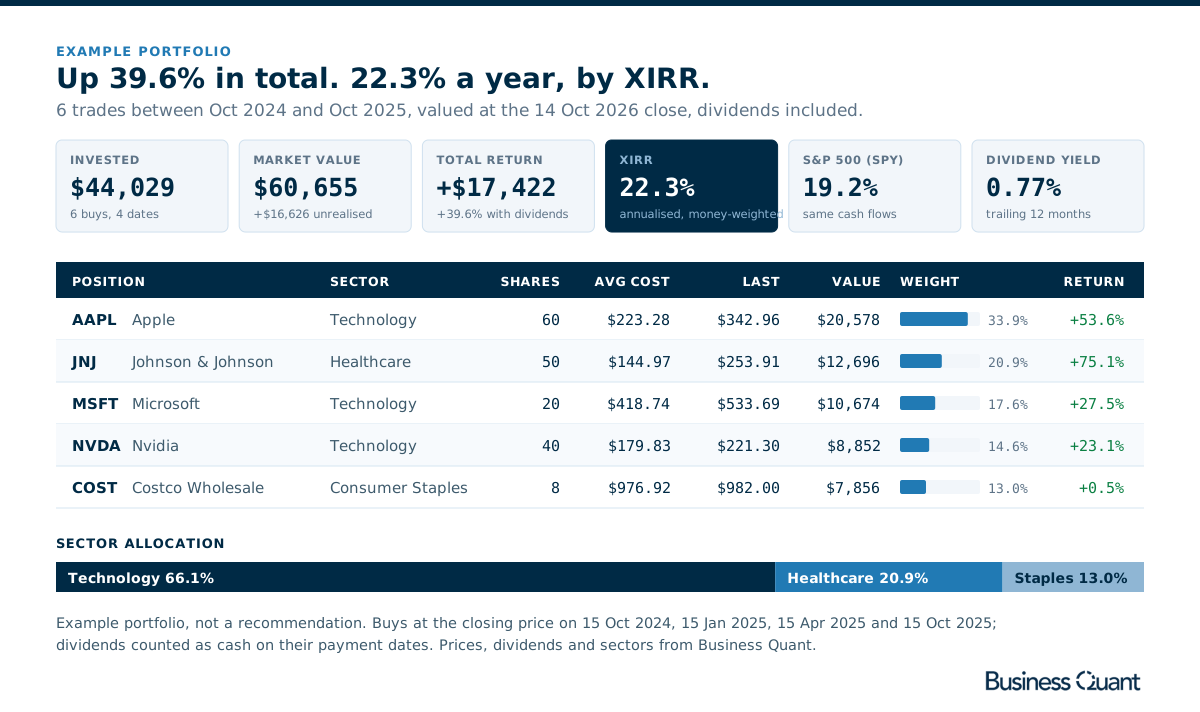
Take 6 trades made between October 2024 and October 2025 in Apple, Microsoft, Johnson & Johnson, Costco and Nvidia. They turned $44,029 into $60,655 by the 14 October 2026 close, and with $796 of dividends that is a total return of 39.6%. It sounds like 2 strong years, but more than half the money went in during 2025 and had less time to grow, so the annual rate is 22.3% by XIRR, a return weighted by when each dollar went in.
Then the benchmark. The same dollars put into an S&P 500 ETF on the same 4 dates would have earned 19.2% a year. That 3-point gap is the real answer to whether the stock picks were worth the effort, and you only see it when both figures are money-weighted over the same cash flows. A tracker that shows only a total gain leaves you with 39.6% and nothing to compare it to.
Allocation is the third check. 3 of the portfolio's 5 stocks are technology companies, so 66.1% of its value sits in one sector.
How to choose a portfolio tracker
- Money-weighted return. XIRR or IRR, so the timing of your deposits counts.
- A benchmark. An index to hold your return against.
- Allocation. Weights by position and by sector.
- Getting your trades in. Manual entry, file import or a brokerage link.
- Research beside the portfolio. Statements, estimates and ownership for what you hold.
If income is what you track most closely, our dividend tracker comparison looks at that side.
The 10 portfolio trackers at a glance
- Capitally
- Empower
- Koyfin
- Morningstar
- Sharesight
- Snowball Analytics
- Stock Rover
- Yahoo Finance
- Ziggma
- Business Quant
| Platform | Best for | Plans from |
|---|---|---|
| Capitally | Multi-currency, multi-asset portfolios | See note |
| Empower | Linking every account in one view | $0 |
| Koyfin | Tracking inside a research terminal | $39/mo |
| Morningstar | X-Ray of funds and overlap | $20.75/mo |
| Sharesight | Dividend and tax reporting | $7/mo |
| Snowball Analytics | Dividend investors who want IRR | $6.67/mo |
| Stock Rover | Detailed performance reports | $24/mo |
| Yahoo Finance | Quick gain and loss checks | $7.95/mo |
| Ziggma | Diversification and impact scores | $6.99/mo |
| Business Quant | XIRR and benchmark tracking beside statements, segments and KPIs, with export and API access | $29/mo |
Rows are alphabetical, Business Quant last. "Plans from" is the cheapest paid plan's lowest advertised monthly price on 15 October 2026; Empower's dashboard has no paid plan, and Capitally publishes its prices in euros only.
Portfolio trackers reviewed
Capitally
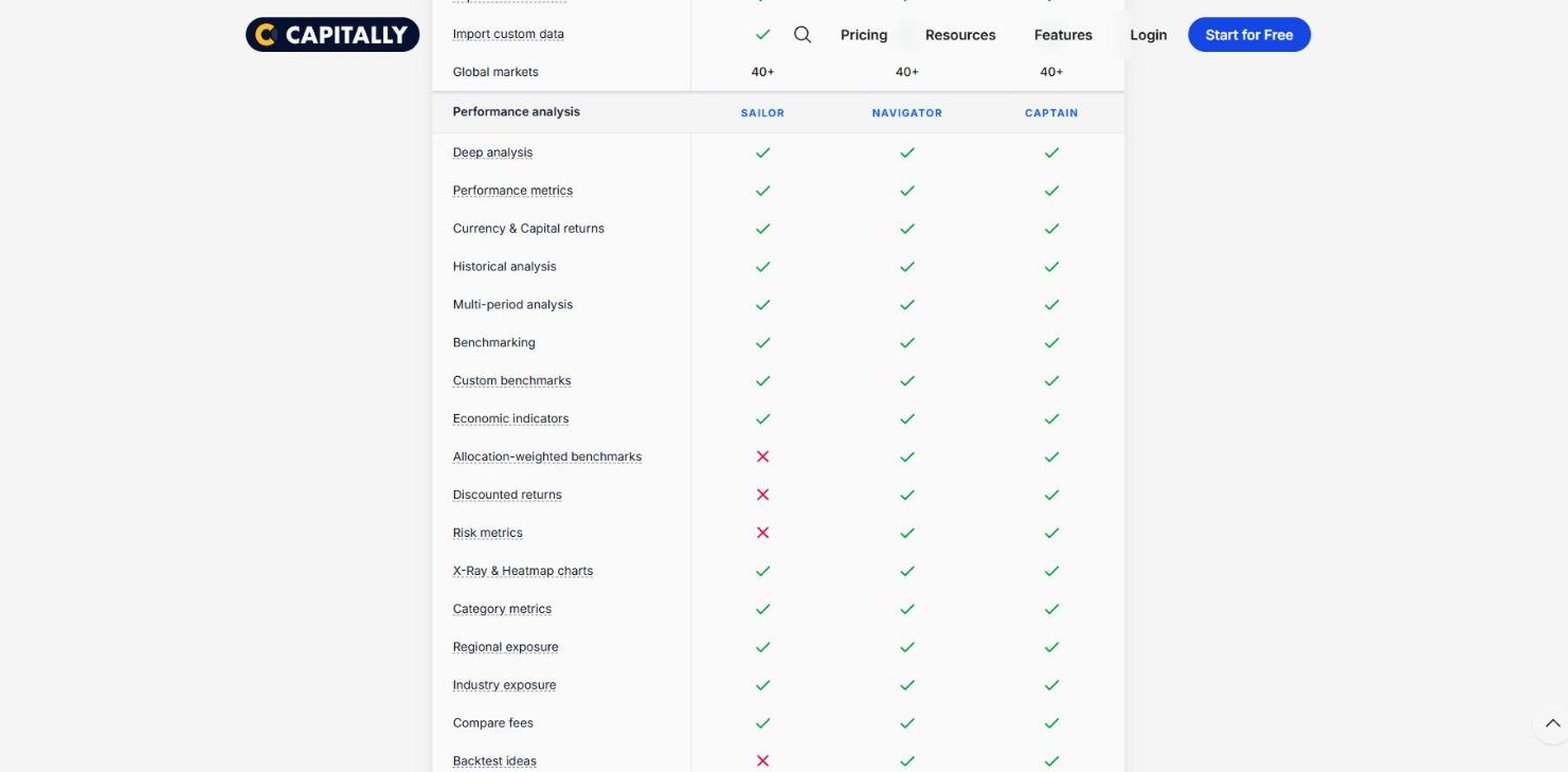
Capitally is a portfolio tracker built in Warsaw for investors whose holdings do not fit a single broker or a single currency: stocks, funds, crypto, real estate, private equity and options in one model. It encrypts your data on your own device.
- Best for multi-currency, multi-asset portfolios.
- 14-day trial with no card.
- MWR, TWR and after-tax returns on every plan.
- Benchmarks, with industry and regional exposure.
- Imports CSV, Excel, JSON and XML, plus broker files.
Capitally is the most thorough performance engine in this list on paper: money-weighted and time-weighted returns, currency and capital returns, returns against inflation and, on Navigator, a benchmark built from your own allocation. It also tracks taxes due for supported jurisdictions.
Where it falls short: there is no permanent free version, the plans are priced in euros only, and it carries no research data on the companies you hold.
Empower
Empower offers a free dashboard that builds a net worth and investment view from the bank, brokerage and retirement accounts you link to it.

- Best for linking every account in one view.
- Free dashboard, built on account linking.
- Performance against benchmarks across linked accounts.
- Allocation view and a free Investment Checkup.
For a household with a 401(k), an IRA, a taxable account and a mortgage, Empower is the quickest way to see the whole picture without typing a single trade. The Investment Checkup looks at risk and past performance and proposes an alternative allocation.
Where it falls short: it is built around linked accounts, and its help centre says the dashboard cannot import history from a spreadsheet. The pages read describe no money-weighted return, and the free tools sit beside Empower's fee-based advisory service.
Koyfin
Koyfin is a research terminal with a portfolio module, and its appeal is everything around the portfolio: charts, dashboards and fundamentals.

- Best for tracking inside a research terminal.
- Free plan with one portfolio account and an exposure breakdown.
- Plus from $39 a month, adding benchmark comparison.
- CSV upload of ticker, quantity, date and cost.
If you already research in Koyfin, its portfolio module keeps your holdings next to your charts, estimates, ownership data and filings. The free account is a fair test of the layout.
Where it falls short: comparing the portfolio with a benchmark needs Plus, and the plan grid lists no IRR or XIRR, so the return shown is profit and loss on cost. There is no segment or KPI data and no API.
Morningstar
Morningstar's portfolio tools sit inside Morningstar Investor. The best-known part is X-Ray, which looks through your funds to show what you actually own.

- Best for fund look-through and overlap.
- Investor from $20.75 a month, with a 7-day trial.
- Import holdings from CSV, Excel, PDF or an image, or link accounts.
- X-Ray of asset allocation, sector weightings and fees.
X-Ray earns its reputation with fund-heavy portfolios: 3 funds that each hold the same mega-caps can leave you far more concentrated than their names suggest, and Stock Intersection shows exactly how much. Indexes can be added for benchmarking, and Morningstar's ratings sit on the same subscription.
Where it falls short: there is no permanent free portfolio tool, and its "personal return" is not described as money-weighted. We found no segment, KPI or estimate data on its stock pages.
Sharesight
Sharesight has made performance and tax reporting its whole business, used by more than 200,000 investors by its own count. It calculates returns on a money-weighted basis and handles dividends and corporate actions automatically.

- Best for dividend, tax and multi-market reporting.
- Free plan: one portfolio, 10 holdings including closed ones.
- Starter from $7 a month, with benchmarking, diversity and exposure.
- Spreadsheet and file import, plus broker connections.
Sharesight's help pages explain its dollar-weighted method in detail, and the free plan already includes the performance, sold securities and all trades reports. Standard, at $18, adds contribution analysis, drawdown risk and multi-currency valuation.
Where it falls short: the free plan is small, since closed positions count towards the 10 holdings, and benchmarking needs a paid plan. There is no research data on the companies you hold.
Snowball Analytics
Snowball Analytics is a dividend and portfolio tracker from Lyon that has grown into a full analytics app. Its free version is unusually complete for performance.

- Best for dividend investors who want IRR.
- Free plan: one portfolio, 10 holdings.
- Starter from $6.67 a month, with unlimited holdings and brokerage linking.
- IRR, sector diversity and an index benchmark on every plan.
- Broker report import and CSV export on every plan.
Snowball's dividend side is its heritage: a dividend calendar, received payouts and yield on cost sit beside the performance tabs, along with PE, beta and Sharpe ratio for the whole portfolio.
Where it falls short: the 10-holding cap on the free plan is the limit most stock pickers hit first, and benchmarking against any asset rather than an index fund starts on Investor. There is no research data on the companies you hold.
Stock Rover
Stock Rover is a research, screening and portfolio platform whose Portfolio Performance Report measures your return 2 ways and explains the difference in plain English.

- Best for detailed performance reports.
- Premium from $24 a month, with a 14-day trial.
- IRR and time-weighted return side by side.
- Benchmark of your choice, dividend-adjusted.
- Brokerage links or CSV import; 15 portfolios on Premium.
The report goes further than most: fund look-through, fees in dollars, the trades that drove the result, drawdowns, and Sharpe and Sortino ratios, with sector and region weights set against the S&P 500. Analyst estimates and insider transactions sit on the same platform.
Where it falls short: there is no free version of the portfolio tools, so the trial is the way to test them. There is no segment, KPI or filing data and no API.
Yahoo Finance
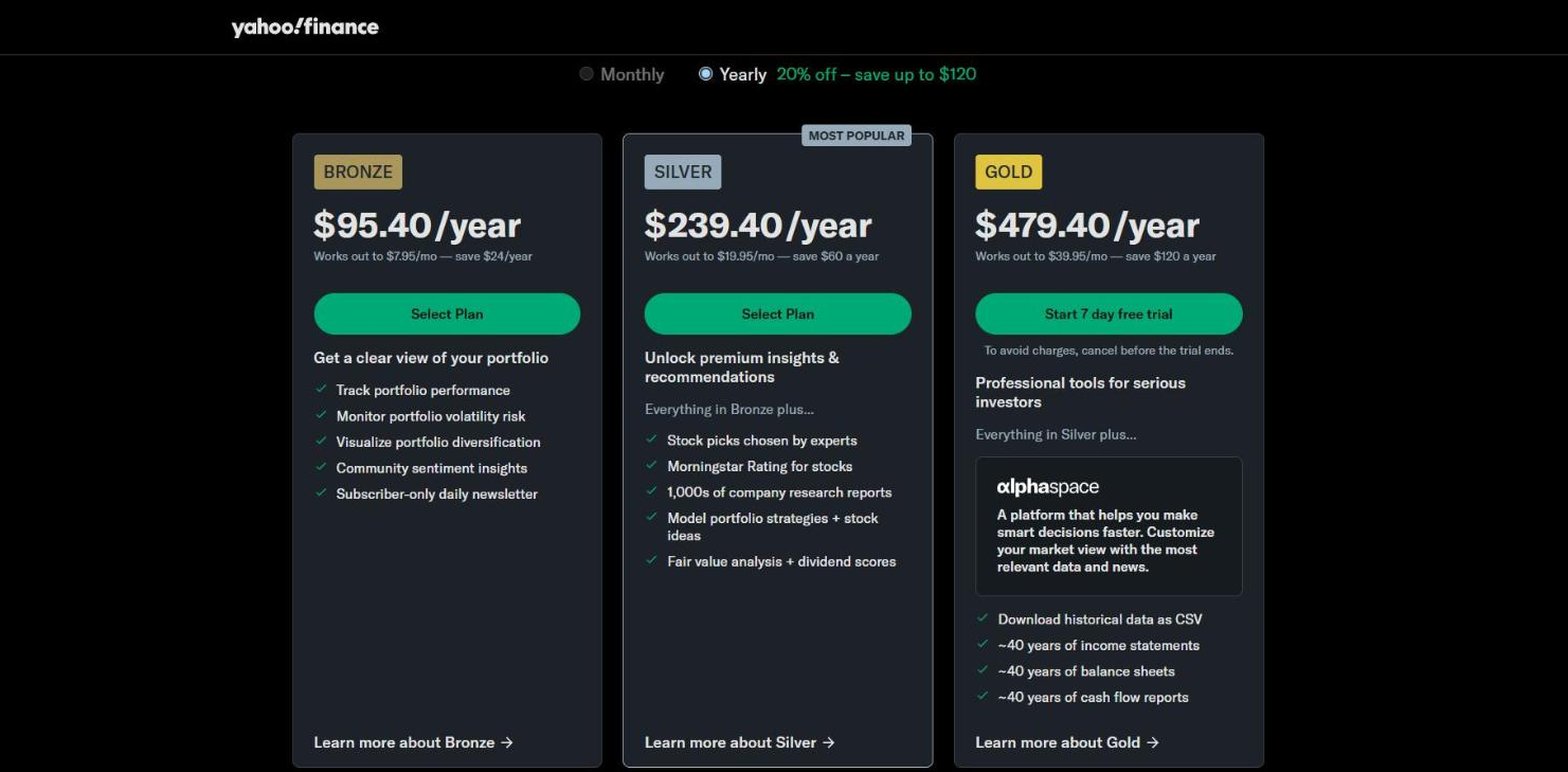
Yahoo Finance's portfolio page is the one most investors have already used. You link a brokerage account, add holdings by hand or import a CSV, and Yahoo shows the day's gain and the total gain next to its quotes and news.
- Best for quick gain and loss checks.
- Portfolios at no cost, linked, entered by hand or imported.
- Bronze from $7.95 a month, with performance, volatility and diversification views.
For checking how today went, Yahoo is hard to beat: the portfolio sits one click from the quote page you were probably reading anyway, with analyst estimates and holders on each stock.
Where it falls short: no money-weighted return or benchmark is described on the pages read, so treat its total gain as a raw figure. There is no segment data, filing list or public API.
Ziggma
Ziggma is a portfolio tracker built around scores: diversification, quality, risk and an Impact Score for climate and values.

- Best for diversification and impact scoring.
- Free plan with 3 virtual portfolios, insights and a dividend tracker.
- Starter from $6.99 a month, linking one account.
- File upload or read-only account sync.
Ziggma's Impact Score is the feature nobody else here offers: each holding is scored on climate action, labour practices and accountability, rolled up to the portfolio. Its diversification view, by asset class, industry and country, flags positions and sectors that have grown too large.
Where it falls short: the pages read describe no IRR or benchmark comparison, so it suits checking what you own better than measuring how well it has done. There is no research data on the companies you hold.
Business Quant
Business Quant is ours. You record trades or import them, and our portfolio tracker turns them into positions, cost basis and a performance report with XIRR, dividends and a benchmark, free to use with an account, next to the research on every stock you hold.
- Best for XIRR and benchmark tracking beside statements, segments and KPIs, with export and API access.
- Free to use, the tracker, reports and 5 years of statements, no card.
- Pro from $29 a month, full history, export and API access.
List of features
- Portfolios, as many as you need, plus a combined view
- Trade entry and CSV import with a template and a row-by-row preview
- Positions with cost basis, weight, day change and return on cost
- Trade ledger with search, filters and CSV export
- Total return, XIRR and trailing 12-month dividend yield
- Performance against a benchmark such as the S&P 500, with a drawdown view
- Allocation by position, sector, asset class and geography
- Financial statements: annual, quarterly and TTM
- Segment financials
- KPI and operating data
- Analyst estimates
- Dividends
- Institutional ownership and insider trades
- 18 million+ SEC filings since 1993
- Stock screener
- Advanced charting
- Economic data
- CSV and XLSX download
- API access
- MCP server
The reports page is where the honest numbers live. It shows total return and XIRR, annualised and weighted by cash flow, so a deposit made last month does not count as much as one made 2 years ago. It sets the portfolio against an index benchmark, switches to a drawdown view to show the worst declines, and breaks the portfolio down by position, sector, asset class and geography, by exposure or by profit and loss.
The research is the other half. Every stock you hold has its own page with statements, revenue by segment and geography, KPIs, estimates, dividends, institutional ownership, insider trades and filings, and results arrive within 10 to 15 minutes of a company's release, so when a holding reports you can read the quarter on the same site that tracks the position. Pro adds the full statement history, KPI data, longer segment history, CSV and XLSX downloads and our API.
Portfolio trackers feature by feature
| Platform | Money‑weighted return |
Benchmark comparison |
Sector allocation |
CSV import |
Segment financials |
Company KPIs |
Analyst estimates |
Insider & Inst. Ownership |
SEC filings |
API access |
MCP server |
Plans from |
|---|---|---|---|---|---|---|---|---|---|---|---|---|
| Business Quant | ✓ | ✓ | ✓ | ✓ | ✓ | ✓ | ✓ | ✓ | ✓ | ✓ | ✓ | $29/mo |
| Koyfin | ✗ | ✓ | ✓ | ✓ | ✗ | ✗ | ✓ | ✓ | ✓ | ✗ | ✗ | $39/mo |
| Stock Rover | ✓ | ✓ | ✓ | ✓ | ✗ | ✗ | ✓ | ✓ | ✗ | ✗ | ✗ | $24/mo |
| Capitally | ✓ | ✓ | ✓ | ✓ | ✗ | ✗ | ✗ | ✗ | ✗ | ✗ | ✗ | See note |
| Morningstar | ✗ | ✓ | ✓ | ✓ | ✗ | ✗ | ✗ | ✓ | ✗ | ✗ | ✗ | $20.75/mo |
| Sharesight | ✓ | ✓ | ✓ | ✓ | ✗ | ✗ | ✗ | ✗ | ✗ | ✗ | ✗ | $7/mo |
| Snowball Analytics | ✓ | ✓ | ✓ | ✓ | ✗ | ✗ | ✗ | ✗ | ✗ | ✗ | ✗ | $6.67/mo |
| Yahoo Finance | ✗ | ✗ | ✓ | ✓ | ✗ | ✗ | ✓ | ✓ | ✗ | ✗ | ✗ | $7.95/mo |
| Empower | ✗ | ✓ | ✓ | ✗ | ✗ | ✗ | ✗ | ✗ | ✗ | ✗ | ✗ | $0 |
| Ziggma | ✗ | ✗ | ✓ | ✓ | ✗ | ✗ | ✗ | ✗ | ✗ | ✗ | ✗ | $6.99/mo |
Sorted by ticks, ties broken alphabetically. A tick means the platform's own pricing, plan, product or help pages document the feature on a self-serve plan; a cross means we found no such documentation. "Money-weighted return" means an IRR, XIRR or dollar-weighted return. "Benchmark comparison" means setting the portfolio's return against an index. "Sector allocation" means a breakdown by sector, industry, asset class or exposure. "CSV import" means loading holdings or trades from a file. The remaining columns describe research data on the companies you hold: "Segment financials" means revenue by segment, product or geography over several years; "Company KPIs" means operating metrics such as subscribers or deliveries; "Analyst estimates" means consensus revenue or earnings forecasts; "Insider & Inst. Ownership" covers insider trades or holdings and institutional holders; "SEC filings" means a company's filing list; "API access" and "MCP server" mean a self-serve API and an AI-assistant connector.
Business Quant is the only tracker here that ticks every column. Koyfin and Stock Rover come next with 6 each, both carrying estimates and ownership data beside their portfolio tools; Stock Rover also reports a money-weighted return, and Koyfin lists filings. Capitally, Sharesight and Snowball Analytics tick every portfolio column and none of the research ones, because they are dedicated trackers. A cross shows what a product was built for, not how good it is.
Which portfolio tracker is right for you?
- You hold assets in several currencies and asset classes: Capitally.
- You want every account, including cash and loans, in one view: Empower.
- You already research in a terminal: Koyfin.
- You hold many funds and want to see the overlap: Morningstar Investor.
- You need dividend and tax reports: Sharesight.
- You invest for dividends and want IRR for free: Snowball Analytics.
- You want the most detailed performance report: Stock Rover.
- You just want today's gain: Yahoo Finance.
- You care about diversification and impact scores: Ziggma.
- You pick stocks and want XIRR against a benchmark, with research on each holding, export and an API: Business Quant.
For researching the companies you hold, our stock analysis websites guide and our stock screener comparison cover the tools.
Where I would track my portfolio
If you mainly want a net worth figure across a mortgage, a 401(k) and a checking account, a pure aggregator will suit you better. If you pick individual stocks and want to know whether the picking is working, I would track the portfolio on Business Quant.
It answers the 2 questions a brokerage app's "up 40%" leaves open. XIRR tells you what the money earned per year, given when each dollar went in, and the benchmark chart tells you what an index would have done with the same money. In the example portfolio above, 39.6% in total became 22.3% a year, against 19.2% for the index ETF. The tracker, the reports, CSV import and the benchmark comparison are all free to use with no card, and each holding has its own stock page, updated within 10 to 15 minutes of results.
A 15-minute test you can run on any tracker: export your trade history from your broker, import it, and write down 3 numbers, the total return, the annualised return and the benchmark's return over the same cash flows. If a tracker cannot give you the second and third, it is telling you how much you made, not how well you did.
How this comparison was made
To make the list, a product had to let an individual record a stock portfolio on the web, by trade entry, file import or a brokerage link, and report that portfolio's return, at no cost or at a self-serve price published on the vendor's own site, without opening an account at a particular broker. Trackers that only work inside one broker, mobile-only apps and watchlists that do not measure performance were not included. 10 products met that bar.
Every price, plan limit and feature was read on the vendor's own pricing, plan, product or help pages on 15 October 2026, with file import checked on help pages on 16 October, and the screenshots were taken on 15 October. Prices are each platform's lowest advertised monthly price in US dollars on 15 October 2026; Capitally prices its plans in euros only. The example portfolio uses closing prices, dividends and sectors from our data, with trades on 4 dates between 15 October 2024 and 15 October 2025, valued at the 14 October 2026 close.
The list, the summary table and the reviews run alphabetically, with Business Quant last, and the feature table is sorted by the number of ticks, with ties broken alphabetically. We make Business Quant, one of the 10 products compared here.
Image credits. Header photograph by Austin Distel on Unsplash, used under the Unsplash License. Vendor screenshots were captured on 15 October 2026 from each provider's own pricing, plan or product pages and are reproduced for comparison. The example portfolio illustration is our own, built from our price and dividend data.
Frequently asked questions
What is the best portfolio tracker for stocks?
The one that measures your return honestly. For a stock portfolio that means a money-weighted figure such as XIRR or IRR, dividends included, and a benchmark to compare it with. Business Quant reports all of that free to use, alongside position and sector allocation, and every stock you hold also has its own page with statements, segments and dividends. Snowball Analytics also reports IRR and sector diversity on its free version, and Sharesight, Stock Rover and Capitally report money-weighted returns on their plans.
Is there a free portfolio tracker?
Several. Business Quant is free to use with no card, with multiple portfolios, CSV import, XIRR, benchmark comparison and sector allocation. Empower's dashboard is free and links your accounts. Snowball Analytics and Sharesight both have a $0 plan limited to one portfolio of 10 holdings, Ziggma's $0 plan allows 3 virtual portfolios, Koyfin's allows one portfolio account, and Yahoo Finance lets you link or add portfolios at no cost. Capitally, Morningstar and Stock Rover offer trials instead.
What is the best website to track my portfolio?
If you hold individual US stocks and want to know whether your picks beat the index, a website that combines tracking with research saves time. Business Quant tracks trades, reports XIRR against a benchmark and shows each holding's financial statements on the same site. If you want every account, including cash and loans, in one place, Empower links them for free. If you hold assets in several currencies, Sharesight and Capitally are built for that.
What is the best portfolio tracker app?
Most of the trackers here work in a phone browser, and several also publish apps. Snowball Analytics lists its apps on the App Store and Google Play, Sharesight has a mobile app, Empower asks you to download its free app for its tools, and Capitally runs as a mobile version you can add to your home screen. Whichever you choose, check that the app shows the same money-weighted return as the website.
What is XIRR and why does a portfolio tracker need it?
XIRR is an annualised return that weights each deposit by how long it was invested. A portfolio that gained 39.6% in total sounds strong, but if the money went in over a year rather than on day one, the annual rate is different. In an example portfolio built from Business Quant prices, 6 trades made between October 2024 and October 2025 returned 39.6% in total, which is 22.3% a year by XIRR, against 19.2% for the same cash flows put into an S&P 500 ETF.
Can I track my portfolio in Excel instead?
You can, but you have to maintain prices, dividends and splits yourself, and calculate XIRR by hand. Most trackers here import your trade history from a file: Business Quant takes a CSV with a downloadable template, Capitally imports CSV, Excel, JSON and XML, Stock Rover imports a CSV of trade history, and Snowball Analytics imports broker reports. Business Quant and Snowball Analytics also export your trades back to CSV.